
Replaced Dell with Mac Mini

I’ve had a PC running Windows in my home office for… well, since there were PC’s running Windows. And before that, a Zenith running DOS. I went through a long Gateway phase before switching to Dell. And my latest Dell tower is several years old. Since getting the Mac Book Pro a couple of years ago, I only turned the Dell on to download/install Windows security updates.

And I noticed I was spending less time in my office because I wasn’t using the PC much. And I really like my little room. I missed it. So we’re sending the Dell to the farm where it can chase rabbits and play with the other computers. Replacing it is a Mac Mini.

Mac Heads will be familiar with the Mini but for your PC folks, it’s a square little slab about the size of a cigar box. No monitor, no mouse, no keyboard… just a miniature computer. But a powerful little bugger.
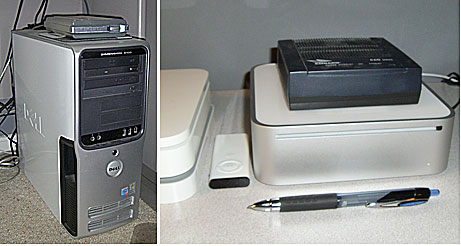
Dellmacmini

But the real power is how easily it networks with my Mac Book Pro. George set it up for me and I won’t try to explain it but suffice to say I can get to all the files on both computers from either computer. Lots of syncing via .mac.

Update my iCal at work… and the Mac Book Pro iCal syncs… and the Mini syncs. I can access all the photos in iPhoto on the Mac Book, as well as my iTunes library. And so on and so forth. I know my IT friends can make all of this happen with Windows but I could not.
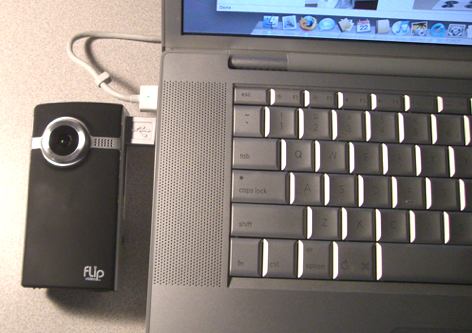

Flip Video Camera

Yes, I am aware of how many video cameras I own. No, I do not need another one. I purchased a Flip video camera ($150.00) because I was so intrigued with the idea of a small, inexpensive camera designed to do just one thing.

They even did away with the USB cable and SD cards. You plug the Flip right into the USB port with a little… flip-out USB connector.

The one I got records an hour of video. I think the $100 model does 30 min. Check the website for specs.

Does the Flip take better video than my little Casio. Probably not. Is it as handy as a pocket on a shirt. Yes, indeedy, and it’s less than half the price.

I’m not sure what I’ll do with mine. I just wanted to see if this device is a cool as I’ve been hearing and reading. I think it might be. Toss it in your beach bag or your purse and go. Hit the red button and you’re recording. Makes the Sony Camcorder seem like a big old pain in the ass to lug around.

Flipcamera

Uses two AA batteries and works with Mac or PC.

Warning: You’ll hear me talking baby talk to our Golden Retrievers. Runs 90 sec.

Radio with pictures

Fezcast1I gotta face it. I’m a radio guy. I have neither the face nor the concentration for TV. That’s my take-away from this morning’s live webcast from the Coffee Zone. Just too many things to keep track of. Watch the chat stream, monitor the audio (which is several seconds behind what is being said), look at the camera… whew!

As I replayed our half-hour chat I found myself thinking, this would have been much easier (and less painful for all concerned) if we’d just streamed the audio. Pictures added nothing to our little experiment.

We had 9 or 10 people watching, giving us encouragement in the chat room like parents at a grade-school production of 12 Angry Men, whispering our lines from the wings (“Turn up the mic!”).

I think I’m going to look for some sort of live event for the next webcast. Perhaps the 4th of July parade or something. Stay tuned.

Green screen with CamTwist

Greenscreen

I finally figured it out. Sort of. If you can count stumbling on the right configuration and being unable to do it twice in a row "figured it out." But I now know that it can be done. (The background image is lobby of our new offices in Dallas.)

My setup is pretty crude. Two flood lights from Lowe’s and a few yards of green felt on the basement wall. It’s pretty clear that lighting is critical for this effect and I might have to come up with more or better lights before I try a video background.

And streaming (over the wifi) from the basement isn’t gonna cut it. Too slow. Gotta get an Ethernet jack down here or set up in the upstairs office. But hey, that’s what weekends are for, right?
I’m proud to say I PayPal’d the CamTwist guy $50. It’s worth far more than that.

iMage Webcam, CamTwist and Ustream

I’ve been trying to assemble the best combination (for me) of hardware and software for streaming live video. The ease-of-use and price (free, for now) of Ustream.tv has made it possible for any nimrod to play in Wayne’s World.

Image200

MacBooks, with the built-in iSight camera, make live video just that much easier but sometimes you want to point the camera the other direction, so an external webcam enters the picture (so to speak).

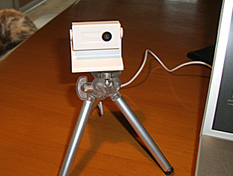
This weekend I’ve been playing with the iMage webcam from eCamm. It doesn’t look like much but –for $60– it delivers a very nice image and you can put it in your pocket. I’ve mounted mine on a small tripod.

The final –and most exciting– piece of the puzzle has been a freeware app called CamTwist. CamTwist works very well with Ustream.tv and comes with an amazing set of features and a UI that’s intuitive and easy to use. If you’re interested, I recommend this short video, but let me mention some of the cool things CamTwist does:

  • Stream your desktop. Rather than making your webcam the video source, CamTwist lets you stream all or part of your computer’s desktop. Let’s say I wanted to show some co-workers in Des Moines how to use a new piece of software. I could simply stream the demo over Ustream. Much better than me trying to remotely "take over" their desktop.
  • Slide Show. The slide show source allows you to stream still pictures. You can drag pictures to the list from your desktop and even iPhoto.
  • Movie. With the movie source, you can play movies over your broadcast. You can drag in several movies to the play list or select a single movie with the movie selection button. Next Saturday George and I are gonna take another run at streaming live from the Coffee Zone. Instead of just watching us yacking for half an hour, we can play video clips as part of the live feed.
  • Flickr Set. Similar to Slide Show, the flickr set source will fetch pictures from a flickr feed and stream them on your broadcast. Why would you want to do this? I don’t know, but it’s cool.
  • Picture-in-Picture. Once you have your video going, it’s possible to overlay another video source on your video.
  • Chroma Key. Sometimes called a Green Screen. This is typically used to create the appearance that something is behind you, such as a picture or a movie. George and I figured out the other features but I haven’t tried this one yet.

There you have it. An inexpensive webcam; a feature-rich piece of freeware; and –for now– a free streaming solution at Ustream.tv. Do we have any program that’s especially compelling or useful? No. But that will be the easy part. And when it comes up, we’ll be ready to share it with the world.