How many songs is enough?

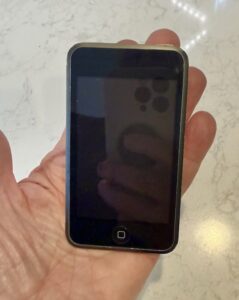
My recent purge/re-org of photos was productive and satisfying. So I decided to tackle my iTunes music library next. I collected a lot of music in the 60s and 70s. LPs, reel-to-reel, cassettes. After I left radio (no longer “on the air” playing music for others to listen to) I pretty much lost interest in music until the iPod came along in 2001. But I never amassed a giant collection of songs.

As I turned my attention to my iTunes library I discovered I had 800+ titles. Scanning and sampling, it quickly became apparent that I hadn’t listened to some of these songs in years… and probably wouldn’t listen to many of them ever again. The result of ripping and entire LP that included only two or three songs that I liked. Or purchasing an entire “CD” from iTunes. But you don’t delete songs, right? You might listen to them someday. So, just tuck them away in a folder or playlist for that day.

In some manner I can’t explain, keeping those never-gonna-listen-to-them again songs were preventing me from listening to the stuff I liked. So I purged. Down to about 650 songs.

I’m still organizing. Creating playlists, adding ratings, etc. This morning I picked my 100 “favorite” songs (from the 650). Much harder than I expected and certainly a moving target. I’ll keep refining that. The goal will be, I think, to reach a point where any song that comes up in shuffle will prompt me to think/says, “Ooh. I love that song!”

I know what you’re thinking (as does The Amazing Kreskin): Why not subscribe to Spotify or Beats or one of the other streaming services and enjoy ALL the songs. See, that’t the problem for me. I can’t enjoy all the songs. Too many choices. I’m glad those services exist and hope there are more and better ones coming, but I’m gonna concentrate on really listening to and enjoying the music I have.

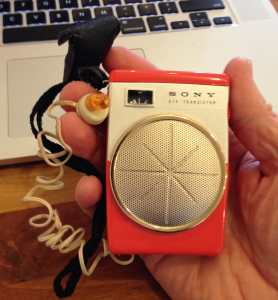
The transistor radio

From Walter Isaacson’s The Innovators:

radio“Transistors were being sold in 1954 to the military for about $16 apiece. But in order to break into the consumer marker. Haggerty insisted that his engineers find a way to make them so that they could be sold for less than $3. They did. He also developed a Jobs-like knack, which would serve him then and in the future, for conjuring up devices that consumers did not yet know they needed but would soon find indispensable. In the case of the transistor, Haggerty came up with the idea of a small pocket radio. When he tried to convince RCA and other big firms that made tabletop radios to become a partner in the venture, they pointed out (rightly) that consumers were not demanding a pocket radio. But Haggerty understood the importance of spawning new markets rather than merely chasing old ones. He convinced a small Indianapolis company that built TV antenna boosters to join forces on what would be called the Regency TR-1 radio. Haggerty made the deal in June 1954 and, typically, insisted that the device be on the market by that November. It was. The Regency radio, the size of a pack of index cards, used four transistors and sold for $49.95. It was initially marketed partly as a security item, now that the Russians had the atom bomb. “In event of an enemy attack, your Regency TR-1 wiU become one of your most valued possessions,” the first owner s manual declared. But it quickly became an object of consumer desire and teenage obsession. Its plastic case came, iPod-like, in four colors: black, ivory, Mandarin Red, and Cloud Gray. Within a year, 100,000 had been sold, making it one of the most popular new products in history.”

“More fundamentally, the transistor radio became the first major example of a defining theme of the digital age: technology making devices personal. The radio was no longer a living-room appliance to be shared; it was a personal device that allowed you to listen to your own music where and when you wanted—even if it was music that your parents wanted to ban.”

MU J-School requires iPhone/iPod Touch. Sort of.

Freshmen admitted into the University of Missouri School of Journalism (and pre-jounalsim students) will be “required” to have an iPhone or ilPod Touch beginning this fall. But not really. If the device is “required” it can be included in a financial need estimate.

According to the story in the Columbia Missourian, iPods and iPhones are “learning devices” used to record lectures. But student still have the option of using their laptops to record lectures.

People have already started bitching about this. Favoring one brand of computer or device; scamming the financial needs program, etc.

When I saw @georgekopp ‘s tweet on this, I thought it was a good idea but for a reason not mentioned in the story.

News is going (has gone?) mobile. A journalism student can’t begin to understand –and report on– that world without a moblie device and –for the moment– the iPhone and iPod Touch are the of breed. I can’t believe the J-school didn’t make that point.

It would be like coming to photography school without a camera.

[A few hours later]

This is another one of those fantasy courses that are easy to come up with if you’ve never taught a class and have no expectation of doing so.

iPhone Reporting would come somewhere in the middle of j-school, rather than at beginning or end. Might work something like this:

Students are equipped with the new iPhone we’re all hoping will come out this summer. It does still images; audio and video (including editing apps). And that’s it. No laptops, digital cameras recorders… just the iPhone.

Each picks a story to cover for the entire semester. Or maybe they pick one from a hat. Either way.

Students are encouraged to use any and all platforms: YouTube, Twitter, flickr, Facebook, Twitpic, etc. The professor follows along online, offering feedback and suggestions during class time.

For all I know the MU J-School might already offer such a course. Perhaps it’s time for another visit with my old pal Mike McKean. Last time we spoke (almost 4 years ago?!) he had been tapped to head up the school’s new “convergence” program. Four Internet years is a lifetime.

PS: I now see he is in charge of the school’s Futures Lab. This implies there is more than one future. Very quantum.

Does size (of your audience) matter or not?

“What we are going to witness in 2009 is the diminished importance of how large your (radio) audience is and the increasing importance of how effectively you connect that audience, whatever its size, with the advertisers and marketers who have the goods and services that audience craves.” — Mark Ramsey Hear 2.0

For some reason this made me think of Apple. I don’t think I’ve ever heard an Apple or Mac or iPod spot on the radio. Lots on TV, of course. And Apple sales are through the roof. I’m trying to think of how I am “connected” with Apple products and how that came to be.

I’m just trying to think of ways radio stations can make –or are making– the connections Mr. Ramsey describes. And what does this trend mean for radio networks?

Seth Godin on radio’s future

Mark Ramsey has posted audio (and partial transcript) of an interview with marketing maven Seth Godin, on the future of radio. This is an update to an earlier interview. These three nuggets sloshed out of my pan:

“So if you’re an advertiser and you have a choice between reaching a ton of people who couldn’t care less, and so you have to talk really fast, yell, and make obscene promises on the radio to get them to show up at your dealership, or reach a smaller group of people about something that they’re very interested in a very connected way, in the long run advertisers are going to come back to the smaller, more tightly knit group.”

“Everything radio has done has been about leveraging a rare piece of spectrum, and the thing we have to acknowledge is that spectrum isn’t rare anymore. So the one asset you built your whole organization on is going away really fast and instead of putting your head in the sand and complaining about that, take advantage of the momentum so that when it does finally disappear, you have something else.”

“Consider the FCC’s ruling recently about the white space spectrum. What white space spectrum is going to mean is that in five years every car sold is going to have an infinite number of radio stations on it. Not 100 or 1,000 but more radio stations than you could listen to in your lifetime, and if that’s true, tell me again why you’re going to win?”

As I ponder these points, I’m listening to the very eclectic music mix on the Coffee Zone iPod. On the way to work, I’ll be live streaming Pandora from the iPhone.

My first “Digital Audio Player”

SandiskOne of my first posts on podcasting was in November, 2004, and featured a little SanDisk  “Digital Audio Player” I had purchased. Apple’s iPod had already been around for a couple of years but I saw no reason to pay more when the little SanDisk would work just fine.

I found the player in a drawer this week and marveled at it’s… clunkiness? Will my sleek new nano look just as ugly four years from now? Hard to imagine.

Sharing music

We were listening to some new tunes on Roger’s iPod as we drove back to Jeff City from Columbia. Like most new cars, his has an input jack for the iPod (or whatever). So it was easy for me to pull out my nano [insert joke here], plug in and play one of my tunes.

As we listened, it occurred to me this simple act couldn’t happen in a pre-iPod world, at least not easily. Yeah, I guess I could have had a pocket-full of cassettes or CD’s, but Roger and I had thousands of songs between us and we thought nothing of switching from his iPod to mine.

Cb011960My old pal RP was an avid collector of 45 rpm records. He had big cardboard boxes jammed with “singles.” The best we could do back then was stack 20 or so on a fat little spindle that would drop the next 45 down to the turntable. Shuffle? Sure, like a deck of cards.

I seem to recall RP telling me he had copied all of his 45’s to CD. Don’t know if he’s made the final leap to an iPod.

It’s hard to imagine what’s next but even hard to imagine there won’t be a “next.”

Coffee Zone Radio

Coffee Zone proprietor Tasir Yanis has an amazing mix of songs on his iPod. That’s what we listen to here at the Zone. Maybe it’s just the ambience of a coffee shop but the former radio program director in me often thinks Taisir’s mix would make a great radio format. Except for all the commercials you’d have to jam in between the songs.

CoffeezoneradioOr we could just download this little app for our iPhones. If I understand this correctly, it enables you to tap into your entire music collection on your home PC via your iPhone – and the music collections of your friends, too – and stream all of the above to your phone, wherever you go. [YouTube demo]

I found this on Mark Ramsey’s Hear 2.0 who describes it as being able to “create our own radio stations from our own content and share them with friends who are mobile.”

So I could listen to Coffee Zone Radio wherever I am? Or Planet Nelson Radio? Or Scott Brandon’s Friday Funk?

Okay, the iPhone is starting to look more and more like something I’m going to have to have. But I really want the thing to stream video, too. I’m getting close.

Web specs

I stopped buying/reading newspapers a long time ago. But there are times –breakfast, for example– when it is inconvenient or impractical to open the MacBook. My solution has been to print articles I find online and take them with me.

KowonvideoglassesI’d really love to have a pair of reading “glasses” with some flash memory to which I could Blue Tooth these articles, including photos and video. I don’t see why that would be technically difficult and damned handy. This is close but likely to get my ass kicked at the local diner where I have breakfast. I’m thinking more along the lines of Clark Kent glasses.

No, I don’t need wifi access. That would be cool but would add a lot of cost. And, yes, I know there are all kinds of portable readers out there but I don’t want to tote around even a book size device.

What I haven’t tried is saving the text to my iPod. Not a great reading experience on the nano but it would work fine on the Touch. Hmmm. And if wifi was available… I suspect this wheel has already been invented.

iMage Webcam, CamTwist and Ustream

I’ve been trying to assemble the best combination (for me) of hardware and software for streaming live video. The ease-of-use and price (free, for now) of Ustream.tv has made it possible for any nimrod to play in Wayne’s World.

Image200

MacBooks, with the built-in iSight camera, make live video just that much easier but sometimes you want to point the camera the other direction, so an external webcam enters the picture (so to speak).

This weekend I’ve been playing with the iMage webcam from eCamm. It doesn’t look like much but –for $60– it delivers a very nice image and you can put it in your pocket. I’ve mounted mine on a small tripod.

The final –and most exciting– piece of the puzzle has been a freeware app called CamTwist. CamTwist works very well with Ustream.tv and comes with an amazing set of features and a UI that’s intuitive and easy to use. If you’re interested, I recommend this short video, but let me mention some of the cool things CamTwist does:

  • Stream your desktop. Rather than making your webcam the video source, CamTwist lets you stream all or part of your computer’s desktop. Let’s say I wanted to show some co-workers in Des Moines how to use a new piece of software. I could simply stream the demo over Ustream. Much better than me trying to remotely "take over" their desktop.
  • Slide Show. The slide show source allows you to stream still pictures. You can drag pictures to the list from your desktop and even iPhoto.
  • Movie. With the movie source, you can play movies over your broadcast. You can drag in several movies to the play list or select a single movie with the movie selection button. Next Saturday George and I are gonna take another run at streaming live from the Coffee Zone. Instead of just watching us yacking for half an hour, we can play video clips as part of the live feed.
  • Flickr Set. Similar to Slide Show, the flickr set source will fetch pictures from a flickr feed and stream them on your broadcast. Why would you want to do this? I don’t know, but it’s cool.
  • Picture-in-Picture. Once you have your video going, it’s possible to overlay another video source on your video.
  • Chroma Key. Sometimes called a Green Screen. This is typically used to create the appearance that something is behind you, such as a picture or a movie. George and I figured out the other features but I haven’t tried this one yet.

There you have it. An inexpensive webcam; a feature-rich piece of freeware; and –for now– a free streaming solution at Ustream.tv. Do we have any program that’s especially compelling or useful? No. But that will be the easy part. And when it comes up, we’ll be ready to share it with the world.