
- Progressive Democrat Abdul El-Sayed wins Michigan Senate race, will become first Muslim senator
- Democrat David Crowley defeats Trump loyalist to become Wisconsin’s first Black governor
- Democrats deliver a stunning rout in Texas to retake power for the first time in decades
- Georgia Democrat Keisha Lance Bottoms makes history as the first Black woman ever elected governor
- Republican Byron Donalds is elected Florida’s first Black governor
- Democrat Gina Hinojosa elected Texas’ first Latina governor, ousts Republican incumbent Greg Abbott
- Democrat Hakeem Jeffries poised to make history as the first Black speaker of the House
- Native American female governor: Deb Haaland in New Mexico
- Openly gay male senator: Chris Pappas in New Hampshire
- Alabama elected a transgender woman to the House.
48 Years
Unique names of Black football players
I started watching NFL football a few years ago. Started off watching the Chiefs games with Barb but now watch three or four games in a week. From the beginning I was fascinated by the names of many of the Black players. I asked Perplexity to give me some examples:
1. Deommodore Lenoir
2. DeMarvion Overshown
3. KaVontae Turpin
4. Dontayvion Wicks
5. SirVocea Dennis
6. Rhamondre Stevenson
7. Qwan’tez Stiggers
8. Ji’Ayir Brown
9. K’Lavon Chaisson
10. Jahmyr Gibbs
11. Ja’Marr Chase
12. De’Von Achane
13. Ja’Tavion Sanders
14. TreVeyon Henderson
15. Calijah Kancey
16. Quinyon Mitchell
17. Azareye’h Thomas
18. Aireontae Ersery
19. LaJohntay Wester
20. Devontez Walker
How, I wondered, did their parents decide on these names? A relative? A favorite movie star? A character from a novel? Or maybe they just liked the sound of the name. And since every parent remembers how they decided, how about a podcast that features a brief interview with one or both parents in which they recount that important moment in the life of their son.
“Tell us, Mr. Thomas, how did you decide on the spelling of Aireontae?”
I can see the appeal of having a unique —or nearly unique— name. These days I suppose it would be as simple as asking your favorite AI to give you some names that are unique in spelling and pronunciation.
Grandmother’s House
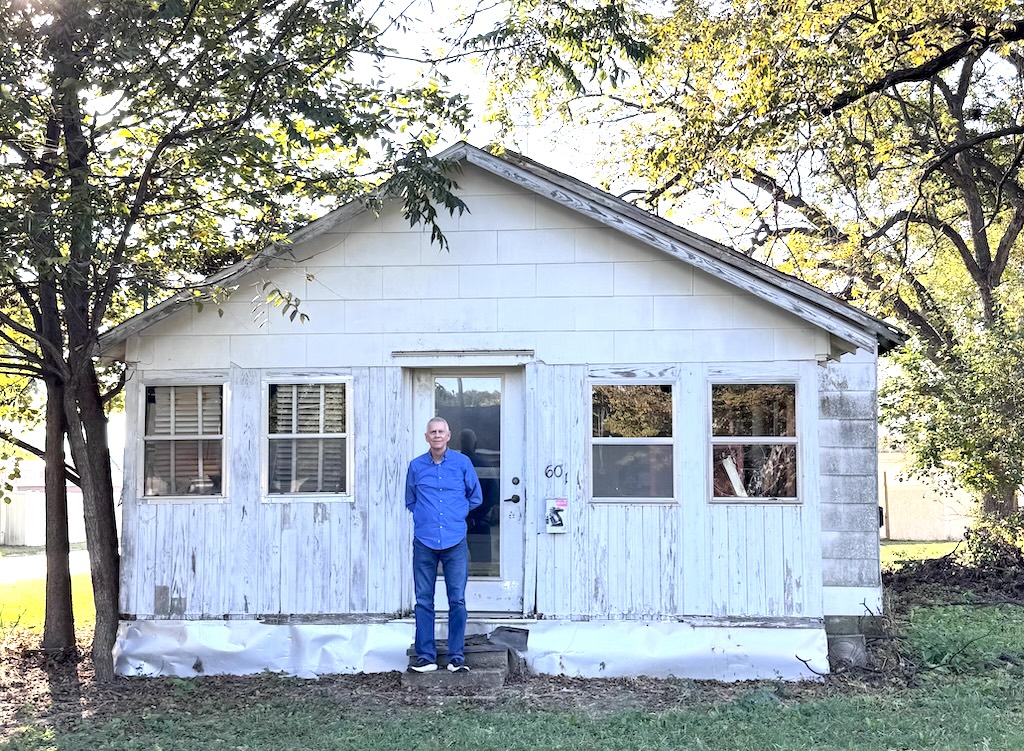
Sometime after my maternal grandfather (Claude Perry) died in 1951, my grandmother moved to the town where we were living. She purchased a little house about a block from our own and did a lot of after-school child care as my brother and I were growing up. Many fond memories.
My brother’s 50th High School Class Reunion was this past weekend and he and his wife attended and stopped by “grandmother’s house.” The years have taken a toll.

High tech/high touch
I’m struggling with how to begin this post. So let’s start with a summary (by Perplexity) of an idea popularized by futurist John Naisbitt.
“High tech/high touch” was a phrase popularized by futurist John Naisbitt in his 1982 bestseller Megatrends, at the dawn of the personal-computer era. His idea was not that society had to choose between technology and humanity. Rather, the more technology entered everyday life, the more people would seek a compensating dose of direct human connection, trust, creativity, care, and meaning.
“High tech” meant computers, telecommunications, automation, data systems, and the emerging information economy. “High touch” meant the things machines could not fully provide: personal attention, face-to-face presence, craftsmanship, conversation, local community, and a sense that another human being was genuinely responsible and engaged.
The phrase reflected its moment. In the late 1970s and early 1980s, computers were still associated with large institutions, bureaucracy, automation, and fears about job loss. At the same time, the culture was reacting against impersonality: there was renewed interest in authenticity, small-scale communities, therapy, spirituality, and “human-scale” living. Naisbitt gave that tension a memorable name.
It feels especially relevant now. The Internet, smartphones, and AI make communication, publishing, searching, and producing information extraordinarily easy. Yet they may also increase the value of a distinctive human voice, careful judgment, genuine attention, and sustained relationships.
I think I’m experiencing some tech fatigue, if that’s a thing. Lord knows I love me some technology (new iPhone and Apple Watch!) but I find myself looking for more “high touch” of late. This feeling has been simmering for a while but bubbled up recently when a friend of mine took his most recent run at convincing me I needed a FSD (full self-driving) vehicle. Specifically, a Tesla. He simply can’t understand why I –or anyone– wouldn’t want such a vehicle.
Sure, part of it –for me– is a reluctance to put one more dollar in Elon Musk’s bulging pockets. But the answer is: I like driving. I liked driving that old Land Rover, I like driving my 79-year-old Jeep, and I like driving Minty Fresh, my beloved old pickup truck. The Rover has a new home and the pickup and the Jeep don’t get as much exercise as they did before I got behind the wheel of the Bronco.
Some of my best memories are driving-related. That 2 a.m. trip to New Orleans with a couple of college buddies; the cross-country adventure with Charlie; my mom teaching me how to use a manual transmission; circling the local teen hangouts while listening to WLS on a tinny AM radio. And so many more. I have a hunch today’s teenage driver will be quietly monitored by Tesla and mom and dad. Can they possibly experience the sense of newfound freedom we had in 1964? Doubtful.
The idea of sitting in a Tesla (or any FSD vehicle) while cruising along a jam-packed I-70 has no appeal for me. Even if it’s as safe or safer than driving myself, it would be bore-ing. As for the argument that Tesla and its ilk are better for “the planet,” okay, sure, no argument. But I couldn’t save the whales, either.
Will I change my tune when I can no longer operate a vehicle? Maybe. But when I’m too feeble to safely operate a vehicle, what will I be capable of when I reach my destination?