I’m always searching for a better app. These days –for me– “better” means simple. Take word processors for example.
On one end of the spectrum is MS Word. The undisputed king of word processors for PC’s. Some people don’t even know they’re using Word. They just take it for granted that this is how you write something on a computer.
I haven’t used Word for years but just looking at the “ribbon” menu, it looks terribly complicated, but that could just be my lack of familiarity. And my guess is it does a LOT of things.
But I only need to do one thing: write. I don’t need any formatting or layout options. Just a few sentences. The fewer the better. I don’t want anything to get in the way of the ideas I struggle to put into words.
Google Docs works great for this. So does Simplenote. Both cloud-based tools. But some folks might want to keep their notes on their computer.
My new favorite tool for this is Notational Velocity, a free, open source application that stores and retrieves notes: “an attempt to loosen the mental blockages to recording information and to scrape away the tartar of convention that handicaps its retrieval.”
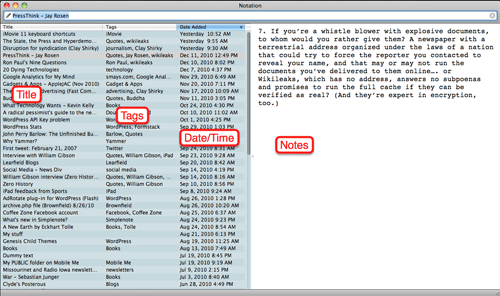
When you begin composing a note in Notational Velocity, the app automatically saves and date/time stamps your work. I’m a big fan of tagging and NV does this cleanly and simply.
I used to be a big fan of putting everything in folders. Within folders. Within folders. NV doesn’t do folders but you really don’t need them.
Each note is indexed in a database and search is lightening fast. So you just create your note and forget about it until you need.
I mentioned Simplenote, the cloud-based note-taking service (with iPhone and iPad apps). Notational Velocity syncs with my Simpenote account so I can create a note in NV and it will automatically be available on all my mobile devices.
If it’s important your writing be “pretty,” Notational Velocity isn’t for you. But if the idea of dropping notes into one “box” and knowing you’ll be able to quickly find them when you need them, it’s a great solution.