I don’t have a post to go with the quote above, but it’s so good I had to write down. I found it on William Gibson’s Twitter feed and he retweeted John Perry Barlow, who overheard it at at dinner party.
“PowerPoint is corporate karaoke”
Reply

I don’t have a post to go with the quote above, but it’s so good I had to write down. I found it on William Gibson’s Twitter feed and he retweeted John Perry Barlow, who overheard it at at dinner party.
I don’t carry a wallet. I keep some cash in my pocket and leave the wallet in the car. All it contains is a few credit cards, an insurance card and my drivers license. But when I couldn’t locate it for a day or so, I was facing the hassle of replacing those few items. No big deal.
Bigger deal? Updating dozens of online accounts that have my credit card info. Being without those services, even for a day, would be a major pain in the ass.
After looking in all the obvious places for my wallet, one of my first thoughts was why can’t I locate my wallet like I do my iPhone? Make it beep or show it on a map.
For that matter, why do we need to carry pieces of plastic at all. My phone is smart enough to contain all of the data and identity represented on the plastic.
I know that in some Asian countries, a growing number of services can be purchased with your mobile phone.
The only part of my life that isn’t backed up is on some pieces of plastic in a little leather envelope. Sad.
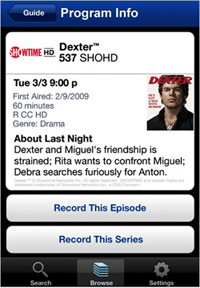 I got out of the fitness center a little late tonight and realized I wouldn’t make it home in time to watch or record The Daily Show re-feed. Comedy Central used to re-run TDS and The Colbert Report one day later at 7:00 p.m. For some reason they moved the shows up an hour. I could watch the first run at 10 p.m. but I’m deep in REM sleep by then. And I think Barb Tivo’s the shows, so this was hardly an emergency.
But I remembered the DirecTV app on my iPhone. I got it mostly for the schedule but seemed to recall that I could set a show to record from the phone.
It was easier to make this happen on the iPhone app than it is with the remote from home. Seriously, the app UI is much easier than the on-board software that comes with the service.
I long ago lost track of how many computers I have owned. During the latter Windows days, I would by a new computer rather than go through the hell of trying to upgrade the operating system. It was just easier to buy a new box with the new OS already installed. But in every instance, it was necessary to re-install all of my applications and move my data over.
Our IT guys have assorted utilities for making “ghost images” and simplifying the process, but it has always been a pain ion the ass for me. Before I switched to Mac.
My new 13″ MacBook Pro arrived yesterday. I set it next to the 15″ MBP I’ve been using for the last year… connected them with a FireWire cable… and then just followed a few simple steps on the new laptop. And then I went to lunch.
When I returned, all of my apps, all of my data, and all of my settings had been copied over to the new computer. Done. I really can’t imagine how it could have been any easier.
The 13″ is about a pound lighter and you notice the difference immediately. (I keep the thing with me at all times) The smaller form factor forced Apple to move the little speakers and –although I don’t see them– the sound is as good as the larger laptop.
I doubt I’ll see the upper-end 7 hours of battery life but hope to get four, which would be a big improvement.
Last night Barb asked, “Tell me again why you got a new computer?”
“Because I’m a good boy,” I replied.
From article at NewScientist.com:
“Worn on a cord around the neck, the camera takes pictures automatically as often as once every 30 seconds. It also uses an accelerometer and light sensors to snap an image when a person enters a new environment, and an infrared sensor to take one when it detects the body heat of a person in front of the wearer. It can fit 30,000 images onto its 1-gigabyte memory.
The ViconRevue was originally developed for researchers studying Alzheimer’s and other dementias. Studies showed that reviewing the events of the day using SenseCam photos could help some people improve long-term recall.
Vicon’s version will retail for about $820 and will also be marketed to researchers at first; it will go on sale in the next few months. A consumer version should be released in 2010. So far, only 500 have been made, most for use by researchers.
For consumers, the gadget will provide an easy way to become a “lifelogger” – someone who attempts to electronically record as much of their life as possible. Microsoft researcher Gordon Bell has made his life an experiment in lifelogging, recording everything from phone calls to TV viewing, and uses a SenseCam wherever he goes.”
Okay, it might be fun to play back a day’s worth of images at high speed. Or to set that little rascal next to your bed if you have to spend a few days in the hospital. And if you’re going to a protest this would be and if you could hang on to it.
Etan Horowitz, posting on E-Media Tidbits, attempts (and succeeds, in my opinion) to answer the question: Which is better tool for journalists, BlackBerry or iPhone? I’ll just share his conclusions here and you can read the full post:
“In the days when producing content mainly happened from a laptop or the office, the BlackBerry made a lot of sense. It is a perfect tool for communicating quickly by e-mail or text and looking up information online. But now that many journalists are expected to post stories, blog posts, photos and videos from the field, the iPhone is a better option.
As a profession, journalism is still struggling to find its footing in the digital age. Since most of the innovative mobile applications are being developed for the iPhone, using an iPhone will help journalists stay current with technology and get them excited about its potential for news.
Don’t believe me? Just give an iPhone to one of the old-school types in your newsroom and see how they react after a few days of use. They’re likely to tell you the device changed their life. You won’t get the same response by giving someone a BlackBerry.
But that doesn’t mean the iPhone is best for all journalists. Editors, Web producers and others who don’t report from the field but frequently communicate with a team will probably be better served by a BlackBerry. And the fact that BlackBerrys cost less, run on multiple carriers and have removable batteries and memory cards are also valid considerations.” [Thanks, Aaron for the link]
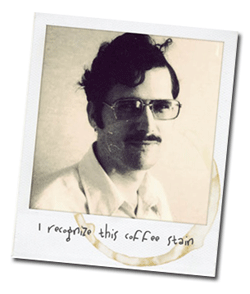 I loved Polaroids for the same reason I love small digital cameras. I got to see and share the photo immediately. No waiting for processing. And there was a space on the front of the photo to write name/date/place.
Rollip is a website that turns your digital photo into a faux Polaroid. I can probably do this faster in Photoshop but if you like this effect, Rollip is fun, easy and free.
We (yes, there IS a mouse in my pocket) migrated one of our websites over to WordPress this week. As near as we can determine, more than 46,000 stories were imported. My role in this has been modest but I did spend a good bit of time working with the categories, keywords, tags and other meta data used to organize all of those news and sports stories.
There are less than 5,000 posts to this blog but it would be impossible (okay, very difficult) to find anything without a good tagging scheme. One of the more common approaches to displaying those tags is the “tag cloud.” I have one on the right side of this page, near the bottom. And here’s the tag cloud for my flickr account.
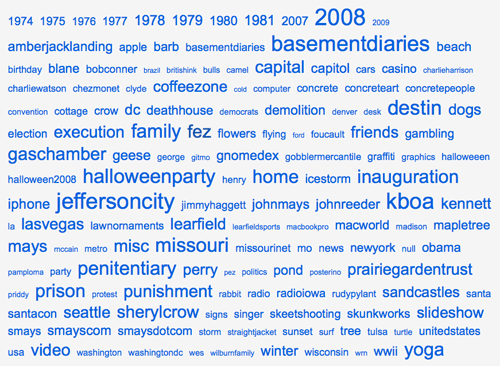
My friend Scott doesn’t like how tag clouds use different size text to indicate the most and least common topics. He thinks it looks “sloppy.” I find the visual cue very intuitive and easy to use. (I can see I have some clean-up to do)
Strangely, tagging is a bit like curling your tongue. Some people can do it and some just can’t. I’m getting better at it.
I think I mentioned trying TwitBlock.org, a website that scans your Twitter followers and ranks them for “spamminess.” Higher the score, more likely to be spam. Looks at things like how many people you foll0w, how many times you’ve tweeted, and so forth. It’s not perfect but it’s better than nothing. And my rule of thumb is, “When in doubt… block.”
I’ve heard from one acquaintance who wanted to know why I blocked him. I unblocked and the pot’s right now. But there are sure to be more. Just ping me.
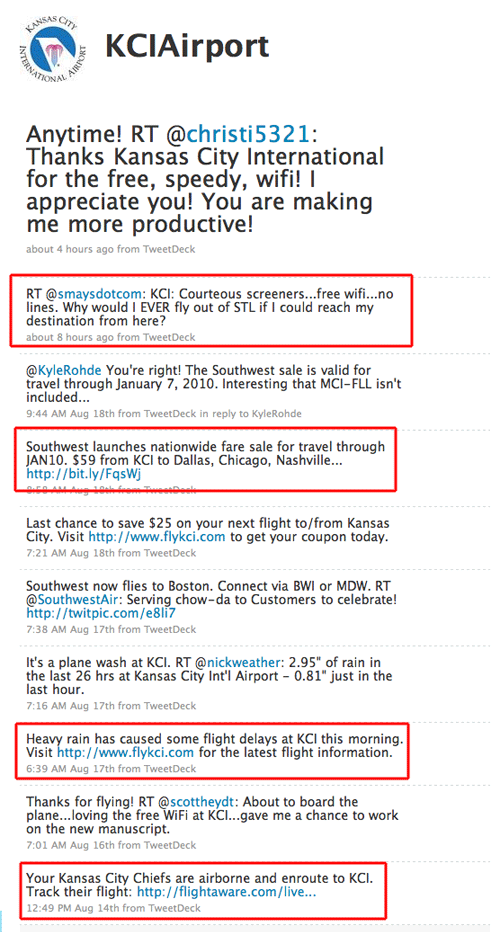
I twittered a few nice words about the Kansas City International Airport this morning and someone at KCI was watching or searching. Either way, they were listening and retweeted my praise. A quick check of their Twitter stream provides such useful nuggets as special prices by airlines; news that the Chiefs are homeward bound; update on the weather; links the twitter feeds of airlines serving KCI. All good stuff.
Sure, they only have a couple hundred followers but that grow. And the cost? A few minutes by someone with a clue. If you fly regularly from KC, why wouldn’t you tap this resource? Well done @KCIairport