
Tag Archives: WordPress
WordPress Media Library
The screencast below is about one of the under-the-hood features of WordPress. So it’s going to be of zero interest to anyone who doesn’t have (or has had) a blog or website using WordPress as the content management system.
WP is great for searching. I have 5,000 posts going back 15 years but if I can remember a word or phrase, WP will find all references in a matter of seconds. If you include media (photo, video, audio) with your post, WP puts it in the Media Library. I had more than 1,600 pieces of media in my library but I couldn’t search because I hadn’t taken the time to give the media a useful name or any other metadata. This 6 minute screencast shows how I cleaned that up and why.
As I’ve experimented with various online tools for managing media (iCloud, Google Photos, Flickr), I’ve found myself drawn back to my WordPress blog. Let me hasten to point out almost nobody visits my blog. That’s been true since the beginning. It’s always been more journal/archive.
But when I put images online, I try do so in some context. If I have 50 photos of my mother as a young woman, I’d rather include those (as a slideshow or gallery) as part of blog post that might include links to other posts and images. You get the idea.
For me, the stories behind the images (if I know them) are as important as the images themselves. A blog works well for this. And because it is self-hosted, I don’t have to worry that Yahoo! or Google or Facebook might one day kill it.
Gallery: Thumbnail view






SimpleGallery WordPress plug-in
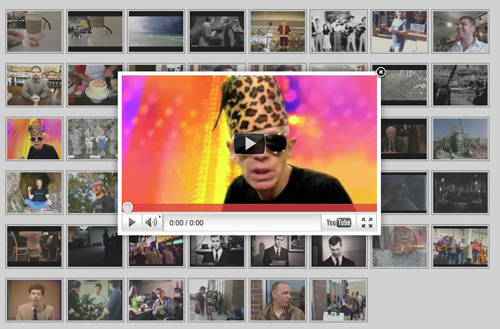
YouTube has added lots of tools for organizing, sharing and displaying your videos. And I haven’t taken full advantage of some of those. But I also like a little WordPress plug-in called Simple Gallery for building a page of thumbnails which –when clicked– pop up a player. This provides a simple way to browse videos.
Onswipe. Flipboard for WordPress
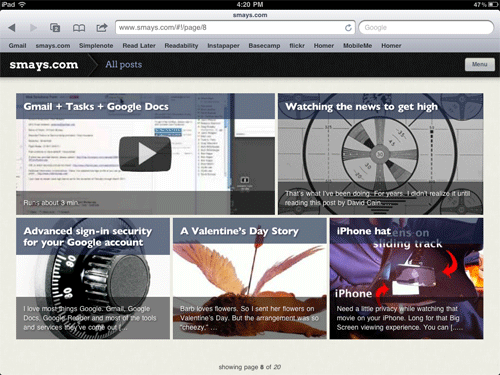
If –as I believe to be the case– most folks will do their web surfing on a tablet device (probably an iPad), I want to be ready. The minimalist theme (Thesis) I have on smays.com looks fine in a browser on the iPad but there’s more to it than that.
You just interact differently with the iPad: leaning back, swiping with your fingers, sharing on Facebook and Twitter… it’s a different experience and –for many– a better browsing/reading experience. Which brings me to Onswipe, a WordPress plug-in that optimizes your blog for a tablet. Think Flipboard.
I’ve only played with Onswipe for an hour or so but can already see a number of changes I’ll be making in coming days and weeks. The plug-in is new and still needs a few tweaks but I’m sure they’re on the way.
One thing Onswipe might do is breathe new life into older posts. The MENU button in the top right corner of the page pulls down to reveal the categories into which I’ve placed posts. If, for example, you were interested in what I might have posted regarding RADIO, it’s a little easier to find and browse with Onswipe.
If you’re reading this on an iPad, you’re feedback will be most appreciated.