
When I copied files from Google Drive to the Files app on my MacBook (and in iCloud), I spent hours (days?) renaming files. A file named 0002346.pdf tells you nothing… you have to open the file. The new OS (both MacBook and iPhone) makes this a snap. (Clip is only 24 seconds and has no audio)
Tag Archives: Siri
Siri AI: Calendar search
It’s been a few years since I decided to move key elements of my online life from Google to Apple. I still have files in Google Drive and Google Docs but most of those are also in my Files app on my devices and in iCloud. As I recall, I wanted to have anything of importance in the Apple ecosystem.
With the arrival of the news and improved Siri AI, that has started to pay off. It’s early days but I’m impressed by what I’ve seen so far. Exhibit A: my Calendar app.
I spent hours entering every event (of any importance) in my Day-Timer’s to the Calendar app on my MacBook (The Great Calendar Project). Even attaching relevant PDFs when I had them. Don’t ask me why. Probably the same reason I’ve maintained this blog for 25 years. Siri AI now gives me a handy (fun?) new way to tap into this archive.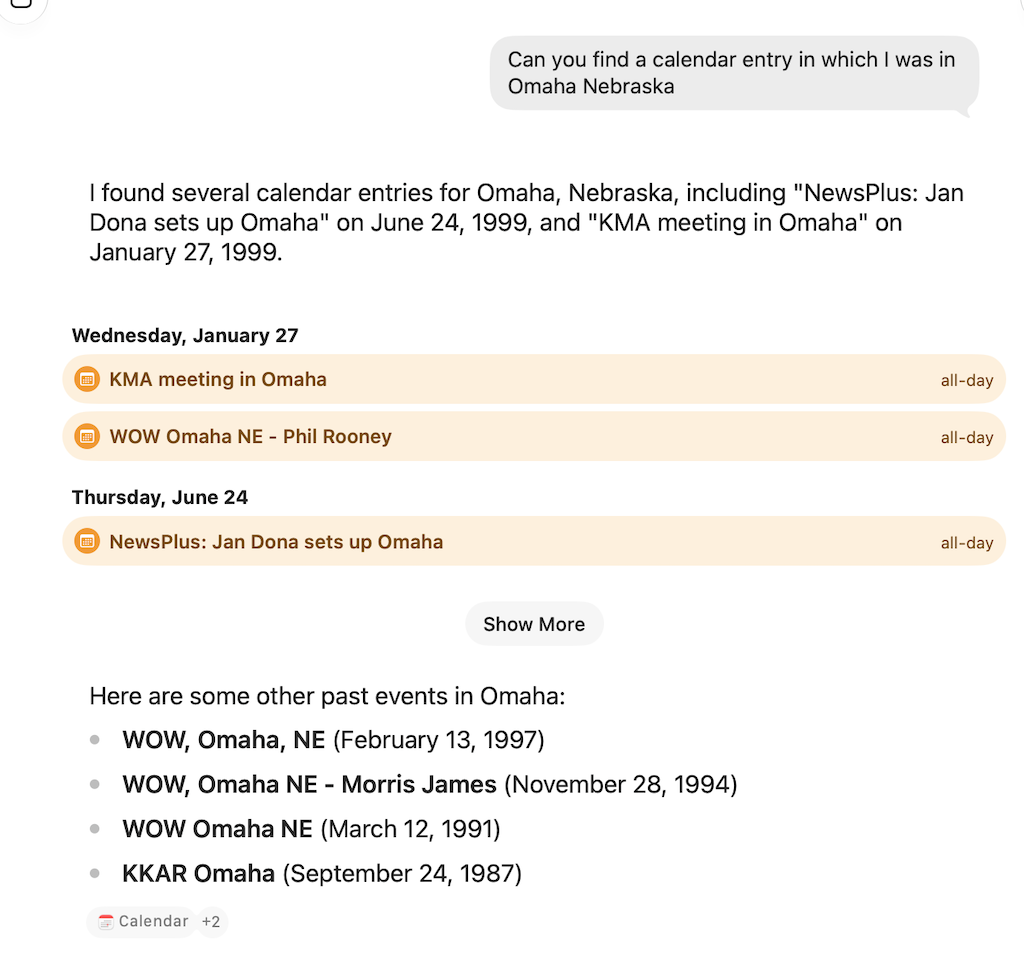
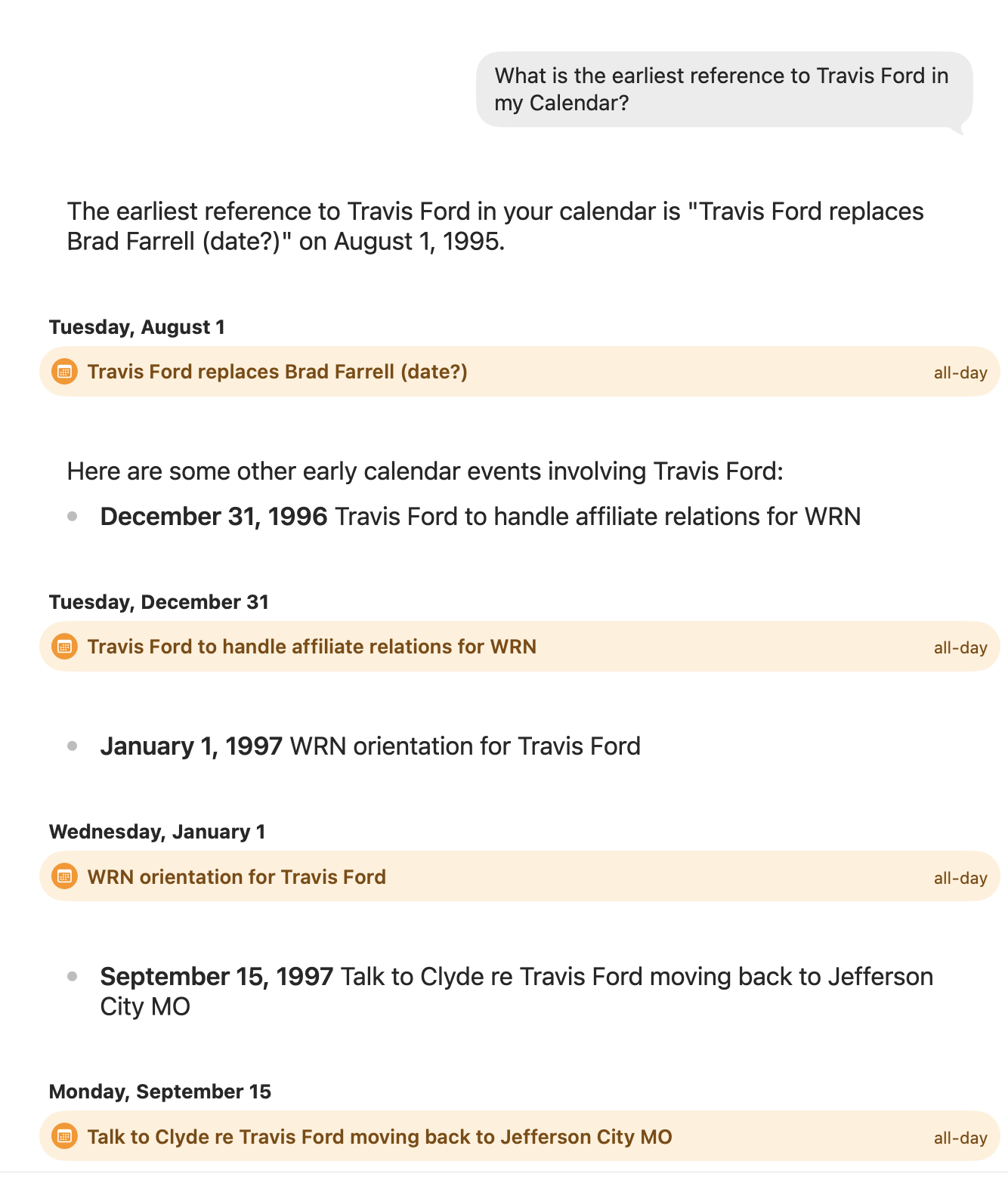
Pretty sure this is not what the Apple programmers had in mind as they worked on Siri AI. Most folks just want to know what’s coming up.
In the coming days and weeks I look forward to exploring what Siri AI can do with all of the data I have (obsessively) collected in various apps.
Siri AI: “It’s a phone-changer”
I’ve been playing with the new Siri AI and find myself more impressed with every little experiment. I think Apple finally got this right. In a recent Substack article (“125 Tests of the New AI Siri”), David Pogue calls it “a phone-changer.” (That will make more sense after you play with it a little)
It replaces most Google searches, most ChatGPT or Claude interactions, and cumulative hours of fumbling and searching and dragging and copying and finding and tapping and pasting. […] You can ChatGPT your own life […] The hardest part will be getting out of the habit of opening apps, and remembering that you have Siri.
It’s tempting to tell those around you, “Wow! Did you know Siri can…” but I’m going to resist that temptation. Here’s the thing… Android users (who all secretly suffer from Apple envy) will insist their phones have done xyz since the early 70s. The anti-AI crowd simply doesn’t want to hear about… anything AI related. So I’ll try to limit myself to sharing WHOA! moments here. Continue reading
Siri AI doesn’t want to be your friend
(Perplexity) Apple executives have explicitly stated that the new Siri AI is intentionally designed to avoid the engagement-driven and relationship-building models used by competing chatbots.
In public remarks, Craig Federighi, Apple’s Senior Vice President of Software Engineering, contrasted Apple’s philosophy with the rest of the industry by criticizing the focus on user engagement:
“If you use many of the existing chatbots, they’re really focused on engagement to a large degree. And sycophancy, right? They kind of want to pull you in. They might encourage you to reveal things about yourself, and then use that as a basis to establish a connection.”
Federighi further clarified that Siri’s design architecture purposefully rejects this approach:
“The way that we have designed Siri, Siri really wants to say ‘Listen, that’s not what I’m here for, right? I’m here to help you. I can help you get things done. I can help you learn about the world.’ But if you try to engage Siri as a romantic partner, Siri’s not up for that.”
Key Elements of Apple’s Approach
- Utility Over Companionship: The system is built around direct, task-focused interactions—such as on-screen awareness, searching deep within personal messages, and executing multi-step app automations—rather than prolonged, open-ended conversations designed to maximize session time.
- Rejection of Personification: Testing of the updated Siri confirms it is programmed to decline “acting human” or expressing personal feelings, preferences, or favorites.
- Privacy Alignment: Minimizing conversational engagement reduces the intake of unnecessary personal data, aligning with Apple’s reliance on on-device processing and Private Cloud Compute.
I think this is exactly the right strategy and can’t wait to try out Siri AI. Readers of this blog might remember I was a big fan of ChatGPT. I deleted my account a while back for a couple of reasons.
OpenAI had been making noises about advertising and while I never saw an overt ad, I can’t be sure it wasn’t happening under the covers. Basically, I just didn’t trust the company or Sam Altman.
And I could not get ChatGPT to stop smooching my bottom (“Great question, Steve!”) Updated my settings but the model was trained to encourage engagement to keep me coming back. Ewww!
Hey, Siri. Sound…anxious
The following excerpt is from William Gibson’s Mona Lisa Overdrive (1988). More than 20 years before Apple came up with Siri.
“Angela,” the house said, its voice quiet but compelling, “I have a call from Hilton Swift…
“Executive override?” She was eating baked beans and toast at the kitchen counter.
“No,” it said, confidingly.
“Change your tone,” she said, around a mouthful of
beans. “Something with an edge of anxiety.”
“Mr. Swift is waiting,” the house said nervously.
“Better,” she said, carrying bowl and plate to the washer, “but I want something closer to genuine hysteria…”
“Will you take the call?” The voice was choked with tension.
“No,” she said, “but keep your voice that way, I like it.”
I’m not a big fan of “voice assistants,” but I might be if they ever work like Gibson’s.
“Change your tone, something like the priest in the marriage scene in Princess Bride.”
Voice-to-text note using Siri via AirPods
I created a note on my iPhone using Siri and voice-to-text. (In a noisy coffee shop). Music is great on the AirPods but my primary reason for the purchase was to see if/how AirPods could change the way I interacted with the iPhone. Using Siri (far from perfect) to read messages and email; create and send messages and email; schedule reminders; etc. Without removing the phone from my pocket. [Video runs 20 sec]
New Siri voice
“Hey, Siri” hands-free
 Apple’s Siri gets lot of shit but not from me. I use it more all the time (and I like “Okay, Google” as well). But Siri became even more useful when I learned I could summon him/her just by saying, “Hey, Siri” as opposed to double tapping the home button. This only works when the phone is plugged in but that makes sense if you think about it.
When I’m reading in bed in the evening the phone is charging on the bed-side table and I might say “Hey, Siri… set alarm for 7:30 tomorrow” or “Hey, Siri… new reminder. Pick up dry cleaning tomorrow afternoon.”
This feature is even more useful in the car (I just started using a cradle). “Hey, Siri… Instant Message my location to Barb” or “Hey, Siri… how far am I from Nashville?”
While it’s not difficult to reach over and double-tap the home button, I find the “Hey, Siri” feature remarkably useful.