iPods replacing huge 3-ring binders?

Kevin O’Keefe (Real Lawyers Have Blogs) points to an interesting article about benefit managers putting content, such as benefits and wellness updates and bonus guidelines, online without always going through IT. The benefits department can easily become a news publisher of compensation and benefits information.

Pleased to say that we’ve been doing that at Learfield for some time now.

Kevin also reports at least one of his clients giving iPods to employees so as to keep employees abreast of company human resources matters and training materials. The iPods come preloaded with relevant content with updates streamed to employees via the net.

Now, that is a wired company.
Problems for XM and Sirius?

WSJ: “Many people are simply having iPod adapters installed in their cars and skipping satellite altogether, a concept that was barely on the horizon when the industry was young.”

Not sure how big a problem this is. But I’m one of those folks spending more time with the pod and less listening to satellite radio. If I had to renew today… I would. A year from now…?

Car stereo with USB port

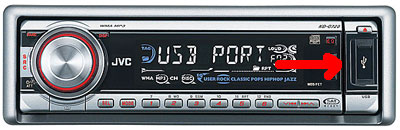
Eric Benderoff (Tech.Buzz/Chicago Tribune.com) loves his JVC KD-G720 car stereo, an aftermarket item into which he can plug (via USB port) an iPod, or a thumb drive filled with MP3 files. The songs play through the car stereo, and he can control the volume and song selection directly through the unit, not the iPod. When his iPod is plugged in, the car stereo charges the music player as it plays. And the song information scrolls across the stereo’s screen, telling him the artist, song name and album title. The thing can also receive satellite radio from XM or Sirius, spin CDs (in WMA and MP3 formats) And play terrestrial radio stations. All for about $200, not including installation.

JVC USB Stereo

This just makes so much more sense than some proprietary, factory-installed hardware. I might have to get me one of these. Yum. [via RAIN]

iTunes video

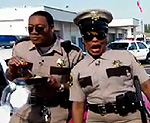
Reno 911Tonight I purchased (and watched) my first TV show from iTunes. I somehow missed the first episode of Comedy Central’s Reno 911 (Seaon Four) but there it was on iTunes for just $1.99. I’m sure the cable channel will show the episode again (many times). But I wanted to see it now and I wanted to experience watching a TV show on my Mac Book (I don’t have a video iPod).

Took about 2 minutes to download the file and I found it to be very watchable on the small screen. I might just purchase every episode for the convenience of having them on my Mac Book to watch whenever/wherever. This is where it’s headed folks.

Mac migration continues

After I purchased my iPod nano (a year ago? two years?), I installed iTunes on my home desktop Windows machine. And for the most part, that has worked fine. This morning I migrated everything over to the Mac Book and sync’d up the nano. My original thought was I wanted to be able to update podcasts wherever I might be. Before, I had hook up to the home PC…now I sync with the Mac Book which I am keeping with me more and more.

I’ve also loaded my Outlook contacts back on the nano (I’ve found this to be extremely useful). First time I did this it was a bit of a pain. Had to export the contacts from my Win machine at work and jump thru a couple of hoops to get the file on the nano. These days, I keep my Mac Book Address Book sync’d with work (I just drag and drop a file) and sync’ing the nano with the Mac Book is… well, you’ve seen the TV ads.

Pre-Mac, I tended to keep a lot of stuff scattered between home, work, laptop. I find myself looking for ways to get my most important stuff on the Mac. I’m looking forward to my first road trip with the Mac.