iPads just what the doctor ordered

That clipboard your doctor used to carry around is getting replaced by the iPad. From the Chicago Sun-Times:

“Emergency room doctors are using iPads to order lab tests and medication. Plastic surgeons are using them to show patients what they might look like after surgery. And medical residents are using them as a quick reference to look up drug interactions and medical conditions.

Since Apple’s iPad hit the market in April, doctors at Chicago area hospitals are increasingly using the hot-selling tablet as a clinical tool.

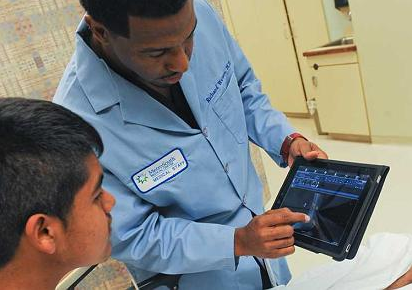
Not only does the iPad allow doctors to view electronic medical records, wherever they are, it also gives them a way to show patients their X-rays, EKGs and other lab tests on an easy-to-read screen. Plus, it’s lighter and has a longer battery life than many laptops, making it convenient for doctors to take on rounds.

Within the next month, the University of Chicago Medical Center plans to provide iPads to all of its internal medicine residents, expanding on a pilot program launched earlier this year. Similarly, Loyola University Medical Center in Maywood has given iPads to all of its orthopedic residents as part of a pilot program.

Other doctors are buying their own iPads and using them to interact with patients. At U. of C., for instance, plastic surgeon Dr. Julie Park uses her iPad to show breast-cancer patients what they might look like after reconstructive surgery.

Another hospital that has embraced the iPad is MetroSouth Medical Center in Blue Island. Once doctors there learned that they could access the hospital’s electronic medical records with the iPad, “it went through here like wildfire,” said Dr. Richard Watson, an emergency room physician at MetroSouth. “At least half of our staff here in the emergency room has their own iPad and carries it and uses it.”

Though the iPad provides a portal to the hospital’s electronic record, patient information isn’t actually stored on the device. And both the iPad and the hospital server are password-protected, lowering the chances that sensitive data could be swiped from a lost or stolen iPad.

Dr. Eric Nussbaum, MetroSouth’s emergency room chief, said the iPad also solves one of the problems created by switching from a paper-based record system to an electronic one: having to go to a desktop computer to order lab tests or type in notes on a patient.

“With this, I’m back to the convenience of being in the patient’s room, talking to them and plugging in my orders right then and there,” he said.
If you’ve spotted the iPad in the medical wild, let us know in the comments.

iPad stories

The company I work for has been giving iPads to our sellers as incentives for meeting sales goals. The iPads are theirs to use any way they choose. Here’s some of the feedback to date:

“I use it at home more than anything for web browsing etc.  But also bring it in the office everyday, just in case I made need it for meetings, etc”

“I never see it, but my family loves it!”

“My family and I have been enjoying the iPad since receiving it back in early August. I tend to use it more as an informational resource, especially to view daily newspapers and other on-line publications. My kids love the game apps and we have started to explore some of the educational programs. Much like the Wii and the Flip Video Cam previously, the iPad was a very popular gift this year for my gang.”

“Using it at home right now for personal use.  I am sure when sales season picks up I will use on some presentations.”

“Yes I use my iPad all the time at home…my laptop is collecting dust. I use it some at work for taking notes in a meeting. I can’t really use it beyond that because it’s not 3G. We have bad WiFi in the stadium where our offices are.”

“Using the iPad a lot at home actually. Funny enough, other than iTunes, we use it most with our 2 year old son. There are flash card apps on there that he LOVES, he asks to play on it almost every night. Pretty cool. Also really nice to have a second device with good internet access when either Stacie or I am on the MacBook at night. For work, not much lately just because there haven’t been the fact findings and presentations like we will have staring back again in January.”

“My 15 month old little boy is loving the iPad.  We have downloaded several Pixar movies to keep him entertained in the car as well as when we are dining out.  My wife has also downloaded several kid friendly apps that she uses as teaching/learning tools for him.  It has been awesome!  My mother-in-law has had an iPad for a while now, so (our son) knows his way around it much better than I.”

What do you think? Is the iPad a transformative (new) device? Will this (and similar) devices replace laptops one day? I expect our company to take the initiative in showing our sellers (and others) how to use the iPad as a communication tool in all kinds of settings. I find these stories very exciting.

iPad above every player’s locker

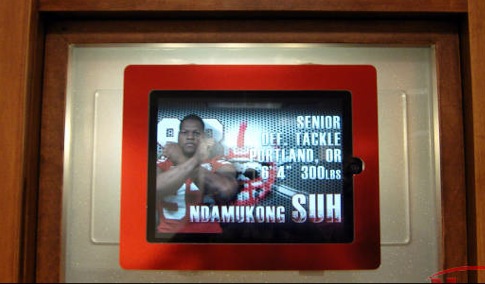
Beginning Monday, the 123 back-lit nameplates about the lockers of Nebraska’s varsity football players will be replaced with iPads.

From the story on Huskers.com:

Nebraska Athletic Director Tom Osborne admitted Friday that he didn’t know a lot about iPads, “but the main purpose,” he said, “is for communication, so if Bo (Pelini) or an assistant coach needs to schedule a meeting, everybody can know immediately, whether they’re in the varsity locker room or the walk-on locker room at the Hawks Championship Center.

For compliance reasons, the iPads will be mounted into each player’s locker. The football staff will have the ability to send messages to the players via their iPads. The players will be able to acknowledge and respond, but their messages will be limited to football and academic personnel only.

The new capability will enable the football staff to post events to each player’s iPad calendar, so he will know the times of each practice, conditioning session, academic meeting or position meeting, even if it’s called at the last minute.

What about the capability to access all iPads remotely so they can play the same video at once?

“Wireless can cause a slight delay, but yes, that’s the plan – to get all to play at once when the situation calls for it,” said Chad Chiesa, a Nebraska Athletic Department IT specialist. “With the assistance of a software development firm that specializes in mobile device applications, our hope is to keep everything in sync.”

I’m sure the guys in Cupertino didn’t foresee this particular use of the iPad but they knew in their hearts and smart heads that there would be no end of creative uses. Do you think they pull these down and replace them with the new RIM Blackpads? Or Microsoft’s Slate?

via Uber Husker, Todd Perry

Will iPads replace laptops?

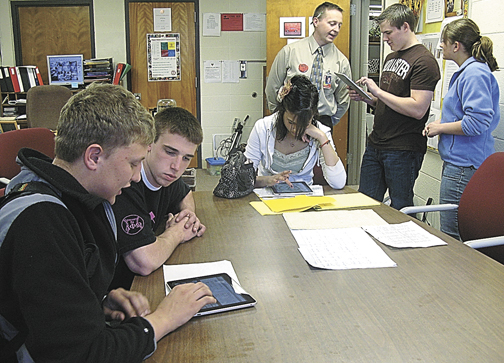
Dylan and Miles dropped in at the Coffee Zone this morning. They’re high school sophomores in Savannah, Missouri. Dylan brought his new iPad which he purchased with money from his summer job (scanning medical records).

He has a desktop computer (and a Blackberry) but no laptop. I found it interesting that he would go for the iPad instead of a laptop. But not surprising. I think we’ll see this happening more and more. For all the reasons we’ve mentioned here. Price and cool factor topping the list.

Dylan says he plans to take it to class this fall. Would like to know how that works out.

Lots of colleges are exploring ways to bring the iPad into the classroom.

iPad turns on instantly

I haven’t posted on the iPad for a while because we’re transitioning the little slab of magic from a Steve Device to a Barb Device. I’m sure it will still by lying around the house and I’ll pick it up as needed, but it’ll have her stuff on it.

I was pleased to see that Scott Adams appreciates the iPad for some of the same reasons we do:

“By far, the iPad’s most wonderful feature, compared to laptops, is the fact that it turns on instantly. There’s no boot-up sequence. That one advantage makes the iPad an entirely different product from a laptop. Once powered on, the iPad doesn’t start begging me to update things nor force me to make decisions. It doesn’t remind me of all the ways it is protecting me. It doesn’t tell me to order printer ink or ask me to fill out a survey. A regular laptop is like your boss: always making you wait before giving you busy-work assignments. The iPad is more like a punctual lover. It’s always ready for fun. And if you are tempted to do some work on the iPad, its non-keyboard quickly changes your mind. You wouldn’t say a lover is a crippled version of a boss. (Insert your own inappropriate humor here.) So any comparison of an iPad to a laptop simply doesn’t work.”

“Another interesting phenomenon of the iPhone and iPad era is that we are being transformed from producers of content into consumers. With my BlackBerry, I probably created as much data as I consumed. It was easy to thumb-type long explanations, directions, and even jokes and observations. With my iPhone, I try to avoid creating any message that are over one sentence long. But I use the iPhone browser to consume information a hundred times more than I did with the BlackBerry. I wonder if this will change people over time, in some subtle way that isn’t predictable. What happens when people become trained to think of information and entertainment as something they receive and not something they create?”

I believe iPads are among the prizes being offered as incentives in one of the sales contests underway at our company. And our company chairman placed an order after watching some of the Mac heads playing with theirs at the Coffee Zone.

Frankly, I’m a little releived to be handing off our iPad to Barb. I LIKE creating informaiton and with the iPad it was so easy to just lean back in a big stuffed chair and graze.

“Miss Perry, take a letter, please”

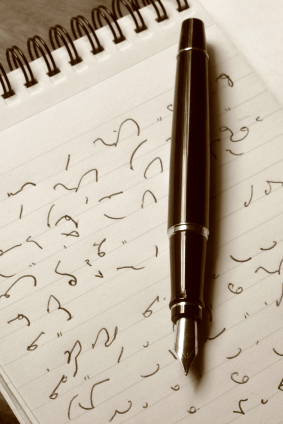
One of my mother’s many talents was shorthand transcription. A skill she used during her early working career. In those ancient times, people would dictate a memo or a letter and mom would write it down using something called Gregg shorthand.

I assume she took her “steno pad” back to her desk where she’d roll some typing paper and carbon sheets into the old manual typewriter and bang out a few copies which, I assume, got marked up with corrections, and she’d do it again.

I was reminded of this painful process recently when I heard Barb dictating a memo on her iPhone using Dragon Dictation. I’m just not sure how it gets much easier (but it will).

In a few years we’ll look at our huge 3-ring binders and drawers full of paper and shake our heads in wonder. But some folks just have to hold the paper in their hands. The numbers/words are just less real if not printed. One wonders of the iPad and similar future devices (digital paper) will change this.

One of my next projects is to convert the few remaining paper artifacts in my desk to PDF. I think I can get pretty close to paperless in my work life. I’m close.

Speaking of paperless…

I’m nearly finished with my first ebook. It was a very good experience. My beloved paper books will undoubetedly go the way of my vinyl LPs. Alas.

TV station gets iPads, saves on paper and looks hip

Last week, news anchors and producers at Barrington Broadcasting Group’s WFXL Albany, Ga., replaced their paper scripts with electronic versions displayed on the iPad. They project the move will save nearly $10,000 a year in paper costs. From the original story:

“Newscast scripts are composed as usual. But rather than printing to paper, the final version is formatted as a PDF file and transmitted to each iPad via e-mail. The PDF translation is handled by iAnnotate by Aji.LLC, a $7 program sold and downloaded via Apple’s App Store.

Although WFXL doesn’t employ iPads as teleprompters, it could if it chose to. Apple’s App Store already offers two third-party applications for scrolling copy on the iPad: Nairo Techology’s iPrompter for $2.99 and Bombing Brain Interactive’s Teleprompt+ for $9.99, which allows any iPhone to double as a remote controller.

In addition, hardware vendor Bodelin Technologies offers a new version of its through-the-lens ProPrompter HDi display, which mounts the iPad as a prompter monitor on both studio and field cameras. The $850 device includes “professional” display software, which is also controllable through an iPhone or iPod Touch.”

And they look pretty cool. No small thing in the world of TV news.

I predict it will become common practice to cover the Apple logo with the station logo.