15,500 emails. Poof!

I’ve previously posted about creating a Gmail account in 2004. Google launched the service on April 1st of that year and I created my account (invite-only at the time) on April 21, 2004. In those 20+ years I accumulated more than fifteen thousand emails. Google’s pitch was their search was so good you could just keep all of your emails and they’d help you find it. And it worked pretty much as advertised. But I rarely needed to find an old email. And my ALL MAIL folder just got bigger and bigger. If memory serves, I downloaded all/most of my Google stuff a couple of times during those 20 years but never had a need to use those backups.

Most of my computing these days happens on my iPhone and my MacBook. But given my lengthy history with Google (Gmail, Google Drive, Google Calendar), I’ve never migrated over to Apple for these tools. Until now.

I was very impressed with Apple’s approach to AI (“Apple Intelligence”) and to get the full benefit I’ve decided to go all-in. Starting tomorrow I’ll be using Apple Mail and Calendar. Not sure yet about switching from Google Drive to iCloud. I have a lot of files in Google Drive (850 GB).

As for deleting 20+ years of emails? Felt great. If I experience any regrets, I promise to update this post.

1.5 billion active Gmail users

In May of 2004 I received an invitation to beta test Google’s new email service, Gmail. Google had acquired Blogger in early 2003 and sent invites to users. We were allowed to invite two friends. As I recall, people were selling such invitations. It was early enough that I was able to get “stevemays@gmail.com”

For reasons unimportant, yesterday I created a second Gmail account, my first ever. I decided to use the name of a character from one of my favorite novels. I searched for more than half an hour, picking the most minor and obscure characters I could think of, and never found one that wasn’t taken. I finally gave up and went for nonsense: poontangmeringue@gmail.com. And decided I didn’t really need a second account after all.

Google says they have 1.5 billion active Gmail users. I’m a little surprised poontangmeringue was still available.

Revisiting Picassa

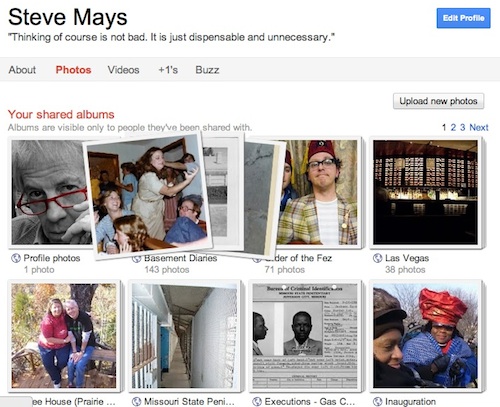
I’m a long-time flickr fan. Have a couple of thousand photos in my photostream. Shoot, I’m paid up until 2013. It’s a great service. And yesterday I downloaded (copied) all of those photos and posted them to my Picassa account.

The geek-o-sphere is buzzing (wait, no good)… is all atwitter (uh, that won’t work)… talking about Google+, the new social initiative from Google. If you haven’t followed this, it’s not important, except to explain why I’m exploring another place to put my photos online.

I’m a big fan of most Google services (Gmail, Reader, YouTube, Calendar, Maps, etc etc) and all of these will –eventually– be tightly integrated with Google+. It dawned on me that photos was about the only thing I was not using Google for.

No one knows if Google+ will be a success but I’m hoping that it is and decided it made sense to bring my pix under the Google tent.

And if you have an invite…

Why I love Gmail #326

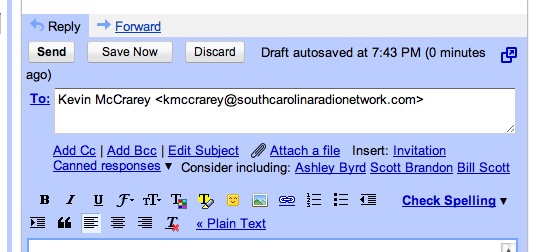
The screenshot above is from a reply to an email earlier today. Note the “Consider including” option. The first two suggestions are on the money (not so “Bill Scott”). Gmail has had this feature for a while but I just haven’t been noticing it. It just gets smarter and smarter. I also like the option of editing the subject line but perhaps most email clients do this.

Chrome Notebook

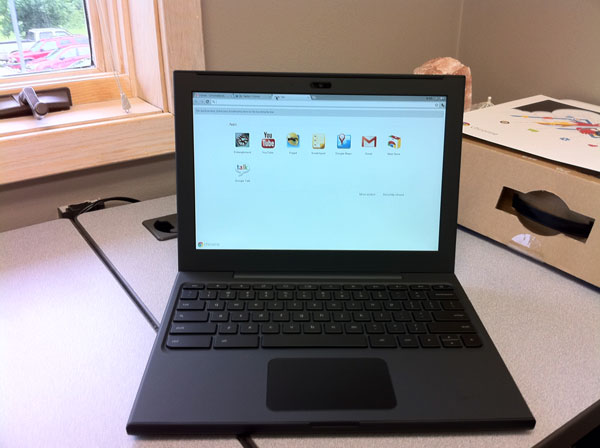
I was certain I had posted something about Google sending me a Chrome Notebook to try out but I can’t seem to find it [will update later]. After playing with it for a week I handed it off to George Kopp who kept it for a week and then last Saturday, Tom Piper took it. His excellent comments below.

Disclaimer: The first most difficult task is to set aside 32 years of self-contained computer experience (since my first Apple ][ 48K computer), and to stop using hand gestures on the trackpad to make things happen. That being said, I approached the Chromebook as a “new user” with a zest for trying out everything I saw.

Step 1: First impressions of this laptop are very positive. With a screen a little over 12″ diagonal, weighing in at just over 3 lbs, and a petite size of less than 1″ x 9″ x 12″, it feels like a solid package. The rubberized texture of the surface gives it a sense of stability which is easy to handle and carry around. The keys and trackpad are laid out well, and simple to understand.

Step 2: Hit the power button upper-left of keyboard, wait less than 10 second watching the colorful Chrome logo, and I am presented with an opportunity to select my local Wi-Fi network, and setup my Google-based login account, complete with a self-portrait . . . thereafter, I just select my picture, enter my password, hit Return, and I am instantly on the desktop. I am confronted with eight icons to choose from, which is very straight-forward.

Step 3: I start by double-clicking the YouTube icon. which takes me to the YouTube website in about 5 seconds. I select something under Most Viewed, and almost immediately am watching live action. Click on the left-arrow at upper-left, and I’m back to the YouTube menu where I select another . . . very quick response, but the sound on the unit isn’t very good. It’s time to move on, so I click an “x” in the upper tab, and return to the main screen.

Step 4: A double-click on Google Calendar brought up a week-at-a-glance view showing 7am-to-7pm time slots, and pre-posted holidays, plus a full-month minature at the upper-left corner. Buttons at the upper-right easily take me to one day, a week, a month, 4 days or agenda for all posted activities for the year . . . again, very fast. Edits a powerful with times, reminders, colors, guests, descriptions and more.

Step 5: Next, I tried GoogleDocs, which let me access and modify files I had previously posted. Simple and easy to do, little thought needed. I added the Scratchpad by clicking on the “+” next to the top top . . . neat little tool to capture and save thoughts while using another application. Gmail brought up a familiar screen showing email that I usually receive here . . . no surprises. GoogleTalk is my next tab opened, which appears that it will let me chat with another Google account holder, maybe even with video since I see a little green videocam silhouette (did not use this feature).

Step 6: Chrome Web Store is my next open tab showing lots of opportunities to get more programs, divided into descriptive categories. Popular Science (a hardcopy magazine I already get) was my first selection, which immediately appeared on screen and installed as a new main screen icon. Within 5 seconds of double-clicking, I’m in the animated magazine complete with movies and sound (adding earbuds improved the sound quality) . . . very fast access! I couldn’t resist installing Angry Birds (free) which played incredibly well. WeatherBug was my next installation (very fast installment) which worked great, giving excellent and quick information.

Step 7: Entanglement was my next tab to engage . . . cool music, with nice tutorial, but a little confusing, and very unusual game. I’m not much of a gamer, since this program, though intriguing, didn’t hold my interest.

Conclusion: The more I do, the more fun and engaging the experience with the Chromebook becomes. Overall, I found the response to be very good, the detail to be satisfyiing, the opportunities to be alluring, and the future to be full of possibilities (in spite of a trackpad that kept moving the cursor when I was trying to click on something). With a current market price of $430-$500 (Samsung at BestBuy), this device seems overpriced, but perhaps retail buying will get better with competition. In a fixed environment like an office, or at home (but not traveling), I could see real value in this unit.

Tom describes the battery life as “very impressive.”

UPDATE (6/26/11): Andy Small test-drove the Chrome for a week and shares his impressions.

Rapportive. Making Gmail just a little better

Gmail is –and has been for some time– my primary email tool. The reasons for this grow longer every day. The most recent is a little add-on called rapportive.

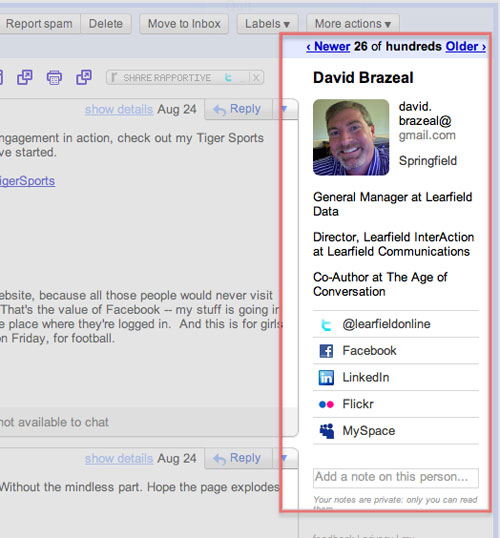
Once installed, rapportive searches the web for each of your email contacts and displays profile information (if available), links to social networks, even recent tweets. There’s also a place for notes about that contact.

It looks like rapportive replaces the Google Ads but I’m not sure why Google would allow that.

If your first reaction is, “I don’t want the people I email knowing this stuff about me,” well, you need to run out and buy some stamps and envelopes. If you want to get into my in-box, transparancey is the price of admission.

It’ll take a week or two to know if this is as useful as it first appears. If you are a fan of Gmail, give rapportive a try (it’s free) and let me know what you think.

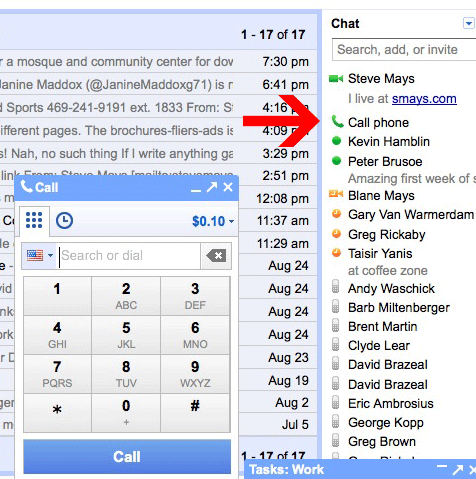
Phone calls from Gmail

The new service puts Google in competition with Skype (and all the other telcom providers). Gmail has offered voice and video chat for two years, but both parties must be at their computers.

I made a couple of calls tonight and the quality was pretty damned good. Will I call someone from my laptop instead of just picking up the mobile? Probably not when away from my desk, but I can imagine using my MacBook as a speed-dialing speaker phone. And my brother and I have been calling (laptop-to-laptop) back and forth from Indonesia for a couple of years. Sounds like he’s in the next room.

Calls to numbers in the United States and Canada will be free at least through the end of the year. International calls range from 2 cents a minute to many countries.

And if you need to reach me, my Google phone number is 573.200.6776

“Digital-age monks illuminating manuscripts”

From an op-ed piece on NYTimes.com, by Sheelah Kolhatkar:

“You can tell when a print journalist has lost his full-time job because of the digital markings that suddenly appear, like the tail of a fading comet. First, he joins Facebook. A Gmail address is promptly obtained. The Twitter account comes next, followed by the inevitable blog. Throw in a LinkedIn profile for good measure. This online coming-out is the first step in a daunting, and economically discouraging, transformation: from a member of a large institution to a would-be Internet “brand.”

“While most people are worried about getting paid for their work, I’m more concerned that journalists might be the digital-age equivalent of monks illuminating manuscripts, a group whose skills will soon disappear.”

I feel bad for anyone that has lost a job, but can’t help wondering why the reporter in this piece didn’t already have the online presence. It’s like going camping without a flashlight.

Gmail Task applet

I attended my first “time management” workshop back in the early 70s. I got the bug pretty bad. Read and listened to countless books and cassette tapes (before CDs) on productivity. I think there was a recent resurgence under the GTD (Getting Things Done) banner. Somewhere along the way, my passion waned but in those 35+ years, I’ve tried lots of tools and systems.

To-do lists have always been a challenge for me. I tend to put too load them up with too many items and they stay there too long. I recently came across the notion of identifying three things you really want to accomplish during the day and writing those on a 3×5 card. Portable, focused… might work.

tasklist

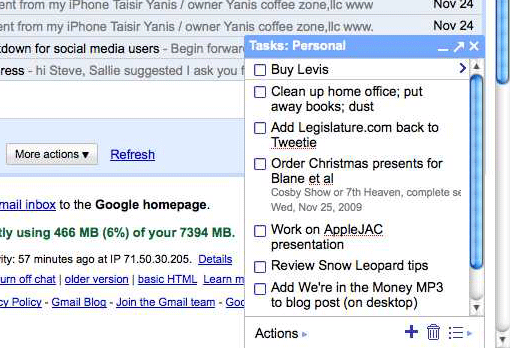
My current favorite is the Tasks applet in Gmail. Small, simple and available everywhere. Supports multiple lists. About as close to that 3×5 card as I can get.