
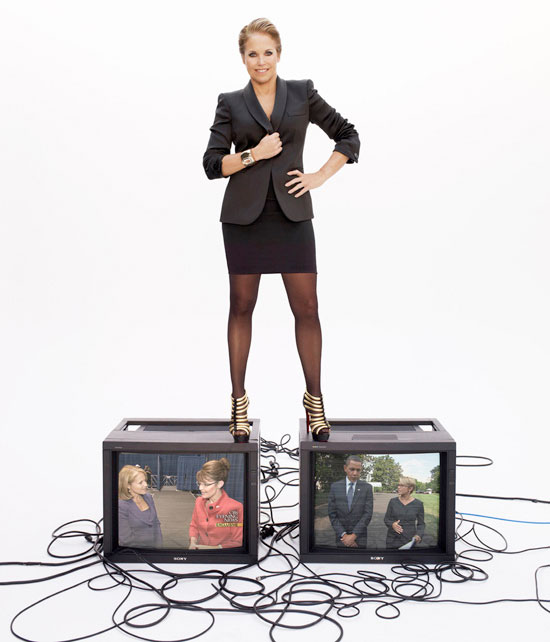
“The Future Journalist”
Found these (and much more) at Mashable. Specific digitally-oriented skills and traits a future journalist would need. These include being:
- a multimedia storyteller: using the right digital skills and tools for the right story at the right time.
- a community builder: facilitating conversation among various audiences, being a community manager.
- a trusted pointer: finding and sharing great content, within a beat(s) or topic area(s); being trusted by others to filter out the noise.
- a blogger and curator: has a personal voice, is curator of quality web content and participant in the link economy.
- able to work collaboratively: knowing how to harness the work of a range of people around him/her — colleagues in the newsroom; experts in the field; trusted citizen journalists; segments of the audience, and more.
If you are a working journalist, could you get the job you have today based on the requirements above?
RTNDA Guidelines for Social Media and Blogging
Several Learfield (the company I work for) employee are members of the Radio and Television News Directors Association, so I was pleased to come across their recently published guidelines for social meida and blogging. A few snippits:
“Social media and blogs are important elements of journalism. They narrow the distance between journalists and the public. They encourage lively, immediate and spirited discussion. They can be vital news-gathering and news-delivery tools. As a journalist you should uphold the same professional and ethical standards of fairness, accuracy, truthfulness, transparency and independence when using social media as you do on air and on all digital news platforms. “
Ahem. This is where it would be tempting to remind some of my colleagues how ferociously they fought the very concept of blogging.
On Accountability and Transparency:
“You should not write anonymously or use an avatar or username that cloaks your real identity on newsroom or personal websites. You are responsible for everything you say. Commenting or blogging anonymously compromises this core principle.” [Emphasis mine]
“Be especially careful when you are writing, Tweeting or blogging about a topic that you or your newsroom covers. Editorializing about a topic or person can reveal your personal feelings. Biased comments could be used in a court of law to demonstrate a predisposition, or even malicious intent, in a libel action against the news organization, even for an unrelated story.” [Emphasis mine]
Reporters who forget that second point could face dire consequences.
Image and Reputation
“Remember that what’s posted online is open to the public (even if you consider it to be private). Personal and professional lives merge online. Newsroom employees should recognize that even though their comments may seem to be in their “private space,” their words become direct extensions of their news organizations. Search engines and social mapping sites can locate their posts and link the writers’ names to their employers.”
“Avoid posting photos or any other content on any website, blog, social network or video/photo sharing website that might embarrass you or undermine your journalistic credibility. Keep this in mind, even if you are posting on what you believe to be a “private” or password-protected site. Consider this when allowing others to take pictures of you at social gatherings. When you work for a journalism organization, you represent that organization on and off the clock. The same standards apply for journalists who work on air or off air.”
I don’t belong to RTNDA (or any association, if you don’t count the Order of the Fez) but I like these guidelines. Sort of, “Everything You Need to Know About Social Media You Learned in Kindergarten.”
twitcam
Streaming live video has never been easier. Ironically, the bigger challenge is coming up with something anyone would care to watch. Which I clearly demonstrated this morning at the Coffee Zone.
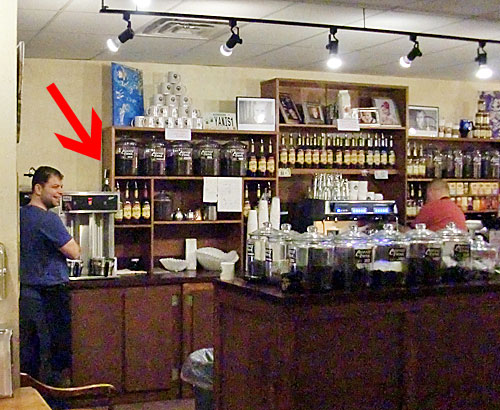
In the photo above, you can see my BT-1 wireless webcam atop the Rocket Fuel storage tank. I was sitting about 25 feet away and never lost the signal.
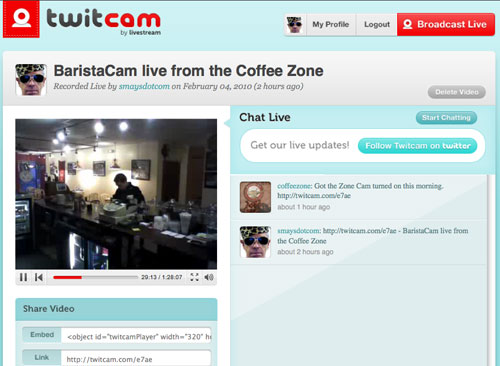
Instead of uStream or qik (which works with mobile phones only, as far as I can tell), I used a nifty site called TwitCam. The screenshot below is really all there is to twitcam. And, yes, it’s free. For now. You just log in with your Twitter info and go. TwitCam records as it streams. No option for live stream only, as far as I could determine. I don’t see how video can get much easier than this.
As soon as I can come up with something worth the bandwidth, I’ll take this back to the state capitol.
Top Ten Mistakes Managers Make With Email
1. Using vague subject lines. “Meeting,” “Update,” or “Question” provide no value as subject lines. Maximize the subject line’s message. PDA users will get the message quickly; everyone will appreciate the clear summary. You can communicate plenty in a five to 10 word subject line: “Your Action Items and Minutes from Last Week’s Meeting” or “Sam: See You at 10:00 Tuesday with Report In-Hand?”
2. Burying the news. Convey the important points first: put dates, deadlines and deliverables in the first one to three lines of the message (if not also in the subject line). PDA limitations, time pressures, cultural distinctions and value judgments keep many readers from reading further.
3. Hiding Behind the “BCC” field. At best, the ‘blind copy’ field is sneaky and risky. At worst, it’s deceitful or unethical. Plus, blind recipients sometimes hit “reply all,” revealing the deception. Instead, post the initial message and BCC no one. Then forward your sent message to others with a brief explanation.
4. Failing to clean up the mess of earlier replies/forwards. Few readers will wade through strings of previous messages. State your position clearly, even if context follows below in the email string. “Yes” helps less than “Yes, you can have the extra funding to hire 5 temporary workers.”
- Summarize the discussion to date: “See below: R&D is looking for more time but Sales risks losing customers if we don’t act now.”
- Force focus when necessary: “Let’s focus on cost now and revisit the morale and equity issues at our staff meeting next week.” Change subject lines cautiously.
- Tighter, more relevant subject lines work best, but even one letter’s difference upsets inbox sorting mechanisms.
- Cut extraneous or repetitive information.
5. Ignoring grammar and mechanics. PDAs have granted us certain sloppy flexibility, which means you’ll impress readers even more when you write precisely.
- Follow standard punctuation, capitalization and spelling rules.
- Think carefully about the tone different punctuation conveys. “Dear Betty,” is standard, neutral; “Dear Betty:” is professional, perhaps distant; “Dear Betty!” is personable, perhaps excessively so; “Dear Betty.” prefaces bad news.
- Avoid over-stylizing with high-priority marks, disorienting color or complex backgrounds.
- Avoid all-caps and excessives (like “!!!!” or other strings of punctuation).
6. Avoiding necessarily long emails. Longer messages sometimes work best; they can help avoid attachments’ hassle and security fuss. Don’t fear long emails but outline your structure and motivate reading up top.
- Provide a ‘mapping statement’ to allow readers to skim for key information: “I’ve included information, below, on the background, costs, implementation schedule and possible problems.”
- Emphasize the specific response you seek: “Please let me know, before Monday, how this project will impact your team.”
- Indicate an attachment’s presence and value: “I’ve attached slides that I need you to review before our meeting; those slides identify total costs and break down the budget.
7. Mashing everything together into bulky, imposing inaccessible paragraphs. Length does not discourage reading; bulk does.
- Keep your paragraphs short, ideally no more than three to five lines of type.
- Open each paragraph with a bottom-line sentence.
- Use section headings (in all-caps) to facilitate skimming.
- Include blank lines between paragraphs and section headings.
- Avoid italics, boldface and other typeface changes which do not reliably carry across email systems.
8. Neglecting the human beings at the other end. Email travels between actual people, even though we don’t see or hear each other directly.
- Praise, precisely. “Great job” takes little time and space but can work wonders. Quickly wishing someone a good weekend, at the end of an email, might perk someone up without cluttering your message.
- Avoid conveying blame or delivering negative feedback over email. Talk to the person instead.
- Avoid sarcasm, caustic wit, off-color humor and potentially inappropriate remarks —all of these elements tend to confuse, disorient or fall flat over email.
- Consider using emoticons and exclamations (“!” but also “ha, ha” or “just kidding”) when they convey useful emotional context.
- Adjust your style to suit your audience. For people who don’t know you, a terse style might seem rude; a wordy style might seem unfocused.
9. Thinking email works best. Email is not always the best way to communicate.
- Need a quick answer from someone nearby? Stop by for a visit.
- Want a reply to several unanswered emails? Pick up the phone.
- Looking for more gravitas? Mail a letter.
- Need to explain a complex or sensitive situation? Arrange a meeting.
10. Forgetting that email last forever. Most of us read, send and discard emails at lightning speeds. But don’t forget that emails remain on a server somewhere as easy-to-forward proof of any error, offense or obfuscation we made.
Source: Wall Street Journal