
iMac Update

I’ve done my share of gushing about the MacBook Pro and, more recently, the beautiful new iMac. So it’s only fair I share some of the rough spots I’ve encountered the last few days.

Firefox is crashing like crazy on OSX. Almost unusable. Same for Photoshop. Not sure what’s happening but look forward to getting it sorted out.

Phil has me set up with XP running on VMware and I’m suffering from mild schizophrenia, trying to move back and forth from Windows (for Outlook, mostly) and OSX. I finally just closed the win version of Outlook and started getting email via the Exchange server (when I could keep Firefox running).

I’m sure I’ll get the hang of this but trying to live in both worlds is challenging. Once we get the crashes under control (I know, I know)… I plan to spend as much time in Mac Land as possible and I’m hoping that makes things easier.

But I’m in for the duration. My experience on the MacBook Pro has been delightful and I’d like to have that warm glow at work, too. That’s gonna take some fiddling and some mental adjustment on my part.
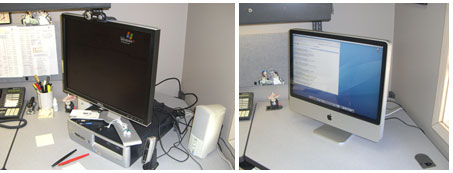
iMac before and after

Help Desk Eric installed my new iMac (24 inch) yesterday. Getting the iMac at work was one of Life’s Pleasant Little Surprises. Phil (our head IT guy) came me a few weeks ago to let me know I was up for a hardware refresh and gave me the option of an iMac. I almost said no.

Learfield COO Roger Gardner opted for an iMac and that –I suspect– paved the way for me. As far as I know, we’re the only two in the company with a Mac on the desktop.

This is an example of what a great IT department we have a Learfield. Instead of taking a we-only-do-Windows stance, they’re open to trying something new. In my case, it makes a lot of sense, because most of the stuff I do can be done a little easier/better on the Mac than the PC.

I still have Windows XP running (on VMware). This means I have to adapt to sliding back and forth between Windows and OSX. It’s gonna take some getting used to.

The iMac is a magnificent piece of hardware. Feels more like a piece of sculpture than a machine. But we won’t go there.

The Office-Cam is down for now. Maybe for good. I’ve got a PC in the office as well and once we get it back online, I might turn the Office-Cam back on.

I’m looking forward to doing some video chats with those of you who have the capability and interest. Email me and I’ll send my AIM name.

What else… Oh yeah, the new iMac keyboard. I love it. Didn’t think I would be it feels great and works well.

So there you have it. Two operating systems running on one sleek device. Best of both worlds. Stay tuned.

Text Messaging Championships

Last December I introduced you to Tyne Morgan, our intern with the amazing touch-texting skills. Now that we have an entire generation of Tynes, it’s only logical there would be a Text Messaging Championship:

“When cued, Participants will place their handsets on a marking on a counter-top area. All handsets will need to be closed. Participants will need to stand with their hands behind their back. The Referee will begin the round by counting down from 3, 2, 1 and announce “Go!” When the Referee says, “Go,” participants will then open their handsets and transcribe the phrase verbatim – no abbreviations, no typos – and send it to the designated referee’s phone.”

“Pivot!! Pivot links Time Warner Cable services u enjoy @ home to ur Sprint wireless phone. w/Pivot home is where ur phone is!”

Some nice prizes, too. [Thanks, Scott]

nano upgrade: A+

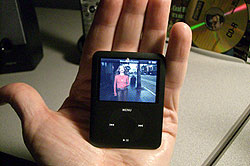
Nano_video250The new iPod nano looked great at the product launch up on the big screen behind Steve Jobs. It looks great on the Apple website. And it looks great in the TV spot. But it looks/feels/smells even better in my hot, sweaty little hand.

How does video look on that wee screen? Amazing. I keep turning the nano over, tying to figure out how something that thin can play sharp, bright, crisp video.

I’m looking forward to watching more video podscasts and maybe a TV show or two.

In closing, a word about the iPod UI. I thought it was damn near perfect before but I must say they’ve improved it.

Grokking new iMovie

My first brush with the new iMovie was bumpy. I’m looking forward to taking another run at it, after watching the first of a two-part tutorial from from ScreenCasts Online.

ScreenCastsOnline is a weekly video podcast of computer based video tutorials. The video tutorials cover many different topics from week to week but predominantly cover mac related subjects. The video tutorials are in the form of "screencasts" which are basically videos of screen captures demonstrating a particular application or service, with a spoken commentary explaining what is happening on screen.

Don McAllister’s easy-to-follow demo/tour was just what I needed. I’ll still use iMovie HD (the previous version) for a lot of stuff, but when I need to throw something together quickly…

I can’t recommend ScreenCastsOnline highly enough. It’s a free podcasts but I recommend the Extra! membership ($50 a year).