
“The Butterfly” and it is billed as “The Living Room Flier” a full radio controlled mini plane you can fly around your living room. “Full Proportional radio control enables you to fly with precision in any room 12′ X 16′. Just add 4-AA batteries to the combination transmitter/charger and you’ll be ready for action anytime Take the Butterfly with you ANYWHERE in it’s own protective aluminum briefcase (included!). The Butterfly costs $239 and it would take Lucy about 2 seconds to shred it.
Category Archives: Gadgets & Apps
Mac OS X Leopard Installation
I remember when installing a new operating system took a huge stack of 3.5 inch floppies (or 5.25 inch floppies!). And a lot of time. But what was really needed back then –at least by me– was patience and courage.
You knew to a near certainty that your computer wouldn’t work at the end of the process. Or some of your applications wouldn’t work or you’d spend hours tracking down and installing drivers.
Somewhere along the way, I stopped upgrading my computers with new operating systems and just purchased a new computer with the newest OS already installed. An expensive solution.
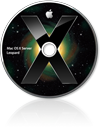
So I have had mixed emotions about the new release of Mac OS X (Leopard). Lots of new features I’m eager for, but trepidation. My plan was to wait until my Mac sensei, George, had time to do the installation.
On Saturday he informed me that this was something that I could do. Back up my data, and stick in the installation DVD.
I took the added precaution of burning my photos and music to DVD and then (with hunched shoulders and squinted eyes) slipped in the installation DVD for Leopard. Less than an hour later, the new OS was running and –so far– nary a problem.
I won’t bore you with my early impressions of the features of this new system. The web is swarming with those. I will share one thing…
Time Machine is the new backup/restore application that comes with Leopard. So I bought a new external HD, plugged it in, and let Time Machine make another full back up of my computer. It will update that back up every time I connect the laptop and the drive.
The real test of any such app is the restoration. When the time comes I need to recover a file or –god forbid– the entire contents of my computer. Let’s hope that’s off in the future. But it’s a pretty slick tool and so easy to use, I will.
But the installation was as advertised: slot the DVD and take a nap.
Marshall Wilson: Happy iPhoner
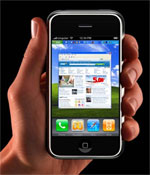 I’ve known Marhall Wilson since he and Barb started working together at the same law firm (Marshall has recently moved on). If I had to guess, I’d say he’d be better at fixing a broken generator than partitioning a hard drive. I don’t think he’s goofy for gadgets like many of my acquaintances.
So when I heard he’d purchased and iPhone, I was curious about his experience to-date:
I carried a Treo for several years. The Treo was my introduction into
“smart phones.” I was instantly hooked on the mobile email and internet
access. Following the recent death of my Treo 650, I purchased a Blackberry Curve. I was unsatisfied with the screen size and quality. I missed the touch screen feature, and I never became comfortable with the “roller ball” navigation.I was hesitant about the iPhone because (a) I do not need or use an iPod, and (b) I had read that the iPhone wasn’t well suited for “business” use. The screen quality plus the way the different applications worked together was the big seller for me.
I purchased my iPhone on the 20th (I’m writing this on Thursday the 25th) so it is still new to me. I am thrilled with it. Our computer tech guy set it up so that the device will reach out and retrieve my emails every 15 minutes. This is more than satisfactory for me. The screen is just stunning. The following are some of the pros and cons
in my opinion and in my limited experience:
- Pro: did I mention that the screen quality is stunning? Viewing videos, photos, and websites is a pleasure.
- Pro: I love the built-in Google maps with the satellite photos. The
clarity of the screen, with the easy zooming in and scrolling around
make the map feature fun as well as useful.- Con: no GPS.
- Pro: safari, the web browser, is great. Being able to open 2 or 3 or
?? Web pages at a time is great. It is happy to show you the whole
page (too small to read) and then zoom in to whatever field you wish.- Pro: the way it will switch from vertical to horizontal mode while viewing photos or the internet is great.
- Con: If you take a photo vertically, you can get whiplash trying to
rotate the device to look at it sideways because it will automatically
adjust itself to the new orientation. Perhaps there is a way to lock
out the rotation, but I haven’t found it yet.- Con: the internet reception in my house is worse than with the Treo or
Blackberry, although phone reception in the same location seems fine.- Pro: Out in the real world, internet pages load plenty fast enough for me.
- Con: the virtual keyboard is as bad as you’ve read about, although I’m
learning. I wouldn’t want to “have” to be typing lengthy emails all
day.- Con: no zoom or video on the camera, although I never used the Treo’s video camera all that much.
Overall, I love it, and I haven’t even utilized the music piece of it. The phone, internet, email and text messaging features are as good as or better than the Treo or Blackberry. Having YouTube, Google Maps, and a simple weather site resident on the device is great fun. Having only 1 button is plenty. I should also mention that the screen is really impressive.
IBM ThinkPad on eBay
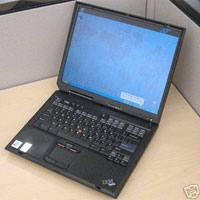 Henry has been kind enough to sell my IBM Thinkpad on eBay. Proceeds will be donated to the local Humane Society. This baby is in mint condition but you just don’t get much for a 3 year old (?) laptop. I paid $3K for the thing and the bidding is at $50.
I’m told that’s likely to jump up near the end of the bidding period (Oct 14) but I shouldn’t count on it. So, if the thing is gonna go for peanuts, I’d rather it go to someone I know. Might be a good box for student or your grandma. Built like tank. I’m only selling it because Henry nagged me into it : ].
Saying goodbye to Outlook
Back in the late 80’s I discovered a little computer application called ACT. It was a DOS app at the time. A year or so later, I purchased the first Windows version while at Comdex. I used ACT for everything for several years. As our company migrated to MS Office, I moved over to Outlook and have been there ever since.
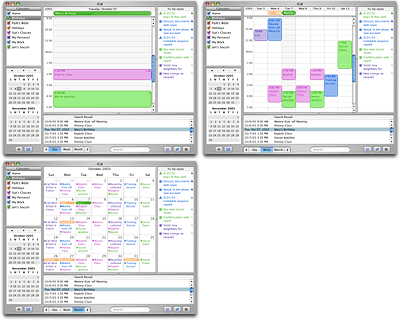 Over the last week I’ve been moving my digital life from Outlook to the Mac. XP is running great on the iMac, so there was no reason I had to switch but I’ve grown fond of iCal, Mail, Address Book and the other OSX tools.
Don’t get me wrong, Outlooks is a great program. And powerful. But it just feels… cramped and busy to me now. So, I’m spending even less time on Windows at work. I jump over to use Internet Explorer from time to time but that’s about it.
It might just be the result of packing up and cleaning house, but for the first time in years, I have an empty in-box. Stuff comes in, I deal with and zap it. Very liberating.
Speaking of things Apple, while in St. Louis yesterday, Barb stopped by the Apple store and did a little window shopping. She’s still on board for a MacBook. Stay tuned.