
“The world in my pocket”

That’s how Mindy McAdams describes her iPhone:

“If someone has all the videos and quality radio news she could ever find time to listen to (or watch) right in her pocket, how can anything even remotely like the newspaper compete with that? The newspaper as it was, in the heyday of the 30 percent profit margins, had something for everyone. Now the Internet-enabled phone provides that.”

I’ve had that “iPhone = world in my pocket” thought while sitting at the counter of the Towne Grill, waiting form my biscuits and gravy. First the email, then the Twitter, then Google Reader.

Once upon a time, I bought a copy of USA Today to read with my grub. But eventually 75 cents for the few stories of interest seemed pricey. Then I started printing out stories the night before and making my own little newspaper. And then I got an iPhone.

I think Ms. McAdams really asks the good question:

“Will traditional print news organization come up with programming, instead of random and disconnected stories? I don’t mean it has to be audio and video, but it would be something with an identity, like a show or a series. The closest thing I can think of that’s not radio is David Pogue — a brand unto himself.”

“Random and disconnected stories.” Hmm. I need to think about this. More in the morning.

Next morning: I’m now wondering if our news networks have been too focused on “random and disconnected stories?” We’ve worked hard to put our news stories online with less thought and energy given to building identity. Well, that’s not entirely true. We’ve put a lot of our existing radio programs and features on our websites. But would we be better served to focus more podcasts?
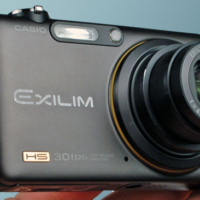
Casio Exilim EX FC100

I’ve only had this camera for a few days and really haven’t played with it enough to offer much of an opinion. The review at InfoSyncWorld says it’s “good” but not “great.” So why did I buy it?
My current Casio is fine and I’ll keep it. But I’ve had such good luck with the Exilim line from Casio, I buy a new one every year or two, just to get my hands on the new features.

I think the FC100 would be a good choice (review above not withstanding) for a parent with youngsters involved in sports. The “High Speed Burst Mode” should let you capture that frozen frame as the soccer ball is kicked or the bat is swung.

The “High Speed Movie” mode claims 1000fps which should make for some fun slow-mo video. I’ll look for opportunities to try out both of those features and post what I get (good or bad) here.

Camera costs between $300 and $350 but that will come down pretty quickly.

Alzheimer’s Disease iPhone app

My father and Barb's father suffered from Alzheimer's Disease and died from  related illnesses. But I am no kind of expert on the disease. Please keep that in mind as you follow along with this post.

I checked the iPhone apps store and didn't find anything like what I'm going to try to describe. Probably a good reason for that. And the application I'm imagining would be targeted at those in the early and mid stages of the disease. And if they refused to keep the phone with them or couldn't remember to take it, game over. But let's assume they're on board.

The iPhone app would launch whenever the phone was turned on. It would be programmed with information about the patient (for lack of a better term).

The map would have pins for the patient's favorites spots (corner market, hair salon, friends, etc). If they clicked on one of the pins, a small bubble would appear with the person photo and some info about them. A video link would play a short video clip ("Hello, Mrs. Johnson. Steve Mays here. Looking forward to your next visit.") and, of course a phone number to call the person.

The patient and family would decide on a radius that covered most of the places they were likely to go. Let's say 20 miles. If they go outside that radius, the phone wakes up and a familiar (?) voice says something along the lines of: "Hi, mom. It's me, Janice. Please give me a call. Just hit the green button.")

This repeats a couple of times and if ignored, the iPhone begins calling family and –if necessary– the authorities.

My father would go to morning coffee and on the way home make a wrong turn and just get confused about where he was. With an app like this he could have turned it on (maybe by just shaking it?) and seen the blue pin for where he is and the red pin for home. Or just say, "Help" or "I'm lost" and get assistance.

And before you point out "if they can't work the Tivo…" Remember I'm talking about people who grew up with mobile phones and –eventually– iPhones. We're gonna be freaked if we don't have the things in bath robes.

If this already exists, send me a link. I'd love to see it. If you have ideas for features I didn't think of, share those in the comments.

And if you are some brilliant young app developer and can make this thing a reality. You've got my blessing. You might even donate porcedes to Alzheimers Assocaition.

stitcher: “Your information radio”

The idea behind stitcher is simple. Organize your favorite podcasts and listen to them all together, in the order you want. It seemed more appealing as an iPhone app than on the desktop. (Like so many things). This is what Jeff Jarvis calls “be the platform, not the commodity.”

When our local news radio station switched from CBS to Fox, I really didn’t have a source for national news (after dropping XM some months ago). And I just never seemed to be in the car at the top of the hour.

With stitcher, I select from a variety of news (or other genres) sources and stack them in the order I want to hear them. And stitcher will email or txt me when something updates.

I can really program my own radio station now.

A feature I’d like –but didn’t find on the website– is the option of adding a local or state newscast to my line-up. You can submit a podcast and hope the stitcher folks add it but we’ll have to see how that works.

If I were programming a local station –or even a state news network– I think I would produce at least two special newscasts each day, designed just for podcasting. I’d have one online by 6 a.m. (local time) and the other by 4:30 p.m. I’d probably keep them in the 5 min or less range.

I’d do my best to get stitcher to add them to the lineup while promoting the podcast on air to the local audience.

Here’s something else I might try…

I’d create a KXYZ News Twitter page and blast out any and ever nugget of news I could find. From any news source. Local newspaper, TV station, news releases, blogs… wherever. And once an hour I’d link my tweet to a 2 min audio news summary. With a reminder that more news can be found on our website.

I think the real challenge for MSM is to stop thinking in terms of what is best for us and ask what would be interesting or useful to those formerly known as The Audience. Only then can we begin to reinvent ourselves for the future that is already here.

PS: And one more thing. If I was one of the growing number of reporters (print, radio or TV) currently out of work, I’d use some of my spare time to produce the podcast described above. You don’t need a printing press or studios or radio/TV transmitters or towers. You need a laptop and a camera and a smart phone. And some imagination. Bet you won’t be without a job for long.

Why two Google Shared Stuff pages?

I’m a regular user of the Shared Stuff feature in Google Reader. That’s the little widget in the sidebar, which feeds to a larger page. I love it.

I recently discovered another Google tool that also seems to be called Google Shared Stuff. This one works from a little icon in your menu bar. As you surf around the web you can add links and notes to a “shared stuff” page. But not the same shared page. It has to be a DIFFERENT shared page.

Why can’t the shared pages be shared? One page for stuff from my Google Reader and the “shared” button. If any of you kids in the Accelerated Class can help me out with this, I’ll be grateful.

iPhoto 09: Faces and Places

I only have 2,300 photos on my laptop, which has become my default computer. The other kids I play with have many, many more than that. But I don’t know how I’d keep up with a couple of thousand photos without iPhoto. I’m not saying it’s the best way to manage your images, only that it’s the best for me. And the new version includes two new features that I really like.

Faces attempts to “recognize” the people in your your photos and group them. This little video tour ‘splains it better than I can but after playing with this for an hour or two, I’m reminded that people (and places) are the way I think about my photos.


Sure, I could go through 2,000+ and tag photos of Barb. But I’d never get around to it. iPhoto 09 pretty much does it for you (with a little help).

I’ll talk about Places in a later post.

Re-evaluating Flip HD

My initial impression of the Flip HD video camera was pretty positive. But the more I use it “in the field,” the more things I find that bother me. The audio is very poor when compared to my Casio EX-Z300 (a small still camera that also takes video). And in low light situations, the Flip really sucks, while the Casio is very forgiving. And if you don’t hold the Flip dead still, your video shakes like pup passing peach pits. Not so the Casio.

These cameras are comparable in price. I think you can get either for around $200. And I’m open to the possibility I’m not doing something right but these are pretty much idiot-proof cameras, so…

The 4 minute video above was shot on my Casio (by my friend Greg Perry) and edited in iMovie 09 (which I like much better than 08). He was also using the Flip. The difference was night and day. Couldn’t use the Flip stuff and the Casio came out okay. There’s some artifacts in the video above but I think that’s mostly YouTube compression. I’ll post the .mov file later if you want to download and take a look.

I still have the inauguration video I shot on the Flip HD so maybe I’ll see better results but I’m skeptical. If you I had to choose between the two cameras, it’s no contest: Casio wins hands down. And it records nice stills and audio. If you bought a Flip on my recommendation and aren’t happy with it, my apologies.

Think before pressing send

President-elect Barack Obama told CNN he thinks he may be able to “hang onto” his blackberry after all.

“I think we’re going to be able to hang onto one of these. Now, my working assumption, and this is not new, is that everything I write on e-mail could end up being on CNN. So I make sure that — to think before I press ‘send.’”

What if all of our leaders understood that everything they say an do “could end up being on CNN” and they had to think before pressing send?

I love that O wants to keep his Blackberry, even if he can only use it for personal communication. The man wants to stay connected.