YouTube SimpleGallery

I love WordPress. I won’t bore you with all the reasons. But one very big one is: plug-ins. These are little add-on’s that add extra functionality to your blog/website. Today one of our sites needed a way to display multiple videos on a single page. I found several plug-in’s that looked like good candidates and settled on one called YouTube SimpleGallery. It’s free but I made a small donation to the developer.

I usually test plug-in’s here, to get the hang of them. If you click on the VIDEO tab at the top of the page,you’ll see a bunch of thumbnail images that –when clicked– play the video on YouTube.

You can also configure the plug-in so the video pops up in its own window.

From my lips to WordPress

One of the reasons that most folks don’t blog from their iPhone or mobile device, has to be the difficulty of typing a paragraph or two. With Dragon dictation, it would seem that I could simply dictate a post and paste that into the rather handy WordPress iPhone app.

WordPress, StudioPress, Thesis. FTW.

TS-thumbnailWe completed a make-over of one of Learfield’s websites yesterday. Like most companies, we’re watching our expenses, so I was pleased to bring it in for the $59 I paid for the theme (not counting my time and some IT help with site prep).

Since the beginning of the year, we’ve converted a dozen websites to WordPress and the process has gone very smoothly. With 50 users working in half a dozen offices, we needed a very friendly content management system and WordPress has delivered. Both for the people working in our newsrooms and for me.

There are literally thousands of plug-ins for every conceivable task. And they’re all free (or donor supported).

I’m not a designer but the variety of affordable WordPress themes is staggering. After a good bit of looking, I found myself coming back again and again to two providers:

StudioPress has great-looking themes that cost about $60 each. Use as-is or have one customized for a couple of hundred bucks.

Thesis is the theme I chose for our news networks. Out of the box, it’s a clean, minimalist design. We can add a coat of Candy Apple Glitter Flake paint later, but for now, I wanted something that was easy to manage under the hood.

thumbnails-three

Both of these developers have great support forums and documentation.

I’ve spent less than $2,000 on the refresh of ALL of our websites. Aside from some great help by our IT folks, and the day-to-day content posting by our news and sports staff, I support all of these by myself.

If quick turn-around is a requirement, StudioPress/Thesis + WordPress is a winning combination. If the content has been assembled, I can get a site up and running in a matter of a few hours.

Fast, inexpensive and fun. For the win.

Websites: Fast, easy, inexpensive

A couple of weeks ago I got a call from one of the guys in our Minnesota office. He wanted a website to serve the advertisers of one of our networks. Said he didn’t really have a budget and he’d like to have it by the first home game, to be played in a brand new stadium (just over a week away). They were going to have lots of photos and didn’t have a good way to share them with fans and sponsors.

I purchased a WordPress theme (from Studio Press) for $65 and paid another hundred or so to have it customized (thank you, Rebecca). Ten days later the site was up and running (still adding content, obviously).

I’ve been at this long enough to be amazed that I could give the guy a credible website for $200 in a week-and-a-half. AND because it’s WordPress, he –or one of his interns– can update this site thorughout the season. I remember when this would have taken months and cost thousands of dollars.

Tag cloud

We (yes, there IS a mouse in my pocket) migrated one of our websites over to WordPress this week. As near as we can determine, more than 46,000 stories were imported. My role in this has been modest but I did spend a good bit of time working with the categories, keywords, tags and other meta data used to organize all of those news and sports stories.

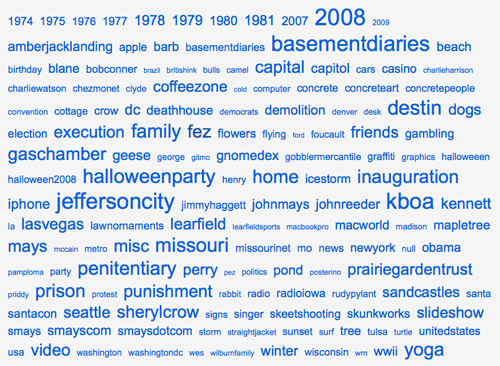
There are less than 5,000 posts to this blog but it would be impossible (okay, very difficult) to find anything without a good tagging scheme. One of the more common approaches to displaying those tags is the “tag cloud.” I have one on the right side of this page, near the bottom. And here’s the tag cloud for my flickr account.

tag-cloud-flickr

My friend Scott doesn’t like how tag clouds use different size text to indicate the most and least common topics. He thinks it looks “sloppy.” I find the visual cue very intuitive and easy to use. (I can see I have some clean-up to do)

Strangely, tagging is a bit like curling your tongue. Some people can do it and some just can’t. I’m getting better at it.