
Tag Archives: Apple
iMessage now using iCloud
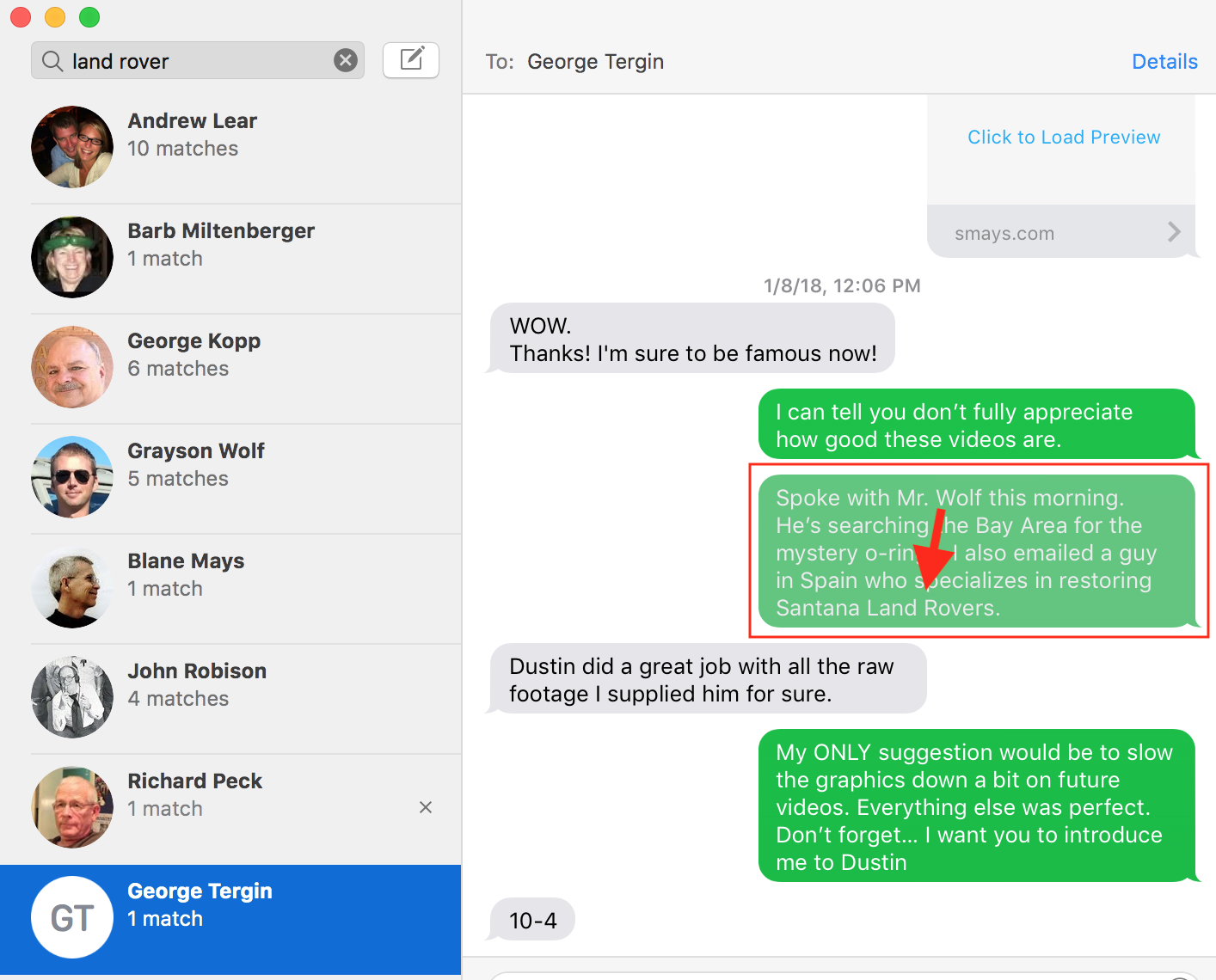 Apple recently updated macOS and iOS to enable syncing/storing of iMessages in iCloud. I don’t use some of Apple’s more popular apps (like Mail and Calendar) but I use iMessage constantly. Google has, what, seven messaging apps now?
Prior to this latest update, a user could have iMessage syncing problems between devices and the app was taking up a lot of storage on your device. Some people have conversations (with attachments) going back years. Moving all of this to iCloud solves that problem.
I never thought much about the archival feature of iMessage. I sort of knew my conversations were archived but rarely went back to look for something. Following this update I started playing with search in iMessage (I always thought of search as just a way to find someone with whom I had had a conversation). A search for “Land Rover” pulled up all of the conversations where that phrase had been used (left side of screenshot). On the right, the conversations with each. Any message containing the searched for word/phrase is grayed out just a bit.
Like a lot of folks, instant messaging (iMessage for me) has become my preferred method of communication. Voice-to-text works great and I occasionally just send a brief audio message. So having all of my conversations stored, sync’d and searchable will be handy.
Renaming files in Apple Photos
Once upon a time file names could only be a certain length. Was 7 characters for he name and 3 or the extension? 8 characters for the name? I can’t recall but somewhere along the way this limitation was lifted and we can name a file something useful. But I never developed the discipline to take advantage of this and have some old files with names like 4777959349_o.jpg . In my OCD moments this bugs me and I might take a few minutes (or a few days) and rename offending files.
I rarely see file names in iPhoto (I refuse to call it Apple Photos), just the Title I enter when adding photo. But my buddy George Kopp pointed out I can change the file name to the Title when exporting images for backup. This short screencast (4 min) shows this feature.
Apple’s New Campus
A few of my favorite excerpts from Steven Levy’s tour of Apple’s new campus.
“Jobs discussed the walls he had in mind for the offices: “He knew exactly what timber he wanted, but not just ‘I like oak’ or ‘I like maple.’ He knew it had to be quarter-cut. It had to be cut in the winter, ideally in January, to have the least amount of sap and sugar content. We were all sitting there, architects with gray hair, going, ‘Holy shit!’”
“At first, we had no idea what Steve was actually talking about with these pods. But he had it all mapped out: a space where you could concentrate one minute and then bump into another group of people in the next,” Behling says.”
“To withstand earthquakes, the Ring is mounted on huge steel base isolators that ensure the building can move up to 4.5 feet in any direction without losing its vital services.”
“The very toughest challenge came from constructing the giant glass sliding doors for the café—they had to extend from the ground to the roof, a full four stories. Each door leaf is about 85 feet by 54 feet. “The only doors I know of in the world that size are on an airplane hangar,” Diller says.”
“It’s not like we’re asking people to be uncomfortable at work,” she says. “We’re asking them to recognize that part of being connected to the outside is knowing what temperature it is. We don’t want you to feel like you’re in a casino. We want you to know what time of day it is, what temperature it is outside. Is the wind really blowing? That was Steve’s original intention, to sort of blur that line between the inside and outside. It sort of wakes up your senses.”
The Perfect MacBook
My MacBook Pro is 3 1/2 years old. It’s the best computer I’ve ever owned. As far as I’m concerned, it’s perfect. So this week I purchased another one, almost exactly like it. (I won’t bore you with the specs) I bought it as a spare but my current machine will become the spare.
I’ve always thought the latest version of the MacBook was better than the one before. Until now. The newest model has a keyboard that just doesn’t feel as good as mine. The Touchpad is bigger than I want or need. And Apple saw fit to do away with the MagSafe connector on the power cord, which kept my box on the table instead of the floor countless times.
M.G. Siegler had similar thoughts a couple of years ago:
“I suspect this new MacBook will be the last laptop I end up buying. Again, that doesn’t mean the MacBook is dying anytime soon, but I believe this will be the pinnacle of the product. We’ll get spec bumps for years to come. But it will be the long, slow fade we just witnessed with the iPod.”
I don’t really fault Apple for this. Let’s say, for the sake of discussion, that Apple (or any company) succeeded in making The Perfect Laptop. I know, there’s no such thing but let’s say it was 99.99% perfection. And the following year — to meet shareholders expectations — they have to roll out a new model. They’ve got make some changes, right? Isn’t it much more likely those changes will make it worse than better? There’s probably a name for this phenomenon (If You Fuck With It Enough You Will Fuck It Up Syndrome?).
I think this is what happened with their latest MacBook Pro. I’m sure it’s a good laptop and lots of people will buy it and be very happy with it. Just not me.
So now I have two (nearly identical) laptops. One in the bag I take everywhere and one on the closet on hot standby.