“100% User-Controlled Radio”

Later this month (28th), CBS Radio will debut “… the industry’s first 100 percent user-controlled, on-air radio program” Sunday nights on KITS-FM in San Francisco. The website is called Jelli. [ADWEEK]

“A far cry from the days of phone-in requests, Jelli gives listeners complete control, just as if they were in the station studio. Using Web-based, real-time voting and other features, listeners create the playlist, determining what is broadcast over the airwaves seconds before it plays. The community can even vote to pull a song off the air instantly.”

I think I agree with James at Podcasting News. Feels a little gimmicky. I wonder if OFF is one of the options.

My first iPhone video

Forget for a moment that I have the iPhone in portrait orientation, and check out the quality of this brief walk through the newsroom. I’ve uploaded videos to YouTube from all kinds of cameras: Sony Camcorder; Flips; my beloved Casios; the MacBook iSight.

But I don’t think I’ve ever ended up with a clip that looked and sounded this good. I know, could be some Cupertino Mind Trick but I think I’m correct on this point. And the iPhone has YouTube option built right in.

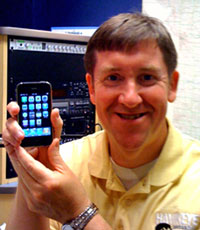
Steve Walsh has an iPhone

waslshiphone200Missourinet reporter Steve Walsh showed up for work on Thursday with a brand new iPhone. Like most of the folks in the newsroom, Steve is a long-time radio guy who remembers what a splicing block is used for.

All of our reporters know how to post stories to the web and about half of them are getting their Twitter on. But it was nice to see Steve invest his own hard-earned journo bucks in the latest tech. (I’ve encouraged him to take advantage of the 30 day grace period and upgrade to the new iPhone)

I can’t wait to see how Steve uses the iPhone to cover and report the news. To help him along, I thought I’d make a list of some apps that might be useful. I have these on my phone but the list is far from comprehensive and I welcome your suggestions in the comments.

  • Google News Reader
  • Tweetie – my Twitter client-of-choice
  • TweetMic – For recording audio and linking to Twitter
  • Camera – Comes with phone. Stills and video
  • Photogene – Great for cropping and tweaking still images

Steve does most of the heavy lifting for the Missourinet blog which can be found at Missourinet.com.

iPhone MobileMe

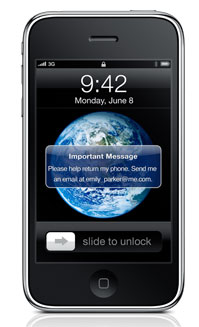
iphone-returnI got a brief look at the new OS for the iPhone yesterday and must say I was impressed. Copy and paste works smooth as buttah. And a bunch of other stuff I didn’t get to play with but the feature that made me squeal like a 12 year old girl was one I had not heard about. From the iPhone website:

“If you misplace your iPhone, MobileMe can help you find it. Log in to me.com to view a map that shows the approximate location of your iPhone. If it’s nearby, have it play a sound to help you find it, or display a message on the Home screen to help someone return it to you.

Your iPhone contains information you don’t want in the hands of a stranger. So if you lose your iPhone and displaying a message on it hasn’t resulted in its safe return, you can initiate a remote wipe and restore factory settings. If you eventually find your iPhone, you can restore your data by enabling your MobileMe account on iPhone.”

How about this option? If you know your phone is stolen and being used by the thief –or someone he sold it to– you turn the phone on and make it play a pre-recorded sound clip: THIS TURD STOLE MY IPHONE! Over and over.

My new phone arrives this Friday and I confess I’m a little giddy with anticipation.

PS: If you click the headline of this post it displays the “related posts” feature we added yesterday. One of which is from a year ago, titled: “Why no iPhone for smays.com.”