Funny Photo Booth video
Reply

I stopped buying/reading newspapers a long time ago. But there are times –breakfast, for example– when it is inconvenient or impractical to open the MacBook. My solution has been to print articles I find online and take them with me.
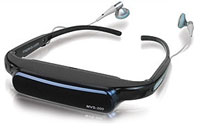 I’d really love to have a pair of reading “glasses” with some flash memory to which I could Blue Tooth these articles, including photos and video. I don’t see why that would be technically difficult and damned handy. This is close but likely to get my ass kicked at the local diner where I have breakfast. I’m thinking more along the lines of Clark Kent glasses.
No, I don’t need wifi access. That would be cool but would add a lot of cost. And, yes, I know there are all kinds of portable readers out there but I don’t want to tote around even a book size device.
What I haven’t tried is saving the text to my iPod. Not a great reading experience on the nano but it would work fine on the Touch. Hmmm. And if wifi was available… I suspect this wheel has already been invented.
If you want to glimpse the future, spend time with those that will live there. Back from a weekend with my brother and his family. The kids are 18, 16 and 12. They’re back in the states for 6 months to help Ryan get settled in college.
 Uncle Steve was a big hit with his belated graduation present, but after giving Ryan his new iPod Touch, he was a little distracted the rest of the weekend. I also miss a lot of birthdays so we did a little catch-up with the other two. They opted for PSP’s (Play Station Portables).
The family is international with friends all over the world. But the kids do not use email to keep in touch (“Uncle Steve, please!”). The primary comm tools are SMS (texting) and Facebook. I had read that but it was interesting to hear it straight from the teenage horse’s mouth.
I’ve had a Facebook page for a while but never use it. If I want to keep in touch with my nephews and niece, that has to change.
Oh, and those PSP’s? Wifi ready so when they’re not gaming (or while they are), they can keep in touch with friends.
PS: On Saturday we stopped by the local Apple store. Packed. An iPhone class was underway and there were more gray heads than mohawks.
We’ve been DirecTV users since it began. When Tivo came along, that seemed like a natural extension. I frequently use the web to check the DirecTV listings but just discovered I can also program the Tivo via the web.
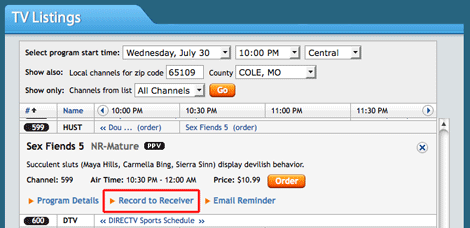
Let’s say I’m sitting here in the Coffee Zone, surfin’ and slurpin’ and see that there’s some special on HBO tonight but I won’t be home to watch or record. Just log in, find the channel and program, click the Record to Receiver link and you’re set.
“12seconds is the best place online for video status updates. It’s a super easy way to share what you’re doing with your friends and family using short video clips. You can use your web cam or mobile phone. Show your friends where you are, share your thoughts, or tell them how you’re doing. We are building a video status platform that will help you keep up to date with your friends 12 seconds at a time.”
Why only 12 seconds?
“Because anything longer is boring. The scientists here at the 12seconds dodecaplex have conducted countless hours of research to determine the precise amount of time it takes for boredom or apathy to set in during typical Internet video viewing. Our patent pending Electro-Tear-Duct Prongers have determined that exactly 12 seconds of video is the ideal amount of time to keep anything interesting.”
The thing that caught my attention was how 12seconds.tv. integrates with Twitter. You’re walking down the street and spot to dogs doing the wild thing. You whip out your camera phone and shoot 12 seconds of video and off it goes to your page on 12seconds.tv. With corresponding tweet.
This reminds me of Twitpic, a similar service for still images. And eyejolt, which makes it easy to email short videos to friends. Not sure why I couldn’t get it to work with Twitter but I’ll fiddle some more. This is the kind of app that might get my to buy a phone that can shoot/send video.
On a down note, I didn’t think quality of the resulting video was very good.

Thanks to the Lord High Commander of Planet Nelson for pointing us to Photofunia. I like this site a lot more than he did. Grown-up that he is, he dismissed the site as a place to fiddle away an "Internet minute." I expect to spend countless hours there.

A week ago I added SiteMeter to get a better handle on the trickle of traffic we get here at smays.com. One of the many features is a map showing location of recent visitors. I was curious about my visitor from Japan so I clicked on the dot and it pulled up a variety of information, including what he/she found (Google search) that brought them to my door. Irashaimasu.
Last week I started using SiteMeter to get a better sense of who’s
visiting smays.com. There’s a wealth of data that I haven’t taken time
to explore but I did come across a section that lists where people are
"coming from."

Most of these are the result of some bizarre Google search and never come back but it illustrates how connected –if only in this small way– the world has become.
And for any international visitor who might be reading this… I am very sorry about George W. Bush. I hope we can make it up to the world.
 Given my love of tech toys in general and Apple stuff in particular, I find myself frequently explaining why I don’t have an iPhone (or plans to own one). Put aside the fact that I might make or receive 5 mobile calls in a week… it’s really a matter of time.
The time it would take me to get up and running is manageable. But I know I would be tweaking and “playing” with the phone until Steve Jobs is called back to that Garage in the Sky. It would be all-consuming.
For someone with very few real-world responsibilities (kids, chores, community service, etc), my days are full. Work, reading, exercise, dogs and, yes, blogging. Oh yeah… and Barb. She doesn’t get her share of my time.
The iPhone would be one more digital child I don’t have time to raise, care for and play with.
Rogue Amoeba makes a great application called Audio Hijack Pro. I’ve heard nothing but good things about this tool so I jumped on their website and bought it. A great price, too. Just $32. (Mac only). They had a free trial option but I was positive this was what I needed.
Turns out it wasn’t. I screwed up. But for the hell of it, I emailed the support guys at AHP, told them what I had done and asked if they’d give me a break. And they did.
I got a well-deserved scolding first for not taking advantage of the free trial offer but they went above and beyond and deserve a little link love for it.
And I promise to always do the trial before I buy.