
We’re using the next few days in D.C. to field test the new iPhone. I continue to be amazed at the quality of the video (and audio) from the iPhone.
Category Archives: Gadgets & Apps
My first iPhone video
Forget for a moment that I have the iPhone in portrait orientation, and check out the quality of this brief walk through the newsroom. I’ve uploaded videos to YouTube from all kinds of cameras: Sony Camcorder; Flips; my beloved Casios; the MacBook iSight.
But I don’t think I’ve ever ended up with a clip that looked and sounded this good. I know, could be some Cupertino Mind Trick but I think I’m correct on this point. And the iPhone has YouTube option built right in.
iPhone jumps the shark
Reply
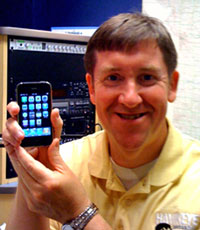 Missourinet reporter Steve Walsh showed up for work on Thursday with a brand new iPhone. Like most of the folks in the newsroom, Steve is a long-time radio guy who remembers what a splicing block is used for.
All of our reporters know how to post stories to the web and about half of them are getting their Twitter on. But it was nice to see Steve invest his own hard-earned journo bucks in the latest tech. (I’ve encouraged him to take advantage of the 30 day grace period and upgrade to the new iPhone)
I can’t wait to see how Steve uses the iPhone to cover and report the news. To help him along, I thought I’d make a list of some apps that might be useful. I have these on my phone but the list is far from comprehensive and I welcome your suggestions in the comments.
- Google News Reader
- Tweetie – my Twitter client-of-choice
- TweetMic – For recording audio and linking to Twitter
- Camera – Comes with phone. Stills and video
- Photogene – Great for cropping and tweaking still images
Steve does most of the heavy lifting for the Missourinet blog which can be found at Missourinet.com.
iPhone MobileMe
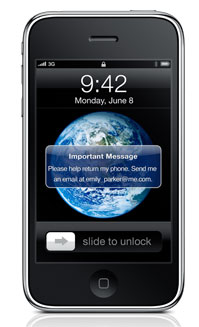 I got a brief look at the new OS for the iPhone yesterday and must say I was impressed. Copy and paste works smooth as buttah. And a bunch of other stuff I didn’t get to play with but the feature that made me squeal like a 12 year old girl was one I had not heard about. From the iPhone website:
“If you misplace your iPhone, MobileMe can help you find it. Log in to me.com to view a map that shows the approximate location of your iPhone. If it’s nearby, have it play a sound to help you find it, or display a message on the Home screen to help someone return it to you.
Your iPhone contains information you don’t want in the hands of a stranger. So if you lose your iPhone and displaying a message on it hasn’t resulted in its safe return, you can initiate a remote wipe and restore factory settings. If you eventually find your iPhone, you can restore your data by enabling your MobileMe account on iPhone.”
How about this option? If you know your phone is stolen and being used by the thief –or someone he sold it to– you turn the phone on and make it play a pre-recorded sound clip: THIS TURD STOLE MY IPHONE! Over and over.
My new phone arrives this Friday and I confess I’m a little giddy with anticipation.
PS: If you click the headline of this post it displays the “related posts” feature we added yesterday. One of which is from a year ago, titled: “Why no iPhone for smays.com.”
World’s first Bluetooth webcam
“The new Ecamm BT-1 combines high-quality video and sound with complete freedom from wires. The new webcam integrates advanced technologies to allow video and sound to be sent through the air to most any Mac. The BT-1 streams 640×480 H.264 video and AAC audio to video applications such as iChat and Skype, taking advantage of Mac OS X’s rich media capabilities to provide a seamless wireless webcam experience.”
This rascal is about half the size of an iPhone. As for video and audio quality? We’ll take her for a test-drive in the morning down at the Coffee Zone.
TweetSpin: “set it and forget it”
TweetSpin, a new Twitter application designed by a radio programmer named Rico Garcia. Among other info, TweetSpin can post "now playing" data from a station's website.
Here's a couple of snippets from a review in R&R, a radio trade publication:
From KHOP PD MoJo Roberts: "TweetSpin allows us to constantly have 'what's playing now' on our status and set appointment tweets to go out so we can set it and forget it."
In addition the "now playing" feature, Garcia is more excited about built-in scheduling that allows stations to set up hourly, daily or weekly messages to encourage listening appointments.
Hardly surprising that an industry in the process of automating itself out of existence would look for a way to automate social media, too. Of course, if there's really no one at the station…
11,000 channel “radio”
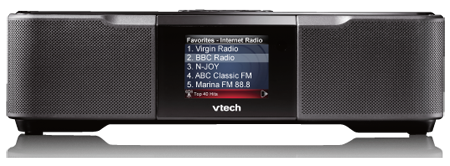
“The VTech IS9181 is a Wi-Fi music streaming device, designed to make accessing the near-infinte variety of Internet radio as easy as traditional radio.”
“The IS9181 connects to any wireless network (802.11 b & g) and lets you access more than 11,000 free Internet radio stations worldwide. It also lets you access audio files (MP3, WMA, AAC, WAV, Real) stored on you Wi-Fi-enabled computer (PC or Mac). The IS9181 also offers localized weather (based on zip code).” (via Podcasting News)
My first thought was, “If I’m running a radio station, it better be one of the 11,000.” My next thought was, “It better be one of the ‘best’ of the 11,000.”
Scott Adams: Calendar as Filter
Scott Adams thinks the calendar will be the organizing filter for most of the information flowing into our lives:
“You think you are bombarded with too much information every day, but in reality it is just the timing of the information that is wrong. Once the calendar becomes the organizing paradigm and filter, it won’t seem as if there is so much.”
News: “When I read the news, I’m generally most interested in how stories have unfolded across time. I want to know the “new news,” as in the topics that have never been reported until today, but I also want ongoing charts and graphs about the “old news” such as wars and the economy. My understanding of the war in Iraq, for example, has little to do with what blew up today and a lot to do with the trend lines over the entire war. In other words, I see the news in terms of time.”
Advertisements: “Some time ago I blogged that advertising belongs in your electronic calendar, for your benefit more than for the advertiser. That’s because my interest and desire in certain products and services is linked to timing. If my calendar has a certain birthday coming up in a week, and I’ve checked the boxes saying the person is a certain age and gender, or has certain hobbies, my calendar can start giving me gift suggestions and recommending online flowers and e-cards and the like. In other words, advertisements can move from nuisance to valuable service just by adjusting when you see them.”
I know a lot of folks who use their Outlook email in-box as their primary organizing tool. (shudder) The calendar makes a lot more sense to me, too. Especially working out of iCal that’s sync’d between my desktop, laptop and iPhone.
Tweetie
Since installing Tweetie, I keep it running on the left side of my desktop. The clever folks who designed Tweetie must have anticipated this is how folks would use it. I can see at a glance when someone tweets; mentions @smaysdotcom or sends me a direct message.
Earlier tonight, William Gibson tweeted about a new movie coming out this summer, describing it as “must see” and included a link to the trailer. Well, when my favorite author says he “must see” the movie, you can bet I’ll see it, too.
When I saw his tweet, I thought: “Cool. William Gibson is online, at this moment, doing basically the same thing I’m doing.”
Now, I can’t direct message Mr. Gibson because he doesn’t follow me and I’d like to think I would not intrude if he did. But, with what other form of communication might I have such a real-time experience with one of my heros? Not email. Probably not a blog post. I’m not sure I can describe the feeling. Not quite personal, but almost.
Little Snapper worth a thousand words
I take a lot screen shots. Every day. In the bad old PC days, it involved hitting the prnscrn key, pasting into Word or Photoshop, etc etc. When I moved to the Mac it got easier, with some short-cut keys. But I still had to do the Photoshop thing if I wanted to annotate or add arrows or such.
Yesterday Bradley pointed me to Little Snapper, a new (?) app for the Mac. I won't event try to list or describe the features in LittleSnapper, there are just too many. But if you're a designer, developer, researcher or writer, you'll want this on your utility belt.
At $39, this is probably not a tool that everyone needs. But if you use screen grabs as much as I do, it's a must.