
iMage Webcam, CamTwist and Ustream

I’ve been trying to assemble the best combination (for me) of hardware and software for streaming live video. The ease-of-use and price (free, for now) of Ustream.tv has made it possible for any nimrod to play in Wayne’s World.
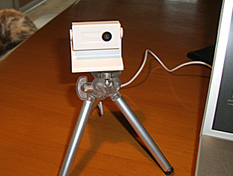
Image200

MacBooks, with the built-in iSight camera, make live video just that much easier but sometimes you want to point the camera the other direction, so an external webcam enters the picture (so to speak).

This weekend I’ve been playing with the iMage webcam from eCamm. It doesn’t look like much but –for $60– it delivers a very nice image and you can put it in your pocket. I’ve mounted mine on a small tripod.

The final –and most exciting– piece of the puzzle has been a freeware app called CamTwist. CamTwist works very well with Ustream.tv and comes with an amazing set of features and a UI that’s intuitive and easy to use. If you’re interested, I recommend this short video, but let me mention some of the cool things CamTwist does:

  • Stream your desktop. Rather than making your webcam the video source, CamTwist lets you stream all or part of your computer’s desktop. Let’s say I wanted to show some co-workers in Des Moines how to use a new piece of software. I could simply stream the demo over Ustream. Much better than me trying to remotely "take over" their desktop.
  • Slide Show. The slide show source allows you to stream still pictures. You can drag pictures to the list from your desktop and even iPhoto.
  • Movie. With the movie source, you can play movies over your broadcast. You can drag in several movies to the play list or select a single movie with the movie selection button. Next Saturday George and I are gonna take another run at streaming live from the Coffee Zone. Instead of just watching us yacking for half an hour, we can play video clips as part of the live feed.
  • Flickr Set. Similar to Slide Show, the flickr set source will fetch pictures from a flickr feed and stream them on your broadcast. Why would you want to do this? I don’t know, but it’s cool.
  • Picture-in-Picture. Once you have your video going, it’s possible to overlay another video source on your video.
  • Chroma Key. Sometimes called a Green Screen. This is typically used to create the appearance that something is behind you, such as a picture or a movie. George and I figured out the other features but I haven’t tried this one yet.

There you have it. An inexpensive webcam; a feature-rich piece of freeware; and –for now– a free streaming solution at Ustream.tv. Do we have any program that’s especially compelling or useful? No. But that will be the easy part. And when it comes up, we’ll be ready to share it with the world.

Technology in the Missouri Senate

Shields200I got a few minutes with Missouri State Senator Charlie Shields this morning. Senator Shields –the Majority Floor Leader–  was kind enough to let me ask a few questions at a very busy time for the legislature. I wanted his take on how the Senate uses –or doesn’t– use technologies like laptops, the web, smart phones, Blackberry’s, blogs and podcasting.
The House allows laptops in the chamber but the Senate doesn’t. The concern seems to be that senators would be surfing the web or checking email and not paying attention to debate and the business of the senate. Senator Shields does not agree with that position and feels it’s just a matter of time until laptops are allowed.

I asked about Blackberry’s and smart phones, which are allowed. He said you don’t have to look hard to find a Senator checking his email.

The media can have laptops in the press gallery at the press table. I didn’t ask but assume there is wifi access for the media because I could get it in the hallway waiting to talk with the senator.

I asked if any bloggers had requested permission to cover the senate. He said not to his knowledge. I wasn’t entirely clear on his answer to the question, would bloggers be allowed to cover the proceedings. I think both the House and Senate make a pretty clear distinction between the “real” media and bloggers.

Senator Shields was unaware of any of his senate colleagues blogging. It surprises me a bit that some of the more clued-in haven’t discovered the power of this tool.

As for personal tech gadgets, Senator Shields has a Blackberry and an iPod on which he sometimes listens to jazz podcasts and NPR’s Car Talk.

He concluded with the prediction that the role of technology in the Senate will increase dramatically in coming years. No doubt.

Update: Missourinet News Director Bob Priddy –who has been covering the Missouri legislature since the early 70’s– adds and clarifies:

“We actually don’t have a press gallery as the House does. We have a press table which is on the Senate floor.  The senate, of course, has had its sessions on the internet, first on our site, then on others, and then on its own site for many years.

The irony of the idea that Senators will be at their desks checking email or playing games or bidding on ebay is that most senators don’t stay on the floor unless the legislation being considered is really big or unless they have a specific role with any bill.  They can be in their offices checking their email or playing games or shopping on ebay.

The use of blackberries and smart phones on the Senate floor is a mixed blessing.  It does enable the senators to get information from their office or their staff without leaving their desks. But it also enables lobbyists to send them messages from the hallways, giving lobbyists access to the Senate floor although the rules don’t allow them in the chamber in person.  For some folks, that’s not a comfortable relationship but nobody has figured out a way to control that access, nor do they seem to want to.

The use of the computer has helped the amendment process. Senate staff sits at the other table at the front side of the chamber and can prepare amendments on the computer and run them into a printer pretty quickly.  It’s been several years since I’ve seen a Senator write an amendment at the desk. In fact, debate is often slowed or stopped so a Senator can go to the staff table and have the staff write an amendment.

Of course the computer has made it a whole lot easier for the people in the clerk’s office to compile the journal, prepare copies of bills with amendments included in them before the bill goes up for final passage—-and just generally manage the flow of documents that go through the place.”

PS: If you’re wondering why I didn’t just post the audio of the interview… I hit the wrong button on my new fancy-pants digital recorder and erased the interview. Please don’t take my car keys.

Public radio and podcasting

Mark Ramsey points us to an interesting piece by “The Long Tail’s” Chris Anderson on how his listening behavior to public radio has been transformed by podcasting.

“I realized that I don’t really support my local affiliate. I love some of the shows it broadcasts and hate others. My attachments are to individual shows, not to a broadcast station. My engagement with public radio is at a more granular level than the affiliate.

Now that I get my radio via podcast, I don’t have to take the bad shows with the good. I’ve got an a la carte menu, and I assemble my own schedule with what I want and when I want it.

But look at the arc of history here. The podcast model is getting cheaper and more ubiquitously available (who doesn’t have a cellphone?), and it serves individual needs and taste better. Meanwhile the broadcast model, which is all about one-size-fits-all taste, is based on human labor costs and costly transmission equipment and is only getting more expensive. You can see how this story ends.”

I’ve had the same guilty thoughts about my own listening habits. I like a lot of NPR programs but listen to them as podcasts. And I would be willing to pay for the best shows (This American Life, for example).

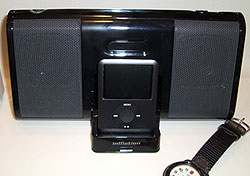
IpodspeakerAnd my morning listening routine has improved with the purchase of a small speaker/doc for my iPod nano. Each evening iTunes downloads any new podcasts to which I’m subscribed, and syncs to the nano. In the morning I pop the nano into the speaker dock and listen to a perfectly customized line-up of progams.
nano upgrade: A+

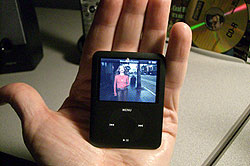
Nano_video250The new iPod nano looked great at the product launch up on the big screen behind Steve Jobs. It looks great on the Apple website. And it looks great in the TV spot. But it looks/feels/smells even better in my hot, sweaty little hand.
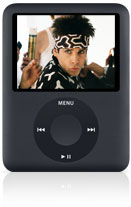
How does video look on that wee screen? Amazing. I keep turning the nano over, tying to figure out how something that thin can play sharp, bright, crisp video.

I’m looking forward to watching more video podscasts and maybe a TV show or two.

In closing, a word about the iPod UI. I thought it was damn near perfect before but I must say they’ve improved it.

HD Radio looking for iTunes hook

“Polk Audio will announce the next generation of HD Radio tuners that will establish a direction connection between HD and iPods — and in the process bring e-commerce to HD. In an alliance with Apple, Polk’s new I-Sonic ES2 HD Radio will include an iPod docking station that features a “tagging button” which will allow listeners to buy songs they hear on HD Radio stations via iTunes. The advancement requires HD stations to encode their signals and insiders say eight radio groups have committed to encoding.” –

– INSIDE RADIO

iPod Nano

Ipodnano_2I love my sleek black nano iPod. Works great in every respect. Couldn’t be happier with it. And I didn’t like the new nanos, based on the speculative images I’d seen on the rumor blogs. But when Uncle Steve pulled the new nano out of his pocket and put it up on that big screen… I was done. New nano on the way.
Here’s my rationale: I’m playing with video more and more and, well, obviously I need a way to watch/share my little projects.

I admit to being tempted (but only a little) by the new iPod touch. But I’ve got the MacBook with me at all times, so…

More on the nano once we test drive. Watch the TV spot.

Hide your iPod in a gutted Zune case

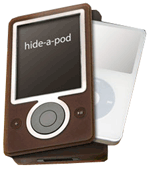
Hideapod“You made a smart choice in choosing an iPod. And now you can protect it from theft and still enjoy using it in public with the new Hide-a-Pod anti-theft case.

It’s really very simple. Just tell us what iPod model you want to protect and we provide a gutted and hinged Zune with our custom molded iPod casing adapter.”

And they “only use brown Zunes for the maximum anti-theft protection.” Ouch.

Playing with George’s iPhone

“The iPhone will flop because it doesn’t work with corporate email.” Yep, that’s a problem. For some folks, not for me. I don’t use Outlook outside of the office. If I want to check  my corporate email from home or on the road, I log in to our Exchange server from a web browser. At tonight’s Mac user group, George logged me in from his iPhone and –while you can’t sync– you can check your corporate email from the iPhone.

MiPhone

Dave Morris took the plunge and writes an excellent review of  his new iPhone:

“How many phones do you have, and am I too late?” It was 5:55 pm, a full FIVE MINUTES before the doors opened. He gave me this little wink that was simultaneously geeky and cocky… and one of those dorky tongue clicks. The only thing missing was the finger-as-pistol “Shooter McGee” motion. He fished around in his pocket. This was his moment to shine!

“Here ya go.” He handed me a voucher that guaranteed me the right to purchase a phone. A little quiver passed through my body… much the same feeling as when you find out your application for auto financing has been approved.”

Unexpected uses of iPods

Like all good lists, there are 10 of these but my favorites are:

  • Train Doctors to Save Lives: iPods can double interns’ ability to identify heart sounds
  • Bring Criminals to Justice: using iPods to hold copies of wiretap transmissions in a large drug-conspiracy case.
  • Record Flight data: iPods as flight data recorders in light aircraft.
  • Flashlight:  For about $13, you can purchase Griffin’s iBeam, an attachment that will quickly turn your iPod into a combo flashlight and laser pointer.