
iMessage now using iCloud

Apple recently updated macOS and iOS to enable syncing/storing of iMessages in iCloud. I don’t use some of Apple’s more popular apps (like Mail and Calendar) but I use iMessage constantly. Google has, what, seven messaging apps now?

Prior to this latest update, a user could have iMessage syncing problems between devices and the app was taking up a lot of storage on your device. Some people have conversations (with attachments) going back years. Moving all of this to iCloud solves that problem.

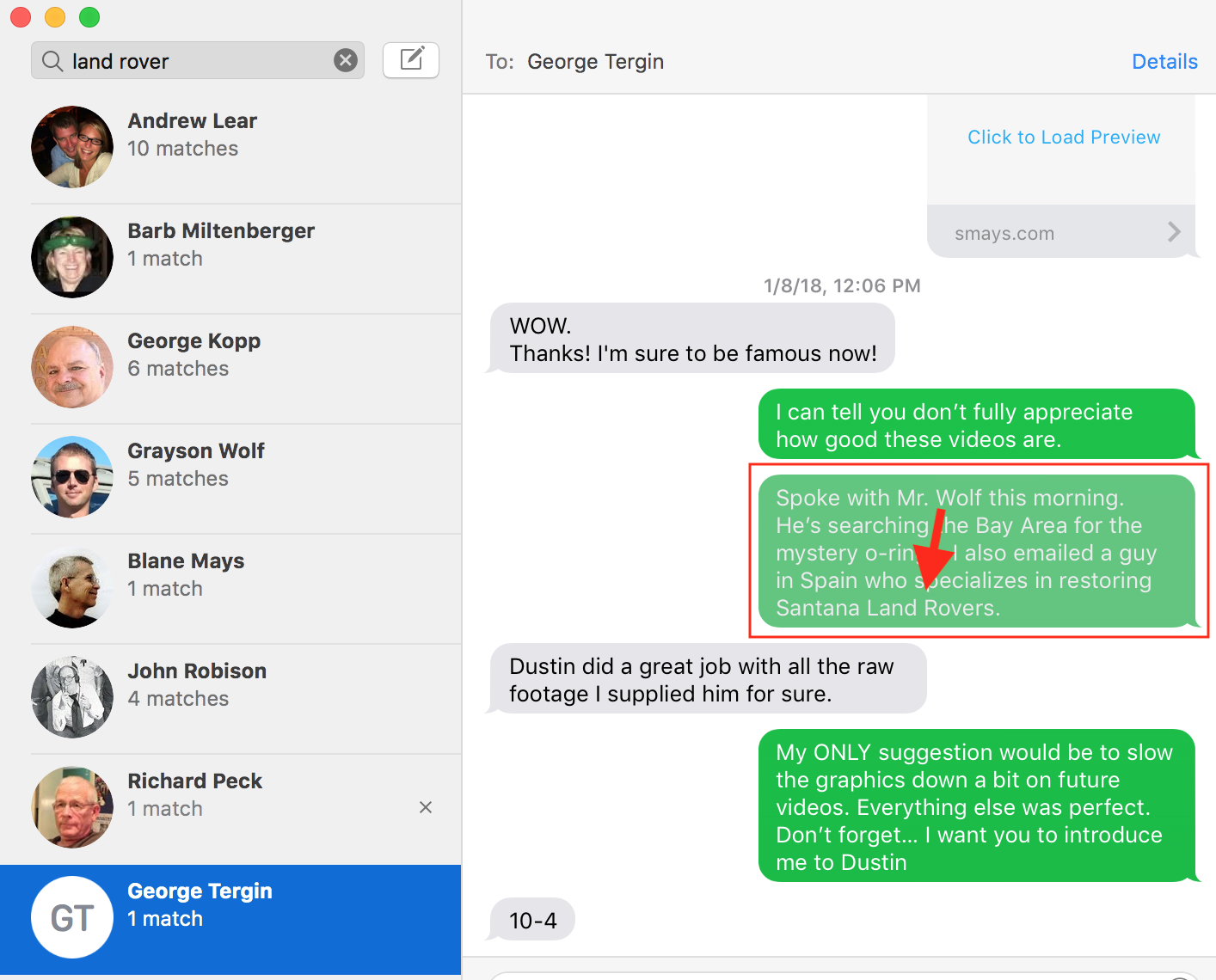
I never thought much about the archival feature of iMessage. I sort of knew my conversations were archived but rarely went back to look for something. Following this update I started playing with search in iMessage (I always thought of search as just a way to find someone with whom I had had a conversation). A search for “Land Rover” pulled up all of the conversations where that phrase had been used (left side of screenshot). On the right, the conversations with each. Any message containing the searched for word/phrase is grayed out just a bit.

Like a lot of folks, instant messaging (iMessage for me) has become my preferred method of communication. Voice-to-text works great and I occasionally just send a brief audio message. So having all of my conversations stored, sync’d and searchable will be handy.
Renaming files in Apple Photos

Once upon a time file names could only be a certain length. Was 7 characters for he name and 3 or the extension? 8 characters for the name? I can’t recall but somewhere along the way this limitation was lifted and we can name a file something useful. But I never developed the discipline to take advantage of this and have some old files with names like 4777959349_o.jpg . In my OCD moments this bugs me and I might take a few minutes (or a few days) and rename offending files.

I rarely see file names in iPhoto (I refuse to call it Apple Photos), just the Title I enter when adding photo. But my buddy George Kopp pointed out I can change the file name to the Title when exporting images for backup. This short screencast (4 min) shows this feature.

Apple’s New Campus

A few of my favorite excerpts from Steven Levy’s tour of Apple’s new campus.

“Jobs discussed the walls he had in mind for the offices: “He knew exactly what timber he wanted, but not just ‘I like oak’ or ‘I like maple.’ He knew it had to be quarter-­cut. It had to be cut in the winter, ideally in January, to have the least amount of sap and sugar content. We were all sitting there, architects with gray hair, going, ‘Holy shit!’”

“At first, we had no idea what Steve was actually talking about with these pods. But he had it all mapped out: a space where you could concentrate one minute and then bump into another group of people in the next,” Behling says.”

“To withstand earthquakes, the Ring is mounted on huge steel base isolators that ensure the building can move up to 4.5 feet in any direction without losing its vital services.”

“The very toughest challenge came from constructing the giant glass sliding doors for the café—they had to extend from the ground to the roof, a full four stories. Each door leaf is about 85 feet by 54 feet. “The only doors I know of in the world that size are on an airplane hangar,” Diller says.”

“It’s not like we’re asking people to be uncomfortable at work,” she says. “We’re asking them to recognize that part of being connected to the outside is knowing what temperature it is. We don’t want you to feel like you’re in a casino. We want you to know what time of day it is, what temperature it is outside. Is the wind really blowing? That was Steve’s original intention, to sort of blur that line between the inside and outside. It sort of wakes up your senses.”

The Perfect MacBook

My MacBook Pro is 3 1/2 years old. It’s the best computer I’ve ever owned. As far as I’m concerned, it’s perfect. So this week I purchased another one, almost exactly like it. (I won’t bore you with the specs) I bought it as a spare but my current machine will become the spare.

I’ve always thought the latest version of the MacBook was better than the one before. Until now. The newest model has a keyboard that just doesn’t feel as good as mine. The Touchpad is bigger than I want or need. And Apple saw fit to do away with the MagSafe connector on the power cord, which kept my box on the table instead of the floor countless times.

M.G. Siegler had similar thoughts a couple of years ago:

“I suspect this new MacBook will be the last laptop I end up buying. Again, that doesn’t mean the MacBook is dying anytime soon, but I believe this will be the pinnacle of the product. We’ll get spec bumps for years to come. But it will be the long, slow fade we just witnessed with the iPod.”

I don’t really fault Apple for this. Let’s say, for the sake of discussion, that Apple (or any company) succeeded in making The Perfect Laptop. I know, there’s no such thing but let’s say it was 99.99% perfection. And the following year — to meet shareholders expectations — they have to roll out a new model. They’ve got make some changes, right? Isn’t it much more likely those changes will make it worse than better? There’s probably a name for this phenomenon (If You Fuck With It Enough You Will Fuck It Up Syndrome?).

I think this is what happened with their latest MacBook Pro. I’m sure it’s a good laptop and lots of people will buy it and be very happy with it. Just not me.

So now I have two (nearly identical) laptops. One in the bag I take everywhere and one on the closet on hot standby.

Macs are $535 less expensive than PCs

“In 2015, IBM let their employees decide – Windows or Mac. “The goal was to deliver a great employee choice program and strive to achieve the best Mac program,” Previn said. An emerging favorite meant the deployment of 30,000 Macs over the course of the year. But that number has grown. With more employees choosing Mac than ever before, the company now has 90,000 deployed (with only five admins supporting them), making it the largest Mac deployment on earth.”

“But isn’t it expensive, and doesn’t it overload IT? No. IBM found that not only do PCs drive twice the amount of support calls, they’re also three times more expensive. That’s right, depending on the model, IBM is saving anywhere from $273 – $543 per Mac compared to a PC, over a four-year lifespan. “And this reflects the best pricing we’ve ever gotten from Microsoft,” Previn said. Multiply that number by the 100,000+ Macs IBM expects to have deployed by the end of the year, and we’re talking some serious savings.”

JAMF

Tim Cook: “We believe the future of TV is apps”

Apple CEO Tim Cook said that during the announcement of the latest version of Apple TV back in September. I didn’t give it much thought at the time but after using apps on the TV for a few days, I’m starting to get a sense of what he was talking about. Not sure I can describe it in any useful way.

Back in the 50s we had two or three channels and everything came through one of them (in real time). Cable brought us more pipes but you had to be watching the right pipe at the right time to see what you wanted (or what the network wanted you to see). VCRs and (later) DVRs allowed us to time shift and skip commercials but its was still a channels-of-programs world.

The iPhone introduced the concept of apps. The New York Times has an app; ESPN has an app; all gods children got an app. Now the world is mobile and apps is where it’s at.

reutersTVThis is where I was going to try to describe how “apps for the TV” delivers a fundamentally different experience than the current TV model but I don’t think I’m up to the task. I know it’s a cliche but you’ll just have to play with for a bit get it. But I do have one example.
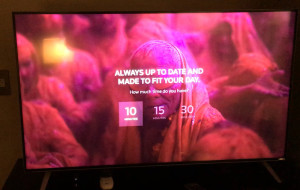
The new (4th generation) Apple TV comes with an app for Reuters TV. You can watch individual stories (Trump on SNL) or categories (World News). Or you can let the app build a “newscast” for you. Tell it how much time you have (5, 15, 30 minutes) and it does the rest.

I’ve been impressed with the few of these I’ve watched. No high profile anchors and no famous network correspondents. I’m reminded of the early days of CNN Headline News with anonymous (but competent) reports told you what was happening. The reporters I’ve watched on Reuters TV are not slick or polished but they get the job done and the story is clearly more important than the people reporting.

The production values are excellent, they’ve just done away with a lot of the shit (glitzy graphics, etc) the networks have piled on over the years. And it’s rare to see an NBC newscast without at least one “story” promoting the network (“More on the TODAY SHOW tomorrow morning…”).

Reuters TV did toss in a couple of 10 second (?) ads but they were not intrusive and they weren’t aimed at the 65+ demo.

So, if I get home in the middle of the afternoon and want a summary of news, Reuters TV can give me what I want; the length I want; when I want it. On my new big screen TV. Apps do this well. Far better than networks and cable channels.

As I get more comfortable with TV = apps I’ll take another stab at describing this. I’d be very interested in hearing from others using the latests version of Apple TV.

Steve Jobs


What can I say about the new Steve Jobs movie other than I really enjoyed it. I came to the Mac late in life so Jobs never had the god-like status he did/does for many. This movie will seem blasphemous for those folks (like The Last Temptation of Christ).

As Aaron Sorkin has said in almost every interview, this is not a cradle-to-grave biopic. If it’s not the Steve Jobs story, it’s i Steve Jobs story and, in my opinion, a damned good one.

I like the way Aaron Sorkin writes. (And make no mistake, this is a talky movie. Noting but talk) And while he could have tried to bunt and beat it out for a single; or pull one hard to left for a stand-up double; he swung for the fence and — again, in my opinion — knocked it out of the park.

If you think the man walked on water, don’t go see this movie. If you go nuts every time Apple sets a new sales record with a product launch (looking at you Android Boy), I don’t think you’ll like it either.

If you enjoyed West Wing or The Newsroom or Social Network, I think you’ll be entertained.

I’m going to again link to a good interview (of Sorkin) by Steven Levy. If you plan to see the movie, read this first.

Backup

hero_2xThis was always a challenge during my Windows days. In part because there were no now high capacity external hard drives, but mostly because it was a tedious chore. And maybe I just wasn’t smart enough of disciplined enough. Best I could manage was to copy some documents and photos to some floppies and pray I didn’t the computer HD didn’t die.

That really changed for me when I switched to Mac and started using Time Machine. When I got to the office each morning I’d plug an external hard drive in and forget about. It did incremental back-ups in the background.

While I never had a hard drive failure, I frequently needed a file that I had mistakenly deleted. I don’t recall how we addressed this in the old Windows days but seems like you had to do a full restore (a major deal) to get that one file back. With Time Machine I just flip back through the backups until I find one where the missing file existed. Just drag the file to my desktop and it’s back.

[Allow me to stipulate that smarter folks than I probably had no trouble managing backups on Windows.]

Barb has less time for this kind of routine (but critical chore) so she doesn’t do backups as often as she should but I think we’ve solved that problem.

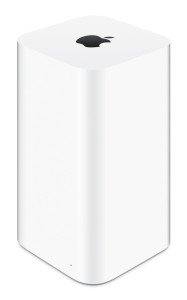
The AirPort Time Capsule is “a superfast Wi‑Fi base station and an easy-to-use backup device all in one.” No more plugging in external hard drives. When we fire up one of our MacBooks it periodically does the incremental backup. With two terabytes of storage, the Time Capsule manages backups for both Barb and me.

Because I’m a little paranoid about backups, I also run Carbon Copy Cloner once a week. And I’m going to start keeping a copy off site.