
Category Archives: Gadgets & Apps
Online banking
For years (I’m embarrassed to admit how many) I’ve kept a wad of cash in a money market account at my local bank. For a long time I thought of this as my “savings” account, as opposed to my day-to-day checking account where I kept a few thousand bucks.
In the last couple of years I’ve moved most of those funds to my investment portfolio but kept some (too much) in the money market account. Last week I got curious about exactly how much the money market was earning. A whopping .15%. The lady at the bank apologized when she told me.
When I asked my financial advisor for ideas he recommended a savings account with an online bank. He pointed out that the good ones are FDIC insured, just like my local bank and because they aren’t supporting all that brick-and-mortar infrastructure, they can afford to pay better interest rates. I went with Ally where I’ll get .90%.
My initial experiences have all been positive. Security seems very tight. I can talk/chat with someone 24/7. And their iOS app is very good. By that I mean, simple.
Once it sunk in that my money is not really in the vault of the bank across the street, I got comfortable with the idea of an online bank. I’ll keep a checking account with my local bank but as tools like Apple Pay gain wider acceptance, that might not always be the case.
Apple Pay
George Kopp and I went to Panera today for lunch and to try out Apple Pay. [The video is vertical because George thought it might get more of the transaction] This took a few extra seconds because I forgot to put my thumb on the Touch ID button. Had I done so it would have automatically used the first credit card in my Passbook app. As it was, I had to tap on my VISA card and then do Touch ID. I’m just not sure how paying for something is going to get easier/faster than this.
UPDATE: I stopped by Walgreen’s for a flu shot and on the way out picked up a bag of cookies to see if I could pay with Apple Pay. And, because nutrition is important to me, I swung by McDonald’s and got some fries. What I found most interesting is at both places, the person behind the counter had obviously never heard of Apple Pay. But when I passed my phone over the scanner, the registers made a happy beep and the transaction just happened. All the counter people did was enter the amount.
I see two possible futures for Apple Pay. (And I think we’ll know in six months) It will either be an unqualified success or it will go the way of the Amazon Phone, Microsoft’s Zune or Google’s Wallet. If it flops it will be because there was insufficient demand; retailers decided they didn’t want it (for reasons good and bad) and refused to make it an option; or some other combination of factors I’m not smart enough to see.
But it won’t be because people started getting their thumbs hacked off to fool TouchID or any other Mission Impossible bullshit.
SWAT app
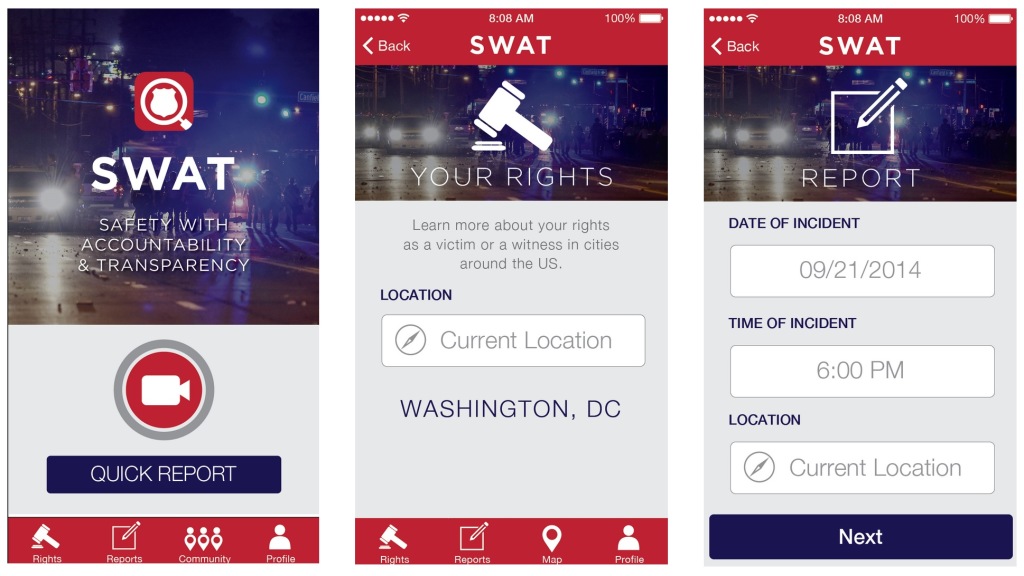 “With a single press of a button, stream live video of your interactions with police to our secure servers. Know what to do if you’re approached by police on the sidewalk, in the car, in your home, or at a protest. Know what to pay attention to if you experience or witness police misconduct. Fill in the information you need to file an official complaint, and send it automatically to the police department. Use your phone’s location services, camera, and time and date stamps to collect evidence.”
Scott Adams: The Age of Magic
“Imagine walking to a crosswalk and doing the “halt” hand motion in the direction of traffic. Your ring and your watch can tell by their orientation to each other that you have formed that gesture and so they send a “pedestrian waiting” message to the street light. The lights change for you and you cross. It will feel like magic. Or point at something in a vending machine and your watch and ring can detect which item you selected, charge your credit card, and send a code to release the item. To an observer it will seem that you pointed at an item and magic released it.”