
Category Archives: Gadgets & Apps
My first iPhone
 It’s done. After a little agonizing and a little nagging, I bought an iPhone. Lisa, the AT&T rep couldn’t believe I didn’t have a mobile number I wanted to keep. She spoke very slowly as she asked me if I had an iTunes account and explained that Safari would be my browser.
Chuck came in while Lisa was showing me how to turn the iPhone on and off. He’s a serious road warrior who is giving up his beloved Blackberry for the iPhone. We are similarly motivated: our clients –and the world– are increasingly mobile. I need to be there and the iPhone is the state of the art.
Obviously, I’ll chronicle my mobile journey here in coming weeks and months.
Get Me Out of Here
1
Planet Nelson points us to getmooh.com, an automated service designed to help you escape a variety of situation by "…calling you automatically on your phone at a pre-specified time and playing you a recording which will either instruct you on what to say to elude your tormentor(s), or which will simply give a convincing sense of you being on an important call."
Wouldn't this make a great iPhone app? Simply program the phone to call at specified time… or you could simply reach in your pocket, press a button … and get the call 5 min later
President Obama trying to keep his Blackberry
“I’m negotiating to figure out how can I get information from outside of the 10 or 12 people who surround my office in the White House. Because, one of the worst things I think that could happen to a president is losing touch with what people are going through day to day.”
— Barbara Walters interview
YouTube switches to 16:9 player
I’ll have to play with this some more but, at first look, here are my options: If I want the ease and quality of the YouTube capture mode on the Casio, I have to go with 4:3 and get the vertical black panels in the new, wider YouTube player. The Casio has an HD/wide-screen setting, but it’s not YouTube ready. I’ll have to jump through all of the encoding hoops to get anything like the same quality. Easy choice.
Casio Exilim EX-Z300
Hmm. Not too bad. I’ll be curious to see if I lose anything by running the video through iMovie, which will be 99% of the time. But if someone wanted a camera that output files you could upload straight to YouTube, this is pretty good. I was really surprised by the quality of the audio on this test. The camera was sitting 3 feet away and the audio sounded damned good to me. I’ll get some stills in coming days and see if I can tell the difference between the previous model (3 megapixel?) and this one (10). They’ve also made some improvements in button placement and size. A very nice camera. Casio has done it again. More at Casio.com.
Video chatting from Gmail
I love Gmail (Google’s free mail service). I use lots of Google tools: Calendar, Google (RSS) Reader; and Google Chat, to which they’ve recently added video. Just tried it out with David and it works great.
While waiting for David to install the little app, Scott pinged me from his hotel room in Cancun. He was doing the same thing, looking for someone online with the new app installed. A little latency on his video, probably due to hotel wifi.
But this is a nice addition to Google chat. If you don’t have a webcam on/with your computer, get one. And the next time you buy a computer, please consider a Mac.
Learning “New Media” tools
I’ll be in our Dallas office for a few days next week. The agenda is kind of loose and open-ended. Our sports division (HQ in Dallas) is exploring ways to use more “new media” tools and I’ll try to help them find ways to do this. I think. My point is, what a great job.
And here’s what I’ve learned. Just about every online tool you need is out there. Cheap or free and easy to use. The hard part is finding people who… I wish I could come up with a better word… people who “get” this whole Internet thing. Sure, everybody uses email and Google and all that, but for most the net is where you go to find something rather than create something.
Posting photos to flickr, writing a blog, even something as simple as Twitter involves sharing something of your self. Expressing who you are. It’s walking out on that high school stage and singing Killing Me Softly. A lot of people just can’t do it.
But when I meet (discover?) such a kindred spirit, someone who has something to say and a passion for saying it, it’s great fun showing them things I’ve discovered on my endless surfing safaris.
Asus Eee
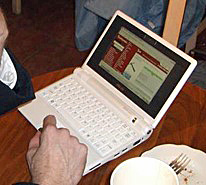 Coffee Zone regular Jeff showed up this morning with an Asus Eee, one of the subnotebook computers that are becoming so popular. 4G flash drive. Runs Linux. Around $400? Nice sharp screen but the keyboard is just a little too small for smays. But it’s easy to see why these are popular. If I needed to go that light, I think I might just pop for the iPhone. But Jeff might not need a phone or the expensive data plan that comes with it, so…
Seth’s Nine Steps to Powerpoint Magic
A must-read/file/review on presentation voodoo by the master. It’s all good but these ideas jumped on my face like the Alien monster:
- Don’t use Powerpoint at all. Most of the time, it’s not necessary. It’s underkill. Powerpoint distracts you from what you really need to do… look people in the eye, tell a story, tell the truth. Do it in your own words, without artifice and with clarity. There are times Powerpoint is helpful, but choose them carefully.
- Check to make sure you brought your big idea with you. It’s not worth doing a presentation for a small idea, or for a budget, or to give a quarterly update. That’s what memos are for. Presentations involve putting on a show, standing up and performing. So, what’s your big idea? Is it big enough? Really?
- The minute you put bullets on the screen, you are announcing, “write this down, but don’t really pay attention now.”) People don’t take notes when they go to the opera.
- Ten minutes of breathtaking big ideas with big pictures and big type and few words and scary thoughts and startling insights. And then, and then, spend the rest of your time just talking to me. Interacting. Answering questions. Leading a discussion.
Life is too short to waste a precious minute watching a lame-ass ppt presentation by the the clueless and lazy. If it looks like I’m not paying attention, I’m not.
“…words belong in memos. Powerpoint is for ideas.”