On several occasions I have gushed about Posterous, the life-streaming/blogging tool. I used it for most of the past year but put it aside a couple of days ago. At least for my personal use. Several of our company blogs are using posterous.
I had to stop for sort of a silly reason. I kept sending personal stuff to one of the company blogs. Not good. The only sure way to avoid this was to pull the plug on the personal account.
I like having a place I can quickly share something of interest and it was there all the time, in Google Reader. For me it does all that I liked about posterous (with a few bonus features). Latest links are back in the sidebar.
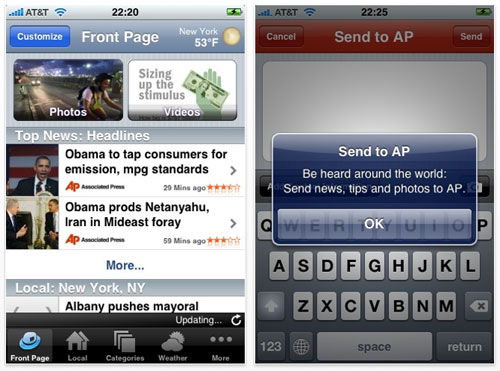
During my “on air” days (the ‘70s and early ‘80s), the AP teletype was our station’s connection to the world. During the late 80’s and early 90’s, I spent a good bit of time trying to create a low-cost alternative (mostly for radio stations) to the AP’s wire service. This morning I downloaded AP Mobile to my iPhone.
I have a feeling it will become my default app for news. Text, photos, video… it’s all there. I can flag topics of interest and AP Mobile will “push” those to me. And if I see a story and want to “report” it to AP, the app makes it easy.
Associated Press used to be pretty protective of it’s stories. Perhaps they still are, I would have no way of knowing. The old radio guy in me can’t help thinking of this is a tiny version of the old teletype. And my next thought is, “How could the AP police all of the broadcasters and keep them from using AP stories without paying for it?”
The answer is, I’m afraid, they don’t care. Would I rather have the full-featured, on-demand experience offered by AP Mobile… or hear my local “announcer” read it to me?
The following is from a post by Jeff Jarvis in which he talks about augmented reality and the annotated world and the ever-changing definition of journalism and local news.
“Every address, every building, every business has a story to tell. Visualize your world that way: Look at a restaurant and think about all the data that already swirls around it — its menu, its reviews and ratings and tags (descriptive words), its recipes, its ingredients, its suppliers (and how far away they are, if you care about that sort of thing), its reservation openings, who has been there (according to social applications), who do we know who has been there, its health-department reports, its credit-card data (in aggregate, of course), pictures of its interior, pictures of its food, its wine list, the history of the location, its decibel rating, its news…
And then think how we can annotate that with our own reviews, ratings, photos, videos, social-app check-ins and relationships, news, discussion, calendar entries, orders…. The same can be said of objects, brands — and people.”
His post includes a few videos but this is my favorite:
When I think about the implications of this technology, and what it means for news organizations, I have what I have come to think of as Wile E. Coyote moments. The realization most will never catch the Road Runner (Beep, Beep!) The future –which is here– belongs to small, flightless birds that refuse to play by our cartoon rules.
PS: If you’re satisfied seeing the world through emails and text messages, your BlackBerry will be fine. If you want to augment your reality (and you will), it will be with an iPhone or similar device.
UPDATE 5/27/19: Looks like these features are no longer available.
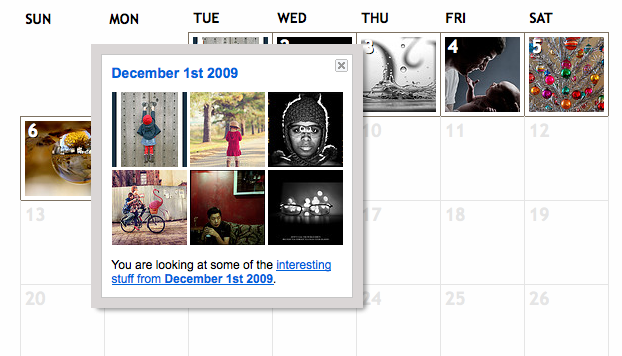
Flickr has something called “interestingness.” I don’t know if this is new or I just never noticed. A photo gets included based on “where the click-throughs are coming from; who comments on it and when; who marks it as a favorite; its tags” and other stuff. You can spend hours on interestingness so don’t go unless you have some time.
Not sure why, but there’s a calendar view in case you wanted to see interesting photos from June, 2008, for example.
Nick Bilton came up with 10 ideas for fixing the email glut. These are my favorites:
Add reply buttons for YES, NO and MAYBE – Some messages just don’t need a comprehensive reply. If someone e-mails me and asks if I’m available to attend a meeting, rather than take the time to write back with a detailed response, why can’t I just click a YES, NO, or MAYBE button? One click and the e-mail has been dealt with.
Cut off anything longer than 140 characters – Speaking of Twitter, do we really need more than 140 characters for most messages? E-mail applications could add a button that would cut off all content longer than 140 characters.
A monthly word limit – We have limits on Internet bandwidth, and surcharges to limit the number of minutes we can talk on our cellphones. Why not limit the number of words an e-mail account can pump out each month? (If you go over, that new government e-mail tax kicks in …)
I attended my first “time management” workshop back in the early 70s. I got the bug pretty bad. Read and listened to countless books and cassette tapes (before CDs) on productivity. I think there was a recent resurgence under the GTD (Getting Things Done) banner. Somewhere along the way, my passion waned but in those 35+ years, I’ve tried lots of tools and systems.
To-do lists have always been a challenge for me. I tend to put too load them up with too many items and they stay there too long. I recently came across the notion of identifying three things you really want to accomplish during the day and writing those on a 3×5 card. Portable, focused… might work.
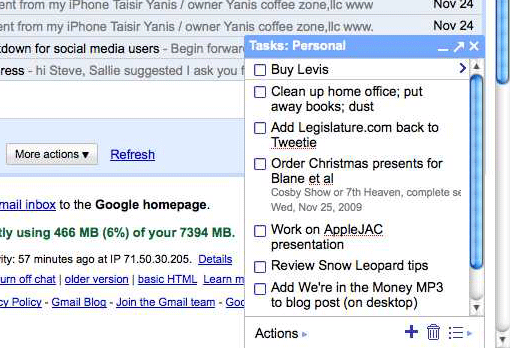
My current favorite is the Tasks applet in Gmail. Small, simple and available everywhere. Supports multiple lists. About as close to that 3×5 card as I can get.
Dropbox is near the top of my short-list of apps/tools I can’t live without. When I need to move a file from my MacBook to the iMac, it goes into Dropbox icon in my menu bar… and a few seconds later I take it out of the Dropbox on the big computer. Much faster than plugging in a thumb-drive. And it works for files too big to send as email attachments.
And it’s great for files that I use a lot and what to have available anywhere. Sure, I could use MobileMe’s iDisk and do sometimes but nothing is as easy as Dropbox.
And the Public folder is the perfect way to share a big file.