
Call a customer service phone number and end up in automated operator hell. With Bringo, you don’t even need to dial your phone. Just find the company you want to talk to in their directory, type in your phone number, and a couple of minutes later Bringo calls you and connects you to an operator at that company. [via Tech Crunch]
Category Archives: Gadgets & Apps
Google Reader share feature
I am a Google Fan Boy. I can’t help it. I love most of the Google services I’ve tried. And I keep discovering new ones. The “Share” feature in Google Reader is not new, but I just got around to playing with it and I love it.
I frequently come across a story that I’d like to share. I’ll sometime email it to friends and –if I have the time– post on it here. But there are times when I just want to point you to the story and have nothing to add. With one click in my Google Reader, I can add the story to a public page (“Steve’s Shared Items”). The five most recently “shared” stories also appear in the sidebar here at smays.com.
This simple tool extends my role of “who asked you?” editor/aggregator. While I cannot post on everything I find interesting, Google Reader has made it easy to share.
flickrvision
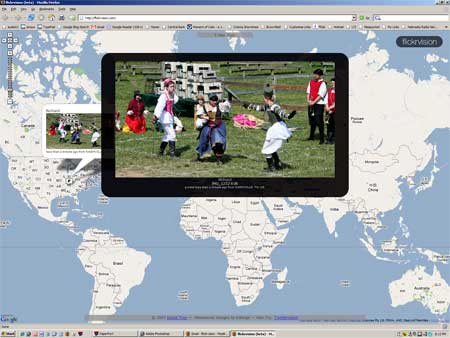
flickervision lets you see photos as they’re uploaded, with geographical location. Hard to stop watching. Like channel surfing but better. And at the risk of getting all “We are the world” on you… it reminded me that there are people just like me in every country, taking pix and putting them up for the rest of the world to see. Thanks to J. T. for the point.
Objective: 1,000 photos on flickr
That’s my goal. And I’m about half-way there. I’m using flickr to host images for the rebuild of The Basement Diaries which should be far enough along for a link by next weekend. A lot of the prints are 40 years old and weren’t great to begin with. But I’m not trying to win a contest, just share some memories with old friends.
And there is something so satisfying about getting these images out the shoe boxes and up on the web where anyone can find them. That means a lot of scanning (I might try one of the services I’ve read about). From now on, if the image is worth keeping… it goes on flickr.
iDVD
[Mac shields up!] I created my first DVD last night, using iDVD that ships with OS X. Now, I’ve burned files to DVD’s before but iDVD makes it fun and easy to create a more finished product. Pick a theme, drag over your video from iMovie, your still images form iPhoto, pull some music over from iTunes… hit the burn button and you’re done.
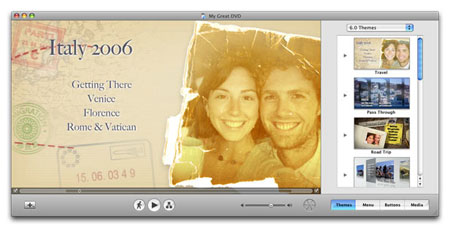
This first effort looks like it. But the next one will be better. I haven’t done much with DVD’s because it seemed like a cumbersome way to share media. But this was fun and the resulting DVD looks pretty snazzy.