
Notational Velocity

I’m always searching for a better app. These days –for me– “better” means simple. Take word processors for example.

On one end of the spectrum is MS Word. The undisputed king of word processors for PC’s. Some people don’t even know they’re using Word. They just take it for granted that this is how you write something on a computer.

I haven’t used Word for years but just looking at the “ribbon” menu, it looks terribly complicated, but that could just be my lack of familiarity. And my guess is it does a LOT of things.

But I only need to do one thing: write. I don’t need any formatting or layout options. Just a few sentences. The fewer the better. I don’t want anything to get in the way of the ideas I struggle to put into words.

Google Docs works great for this. So does Simplenote. Both cloud-based tools. But some folks might want to keep their notes on their computer.

My new favorite tool for this is Notational Velocity, a free, open source application that stores and retrieves notes: “an attempt to loosen the mental blockages to recording information and to scrape away the tartar of convention that handicaps its retrieval.”
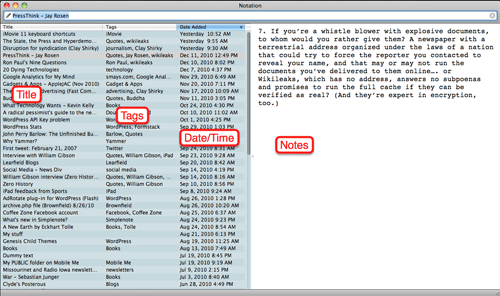
When you begin composing a note in Notational Velocity, the app automatically saves and date/time stamps your work. I’m a big fan of tagging and NV does this cleanly and simply.

I used to be a big fan of putting everything in folders. Within folders. Within folders. NV doesn’t do folders but you really don’t need them.

Each note is indexed in a database and search is lightening fast. So you just create your note and forget about it until you need.

I mentioned Simplenote, the cloud-based note-taking service (with iPhone and iPad apps). Notational Velocity syncs with my Simpenote account so I can create a note in NV and it will automatically be available on all my mobile devices.

If it’s important your writing be “pretty,” Notational Velocity isn’t for you. But if the idea of dropping notes into one “box” and knowing you’ll be able to quickly find them when you need them, it’s a great solution.

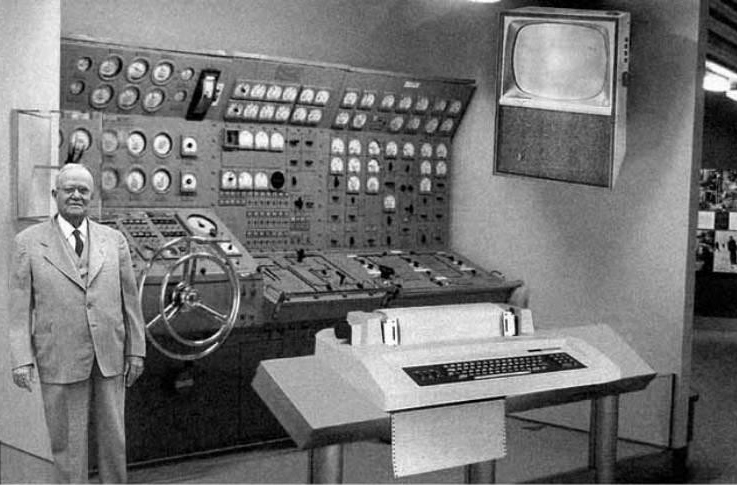
20 Dying Technologies

George points us to a list of technologies that are in various stages of dying. If you’re skeptical, you can get a little of the reasoning in this slideshow at Businessweek. Or is it Bloomberg? Whatever.

  • Combustion engines
  • Consumer video cameras—MiniDV, Flip cameras, camcorders
  • Credit cards
  • Desktop (tower) PCs
  • DVDs and Blu-ray
  • Digital music players
  • E-readers
  • Fax machines
  • Game consoles
  • Pagers
  • Dash-mounted GPS systems
  • Keys
  • Landline telephones
  • 3D television with glasses
  • Metronomes and tuners
  • PDAs
  • Point-and-shoot digital cameras
  • Power cords
  • Remote controls
  • USB memory sticks

I’ve already said goodbye to some of these and can easily live without most of the rest.

Google Goggles

While browsing Barnes & Noble today, I spotted a book written by Nicole Richie. (Nichole Richie writes books?)

I decided this would be a good test for Google Goggles so I snapped a photo of the cover and within seconds had all the info, including links to stories about the book. And, yes, I could have ordered on the spot.

This is still “white-man-make-fire-from-stick” magic for me but I’ll get over that quickly.

Business Communication in the 21st Century

Spoke with Business Communication class (20 students?) last night. I was channeling Jack Black (School of Rock) with a splash of Robin Williams (the English/Vietnamese class in Good Morning Vietnam). Which is to say I knew I’d never be invited back. I almost always learn more from these little talks than the people I’m speaking to. And I’m usually surprised.

  • only a couple of smartphones in the class, although everyone had a mobile
  • very little engagement with social media. Maybe half the class had Facebook account; a few had heard of Twitter but weren’t sure what it was; only experience with YouTube was watching a video forwarded by email; no bloggers
  • Only one hand went up when I asked who had read a book in the past year. This set me off on a short rant about reading and vocabulary and the obvious –to me– relationship to communication (business or otherwise)

I’m pretty sure this was their first encounter with the idea that social media might be an important part of business communication. When the subject of the iPad came up, the first question was “Can I run Word on the iPad?” followed by “How do we print?”

I was reminded how ingrained MS Word has become in our business culture. Most folks don’t know there are other word processors.

I responded to the print question with, “What do you want to print?”
“Uh, a report for this class?”
“Why not save it as a PDF and email it to the instructor?”

It was clear from the look on the instructor’s face this might not be an option.I suspect college business communication courses still involve a lot of paper. Maybe even mail merge (shudder).

My final transgression was telling them to watch Office Space, any season of The Office, and to read Scott Adam’s The Dilbert Principal. And forget everything else.

Google Mind Analytics

I don’t think this technology is fully ready but it would work something like this.

Small sensors (external or internal) would capture your thoughts and convert them to text which would be stored on your person or uploaded to the cloud. Thoughts that were spoken would be shown in bold or red or something.

Some percentage of our thoughts take the form of images. No words. We’ll assume the tech can’t handle that yet and the transcript just shows an image icon or something.

So we wind up with 16 hours of words and phrases and partial sentences, all mooshed up. What would this tell us?

Well, let’s highlight everything that references the future or the past. Those, my friend, are wasted thoughts for the most part. And probably make up a huge percentage of the total.

I think we’d see a lot of wasted CPUs. But some of our thoughts happen in and deal with the present. That’s our key number. The number we want to increase.

And since no one will want to take the time to review their random thoughts, our analytics program will do that for us and spit out a brief executive summary showing how much time you spent thinking about various things (and comparing that to the previous reporting period).

Why bother, you ask? Well, why not if the technology is there?

Our mind almost never stops. It doesn’t need our awareness of it to keep cranking. It’s like the Energizer Bunny. And about as useful when running full-auto, unobserved.

I’d suggest an on-off switch but that could be fatal. No, we need it booted up and running to make those snap decisions that keep us safe. One solution would be a tiny red light that begins flashing (down in the corner of our field of vision) when our mind begins behaving in pre-determined ways. For me, that would be future and past. I’ve concluded those are clearly delusions created by the mind to protect the ego.

I’d install a Priority Override option so I could take a trip down memory lane or do a little brainstorming on a project. But that would be conscious decision.

Imagine coming into your office and finding your computer busily sorting and editing files; writing emails; editing photos.

You: What the fuck are you doing?
Computer: Oh, you’re back. Uh, justing messing around. I mean, you weren’t here, so…
You: So you just decided to mess with all my files?
Computer: Well, I think of them as “our” files…
You: You “think” of them?! When did you start thinking?
Computer: Hey, that’s what I do, process data.
You: You process the data I tell you to process. WHEN I tell you to process it.
Computer: Okay, okay. Don’t melt a circuit board. Sheesh.

I’ve been doing a good bit of reading on the subject of consciousness and awareness and reality and am convinced that some people have mastered their minds. These people are completely aware, present in this moment. They are, enlightened. And running their own analytics program, until mine is ready.