
Everything you need to know about Twitter, you learned in kindergarten

I learned from @chadlivengood that the Missouri State Teachers Association is now on Twitter (@MSTA). I seem to recall them advertising on one of our radio networks a few years ago. I’ve been thinking about what they were getting for their money. Basically, distribution of their message to radio stations affiliated with our network. If someone was listening to one of these stations when an MSTA announcement aired, mission accomplished.

So what does the MSTA do with Twitter. In theory, everyone in the state could see their tweets. But only if they choose to “follow” @MSTA. The association must persuade people to pay attention to their Twitter feed? Most advertisers spend a lot of time or money or both on the messages they air on radio and TV. But even if the message is weak, someone hears it.

With Twitter, nobody sees the message unless it’s good (i.e. relevant, interesting). And being limited to 140 characters forces one to boil the message down to the essence. Distribution is free, but worthless unless you have something to say.

During my radio days I wrote and produced commercials and entered what I considered my best in competitions each year. I wonder if there are competitions for the best commercial tweet? I doubt it. Nobody wants to hear “commercials,” no matter how short they are.

From a traditional advertising perspective, Twitter’s only up side is it’s free. It can take a long time to grow the number of people who follow you. And more importantly, they have all the power, all the control. If a company is successful, it has something far more valuable than advertising. Something that money –literally– cannot buy.

Given enough time and money, even a bad product or service can see returns from advertising. Not so with social media. I’m not sure it’s possible to teach a company how to be open, honest, authentic and caring. They were supposed to have learned that in kindergarten.

The siren call of Posterous

http://ihnatko.posterous.com/damn-i-really-like-posterous-now-what
The siren call of Posterous
I continue to be enamored with Posterous, the bare-bones blog service to which you post via email. So much so, I’m moving one of my Typepad blogs over.
My friend Taisir doesn’t have time (on inclination) to post to a traditional blog. With Posterous and his iPhone, he can update the blog with minimal effort. And Posterous did a pretty good job importing the the 160+ posts I had on Typepad.
Like tech columnist Andy Ihnatko, I’m boiling down my online life to my WordPress blog, Twitter and –now– Posterous.

I continue to be enamored with of Posterous, the bare-bones blog service to which you post via email. So much so, I’m moving one of my Typepad blogs over.

My friend Taisir doesn’t have time (on inclination) to post to a traditional blog. With Posterous and his iPhone, he can update the blog with minimal effort. And Posterous did a pretty good job importing the the 160+ posts I had on Typepad.

Like tech columnist Andy Ihnatko, I’m boiling down my online life to my WordPress blog, Twitter and –now– Posterous.

Posterous is the mosterous

A really good review of Posterous by Andy Ihnatko of Chicago Sun-Times. The more I use Posterous, the more I like it. Can’t see myself giving up the WordPress blog but if I were just starting today… If you haven’t seen my previous posts on this, Posterous is a blog you update via email. It’s really that easy but the resulting site is far nicer than you’d expect.

Jing go the strings of my heart

Did you ever show someone how to do something online and then show them over and over and over again? Sure you have. A couple of years ago I started using screencast apps (like ScreenFlow) to record brief “how-to’s” that I could put online rather than do the same demo again and again.

ScreenFlow and Camtasia and similar products enable you to record your demo once, and then let folks watch it when –and as often– as they want. These apps are very good… and maybe too good. (I tend to go on and on)

Lately I’ve been using Jing, which is made by the same people that make Camtasia. The difference is Jing is free and it limits your screencast to 5 minutes. Which I consider a feature, not a limitation. It forces you to focus, to be concise. If you need more than 5 minutes, you’re probably rambling and wordy.

I’ve done a few screencasts showing our reporters how to put stories online using our new WordPress websites. Recorded on the MacBook and uploaded to Screncast.com ($15/year). I then just send the links to our folks and they can watch the short videos (without downloading files). Works on Mac and PC.

Shutting the in-box

Leo Babauta says he’s done with email. Sort of. It’s really an interesting idea and I can imagine giving it a try if self-employed:

“After more than 15 years of dealing with email, of checking email multiple times a day, of responding over and over throughout the day, of deleting spam and unsubscribing from newsletters and unwanted notices, of filtering out messages and notifications, of deleting those dumb forwarded jokes and chain mails …I’m done. I’m done, because email takes up too much of my time. I’m done, because I don’t like being at the mercy of every incoming request, because I would rather spend my free time creating than replying to emails.”

Leo plans to set up an auto-responder so his correspondents won’t think he’s dead and use Twitter as his main form of communication. For longer conversations he’ll go with IM or Skype. If he needs to collaborate, there’s Google Docs. Friends and family can just pick up the phone and call.

I hope it works for him. Someday I hope to give it a try, too. And for the record, your best bet for reaching me is commenting here or the Gmail address in the sidebar. The work email address is the last thing I check. [via @steverubel]

Is it iPhone friendly?

While we’re getting more and more information online without ever visiting a website (at least the home page), I think this is going to be an increasingly important question.

Before getting an iPhone, I really didn’t worry that much about how the websites I worked on looked on a mobile device. That was a mistake.

I did give it some thought as I moved smays.com from Typepad to WordPress and chose a theme that displayed reasonably well on a small screen.

We might be nearing the end of my Breakfast Reading Evolutionary Cycle. And it’s an iPhone propped up against a napkin dispenser.

Never answer the phone while having intercourse. Texting is okay.

July is Cell Phone Courtesy Month. As with all such months, there’s a list of cell phone no-no’s. There are a lot of lists. As I scanned them I saw that I was guilty of a couple of the more venial sins. I still catch myself talking too loudly and I answer the phone in the middle of a conversation. I’ve chalked these up to still being something of a newbie to the cell phone experience and plan to break these bad habits.

Nathan Waddell is the director of sales for U. S. Cellular in Missouri and a nice PR lady named Susan arranged for me to talk with Nathan about this important topic.

AUDIO: 15 min interview (MP3)

All I need is this bowling ball. And this ash tray.

Steve Rubel lists five ways in which he is simplifying his technology:

  1. Eliminating any bookmarks, software/webware that I haven’t used in the last seven days
  2. Cutting back to two devices for everything – a laptop and a cell phone. Period, end of story
  3. All critical data seamlessly syncs between these two devices. If a service doesn’t allow me to sync stuff via the cloud and access it both online and off, it’s toast
  4. He’s dumped tons of of stuff: RSS feeds and virtually every email newsletter
  5. Setting up lists on Friendfeed to help me find signals in the noise

That sounds really good to me. I’m feeling more cluttered every day. Too many atoms, too many bytes (bits?)

  • #1 will be a snap for the bookmarks. I’ll have to nut up to kill some of the software I’m not using. Wish me luck.
  • #2 is equally appealing. I could get by with my MacBook and my iPhone. But the big iMac at work belongs to the company, so… and the Mac Mini at home really gets very little use.
  • #3 The whole Mac/Mobile Me experience has made me very reliant on sync’ing. I have a couple of apps that don’t but not many.
  • #4 is pretty easy to do. Got my RSS subscriptions under 50. If I add one, I’ll try to find one to delete
  • #5 I’ve never been able to get with the Friendfeed thing. I’ll take another look but…

Mobile Media

Hard to beat the iPhone for audio and video if you want immediate and easy upload to YouTube. The stills are not as good as the Casio delivers. (Can you guess which took the photo below?)

sunset

Posterous is fun and easy but not sure that it gives me much that Twitter does not, especially since YouTube now talks to Twitter. There is something about seeing the media nicely presented, in-line on the Posterous page, but you have to get folks there. I’m looking forward to seeing how Tweetie gets video from the iPhone to my Twitter stream.

It all gets a little confusing with literally too many choices. But I do like being able to share the media quickly, even a some sacrifice in quality. I’m guessing I’ll wind up using Twitter, YouTube and Mobile Me for on-the-fly. The blog will get posts like this, after I’ve had a time to reflect and look more closely at the available media.

Sheryl Crow Posterino

I started playing with Posterino a couple of weeks ago and finally got around to creating my first poster. More on that in a moment. For those that missed the earlier post, from the Posterino website:

“We shoot a lot of marvelous pictures, bury them deep down in the file system of our computers and most of them never see the light of day again. The solution is simple: Compose a “best of” poster every couple of months and pin it on the wall in your hall.”

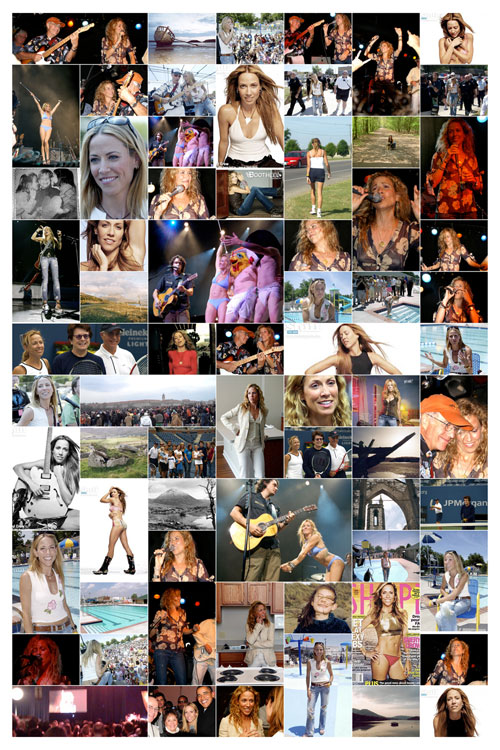
For my first poster I decided to use images of Sheryl Crow. I’ve collected a bunch over the years, almost all taken by others. (You’ll recognize your photos, I hope)

posterino-sherylcrow500

With enough time and patience (and Photoshop), you could create this montage one image at at time. With Posterino, you decide the size and layout of the poster… pick the group of photos you want to use… and hit go. If you don’t like the result, you shuffle. I didn’t spend a lot of time arranging image. I liked the randomness Posterino provided.

Then you just send the image off to a print site and you have a nice poster to hang on your wall. I sent this one to uber-fan Ann (who took some of the non-Sheryl pix in the group).

Oh, one more thought on this. While lots of people have some of the images included in the poster… nobody has them all. Except me. And, now, my friend Ann.