
The sound of silence

I have breakfast most mornings at a local diner which can be a little noisy. Shouted orders, bussing tables, lots of conversation. What you’d expect from a busy diner.

As I do every morning, I inserted my AirPods to listen/watch a video… and the room became dead silent. I don’t know how else to describe it. For a split second I thought something might be wrong with my hearing but when I removed my AirPods all the normal sounds came flooding back.

Let’s jump back a couple of weeks to when I got my new AirPods 4 (with Adaptive Noise feature). I played with that for a minute or two then turned it off with the intention of experimenting later.
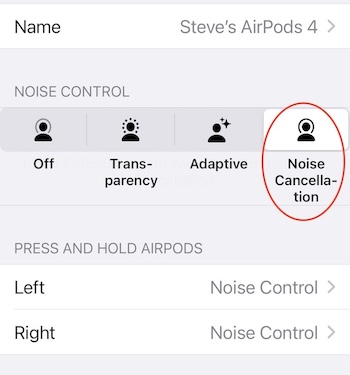
Apple pushed an update to iOS a couple of days ago and I’m guessing the “noise control” feature got reset. Here are the four settings:

1. Off: This disables any noise control, meaning you won’t get any additional noise isolation or transparency. You hear everything around you naturally.

2. Transparency: This setting allows external sounds to pass through so you can hear what’s happening around you while still listening to audio. It’s useful for staying aware of your environment.

3. Adaptive: This new setting automatically adjusts the level of noise cancellation and transparency in response to your surroundings. It tailors the experience based on the noise levels and movements around you.

4. Noise Cancellation: This mode blocks out external sounds by using microphones to pick up ambient noise and counter it with anti-noise signals. It’s great for immersive listening in noisy environments.

I wear ear protectors when I shooting a gun, and I’ve stuck little rubber plugs in my ears when trying to sleep in a noisy hotel room. And I’ve recently started wearing big over-the-ears protectors when driving the Land Rover. But I’ve experienced this kind of near-silence. Almost eerie.
Another run at Apple’s Journal app

I played with this app –briefly– when it cam out late last year. Couldn’t convince myself it was something I needed or would use. I mean, I’ve got this blog, right? And I’m putting more stuff on my calendar, too.

After taking another look I’m going to give it another go. Might be a place where I can put stuff that doesn’t rise to the level of a blog post or is too personal for this space. And it sees –with my permission– pretty much everything that happens on my iPhone and Apple Watch (music, photos, workouts, messages, etc) which makes it pretty easy make an entry.

Jury is out. I’ll let you know in a week or two.

ChatGPT as fitness trainer

As I understand it, the Apple Watch needs some initial fitness data to establish a baseline. It suggested I take a 20 minute walk on a flat surface with good access to GPS. I did three miles and noticed the watch was showing a heart rate just over 100 for most of the walk. I couldn’t remember the formula for calculating my target heart rate so I asked ChatGPT when I finished my walk. My pace was on the money and qualified as “vigorous exercise” for a person my age.

She asked if I was starting an exercise program and I explained I had purchased an Apple Watch and was exploring the health and fitness features.

It’ll be interesting to see how your heart rate responds to different activities. The Apple Watch’s trends over time should give you a clearer picture of your fitness progress. It’s a good way to get insight into your cardiovascular health and adjust workouts as needed. If you’re curious later on, I’d be happy to help you interpret any of the data or trends you notice!

I’m going to need a lot of help interpreting data and had not thought about getting it from ChatGPT. And I have a feeling that will get much easier, and more useful, when ChatGPT is fully integrated with iOS.

I left my new phone in the truck so I could try making a call and sending a message with the watch. Worked as advertised. Turns out I don’t have to do the “Hey, Siri” thing. The watch gently pointed out that I can simply bring the watch up toward my face and talk to it. In the immortal words of Gomer Pyle, “Shazam!”

Apple Watch

It’s been a long time since I wore a wristwatch (the word even feels odd). I’m pretty sure I was wearing one that day in November 2008 when I purchased my first iPhone. And probably for a while after that. But with the phone always at hand (so to speak) the watch became… unnecessary. So, sixteen years since I depended on a wristwatch to tell me the time.

The first Apple Watch was released on April 24, 2015. Not quite ten years ago. And while I’ve purchased most of the devices Apple has come up with over the years, I never took the plunge for an Apple Watch. Until this morning.

This post is something of a warning. As I become familiar with the many features of the Apple Watch I’ll be sharing my experiences here. 

Only those of a certain age will remember the entertainment role played by newspaper comics. And how impossibly futuristic Dick Tracy’s “2-way wrist radio” seemed.

AirPods at the Olympics

I don’t watch a lot of TV news these days but when I do happen upon a cable news interview the odds are pretty good the interviewee will have the iconic Apple AirPods in his ear. That’s how he’s hearing the questions from the news guy. It never occurred to me the AirPod microphones might be the source of the audio.

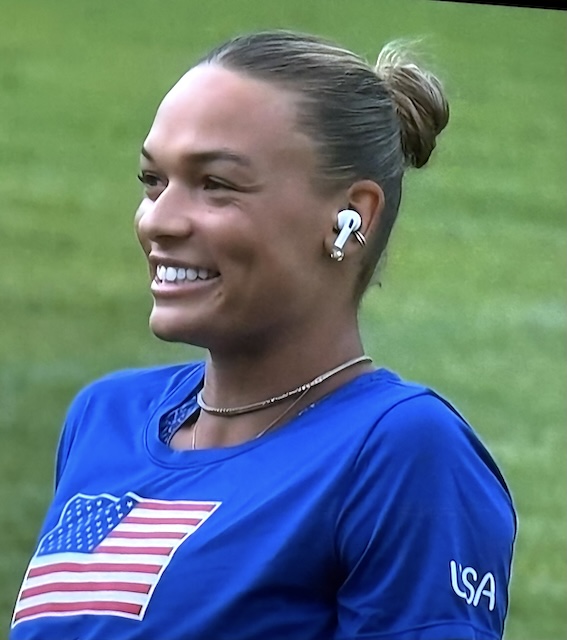
Tonight I watched an interview (on NBC) with one of the Olympic athletes who was using AirPods to hear the questions from the interviewer.

I first noticed this in some of the interviews with family members (of the athlete) sitting in the stands. I’m assuming this works like the earpiece (IFB) news anchors use to communicate with the control room. In every instance (that I’ve seen) they’ve been Apple AirPods when there are probably lots of devices NBC could have used.

As I do with increasing frequency these days, I asked ChatGPT if she had any information on this.


You’re right that NBC and other networks have been seen using Apple AirPods during interviews, including with Olympic athletes and their families. The use of AirPods in these situations is a practical solution for a few reasons:

1.Wireless Convenience: AirPods are wireless, which makes them less cumbersome compared to traditional wired earpieces or over-the-ear headphones. This is especially useful in dynamic or remote settings, like interviewing athletes or their families who may be moving around or in informal environments.

2.High-Quality Audio: AirPods provide good audio quality, which ensures that the person being interviewed can clearly hear the questions being asked. This clarity is crucial for maintaining the flow of live interviews, especially in noisy or crowded environments like those often encountered during the Olympics.

3.Discreet Appearance: AirPods are small and less noticeable on camera compared to larger headphones or traditional broadcast earpieces. This makes them a more aesthetically pleasing choice for televised interviews, where the focus is on the interviewee rather than the equipment.

4.Ease of Use: AirPods are easy to connect to various devices, such as smartphones, which are often used by reporters or production teams in the field to conduct interviews. Their ease of use and quick setup make them an efficient choice for live broadcasting situations.

5.Ubiquity and Familiarity: AirPods are widely recognized and used, so many people are already familiar with how to use them. This reduces the need for technical adjustments or explanations during setup.

NBC’s use of AirPods is a modern adaptation to the challenges of broadcasting in various environments, offering a blend of practicality, quality, and aesthetics.

15,500 emails. Poof!

I’ve previously posted about creating a Gmail account in 2004. Google launched the service on April 1st of that year and I created my account (invite-only at the time) on April 21, 2004. In those 20+ years I accumulated more than fifteen thousand emails. Google’s pitch was their search was so good you could just keep all of your emails and they’d help you find it. And it worked pretty much as advertised. But I rarely needed to find an old email. And my ALL MAIL folder just got bigger and bigger. If memory serves, I downloaded all/most of my Google stuff a couple of times during those 20 years but never had a need to use those backups.

Most of my computing these days happens on my iPhone and my MacBook. But given my lengthy history with Google (Gmail, Google Drive, Google Calendar), I’ve never migrated over to Apple for these tools. Until now.

I was very impressed with Apple’s approach to AI (“Apple Intelligence”) and to get the full benefit I’ve decided to go all-in. Starting tomorrow I’ll be using Apple Mail and Calendar. Not sure yet about switching from Google Drive to iCloud. I have a lot of files in Google Drive (850 GB).

As for deleting 20+ years of emails? Felt great. If I experience any regrets, I promise to update this post.