The sound of silence

I have breakfast most mornings at a local diner which can be a little noisy. Shouted orders, bussing tables, lots of conversation. What you’d expect from a busy diner.

As I do every morning, I inserted my AirPods to listen/watch a video… and the room became dead silent. I don’t know how else to describe it. For a split second I thought something might be wrong with my hearing but when I removed my AirPods all the normal sounds came flooding back.

Let’s jump back a couple of weeks to when I got my new AirPods 4 (with Adaptive Noise feature). I played with that for a minute or two then turned it off with the intention of experimenting later.
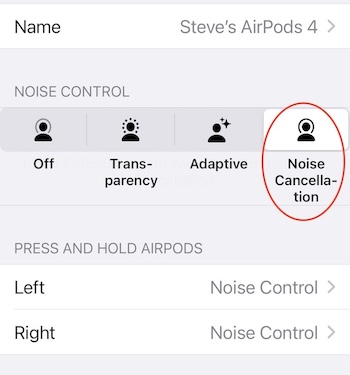
Apple pushed an update to iOS a couple of days ago and I’m guessing the “noise control” feature got reset. Here are the four settings:

1. Off: This disables any noise control, meaning you won’t get any additional noise isolation or transparency. You hear everything around you naturally.

2. Transparency: This setting allows external sounds to pass through so you can hear what’s happening around you while still listening to audio. It’s useful for staying aware of your environment.

3. Adaptive: This new setting automatically adjusts the level of noise cancellation and transparency in response to your surroundings. It tailors the experience based on the noise levels and movements around you.

4. Noise Cancellation: This mode blocks out external sounds by using microphones to pick up ambient noise and counter it with anti-noise signals. It’s great for immersive listening in noisy environments.

I wear ear protectors when I shooting a gun, and I’ve stuck little rubber plugs in my ears when trying to sleep in a noisy hotel room. And I’ve recently started wearing big over-the-ears protectors when driving the Land Rover. But I’ve experienced this kind of near-silence. Almost eerie.
Another run at Apple’s Journal app

I played with this app –briefly– when it cam out late last year. Couldn’t convince myself it was something I needed or would use. I mean, I’ve got this blog, right? And I’m putting more stuff on my calendar, too.

After taking another look I’m going to give it another go. Might be a place where I can put stuff that doesn’t rise to the level of a blog post or is too personal for this space. And it sees –with my permission– pretty much everything that happens on my iPhone and Apple Watch (music, photos, workouts, messages, etc) which makes it pretty easy make an entry.

Jury is out. I’ll let you know in a week or two.

Time Capsule

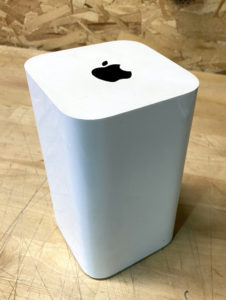
In early 2008 Apple introduced the Time Capsule, a wireless router that automatically backs up data for any computer connected to your wifi network. In approximately 2016, Apple disbanded the wireless router team that developed the AirPort Time Capsule and AirPort Extreme router. In 2018, Apple formally discontinued both products, exiting the router market.

Don’t recall when I got mine but it was a long time ago. Since Apple no longer supports the device, I retired mine and replaced it with an external hard drive, using Time Machine to back up my MacBook.

Was planning to take the old Time Capsule to the recycle place but remembered it still has my data on it. A lot of data. I could plug it back in and erase but I’m told it would take a long time so I decided to destroy the thing. But it’s impenetrable! No way (that I can see) to get it open and get to the hard drive. I could probably beat it with an axe or a sledgehammer but that sounds like a lot of work. So I’ve decided to take it down into the woods (we live on six acres) and bury it. I know, probably not good for ground water but I’ll do my best to seal it up.

I kind of like the idea some alien archeologist discovering the thing and being frustrated she can’t find a power cord or cable for it.

What Apple knows about its customers

A week ago Apple started allowing U.S. users to download all of their data from the company, following a GDPR-mandated feature for EU citizens that launched in May. A friend and long-time Apple user took them up on the offer and after almost a week he got it.

They have a lot of info on me.  Every item I purchased from Apple since 2003.  Every time I called Support.  Every time I had something repaired.  Every survey I replied to and how I answered.  Every app or song I downloaded and the IP address I downloaded it from.  Every time they sent me marketing email and if I opened it and what device I looked at it on.

Honestly, I’m not sure I want to know. Same for Amazon.

Apple TV Screensavers

I’ve got some issues with Apple TV but it works so well with my iPhone and MacBook so I put up with them. And the gizmo is worth the money just for the screensavers. They’re gorgeous. Last night I fired up the Apple Music app while I was ironing shirts. In a few seconds the first screensaver came up on the big screen. If you’ve never seen these it’s hard to understand what I’m gushing about.